| Hey, | Welcome to today's edition of AlphaSignal, a newsletter for developers by developers.
We identify and summarize the top 1% news, papers, models, and repos in the AI industry. |
|
|
|
IN TODAY'S SIGNAL
| Read time: 5 min 53 sec | 🎖️ Top News
📌 WebAI
⚡️ Trending Signals
🧠 Top Papers
🧠 Deep Dive |
|
|
|
If you're enjoying AlphaSignal please forward this email to a colleague.
It helps us keep this content free. |
|
|
|
TOP NEWS
| Language Model | AI21 releases Jamba 1.5 family of SOTA hybrid SSM-Transformer based models with 256K Context Window |
⇧ 1,307 Likes |
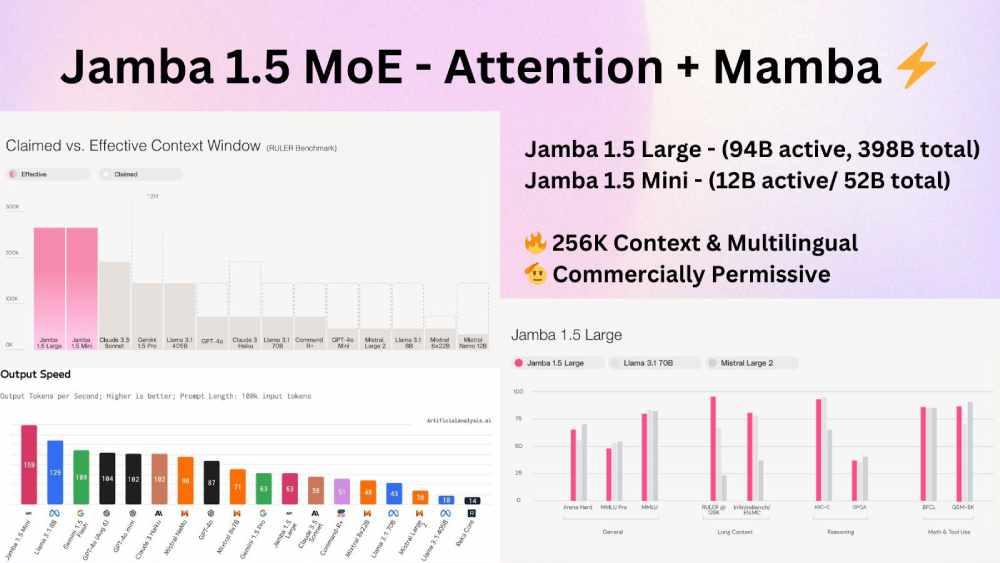 |
What's New | This new Jamba 1.5, a family of models combines Transformer and State Space Model (SSM) architectures.
Key Points
Two versions: Mini (12B active/52B total) and Large (94B active/398B total) MoE. 256K context window Jamba 1.5 Mini is the strongest open model in its size class with a score of 46.1 on the Arena Hard benchmark, surpassing larger models like Mixtral 8x22B and Command-R+. Jamba 1.5 Large, with a score of 65.4, outpaces both Llama 3.1 70B and 405B. Up to 2.5x faster inference on long-context tasks vs. similar-sized models New ExpertsInt8 quantization for efficient deployment on consumer hardware Supports 8 languages, Function calling, Structured JSON output, Citation generation Architecture and Performance Efficiency and Deployment
Introduced ExpertsInt8, a new quantization technique that compresses 85% of the MoE layers to int8. This allows efficient deployment on consumer hardware, with Jamba 1.5 Mini handling up to 140K context on a single A100 80GB GPU. Available on Hugging Face. Can be fine-tuned using Transformers, Axolotl, and FSDP on a single H100 node. Licensing and Fine-tuning | |
|
Read more
|
|
|
|
| Private. Powerful. Effortless. AI the way it should be
| A revolutionary way to build and deploy AI models using your existing infrastructure.
With webAI you will be able to:
Tailor models to your specific needs Deploy AI on your local network Maintain full control and privacy Ready to unlock the real value of AI? |
|
Sign up today
| partner with us |
|
|
|
TRENDING SIGNALS
| Anthropic |
|
⇧8,094Likes | |
Midjourney |
|
⇧ 2,300 Likes | |
Computer Vision |
|
⇧ 1,481 Likes | |
RAG |
| ⇧ 777 Likes
| | Voice AI |
|
⇧ 381 Likes | | |
|
|
|
|
|
TOP PAPERS
| Agent |
| ⇧ 1,960 Likes |
Problem
Manual design of agentic systems using LLMs is time-consuming and potentially suboptimal. The paper proposes Automated Design of Agentic Systems (ADAS) to automatically create powerful agents, including novel building blocks and combinations.
Solution
Meta Agent Search, an ADAS algorithm, uses a meta-agent (LLM) to iteratively program new agents in code. It builds on previous discoveries stored in an archive, enabling the exploration of any possible agentic system within a Turing-complete search space.
Results
Meta Agent Search outperforms hand-designed baselines across multiple domains:
ARC logic puzzle: 14% accuracy improvement
DROP reading comprehension: +13.6/100 F1 score
MGSM math tasks: +14.4% accuracy
GSM8K math (transfer): +25.9% accuracy
GSM-Hard math (transfer): +13.2% accuracy
Discovered agents show strong transferability across domains and models. | |
Computer Vision |
|
| ⇧ 1,930 Likes | Problem
Existing approaches struggle to unify discrete (text) and continuous (image) modalities in a single model. Current methods either use separate architectures or quantize images, sacrificing information.
Solution
Transfusion trains a single transformer on both next-token prediction (for text) and diffusion (for images). It uses a VAE for image encoding, linear or U-Net layers for patch processing, and a novel attention mechanism allowing bidirectional attention within images.
Results
Transfusion outperforms Chameleon (discrete approach) using 34× less compute for image generation (FID). It matches DALL-E 2 on GenEval (0.63 vs 0.52) and Llama 1 on text tasks (66.1 vs 66.1 accuracy). The 7B parameter model, trained on 2T tokens, generates high-quality images and text. | | Pretraining Language Models |
|
⇧ 1,280 Likes |
Problem
The study investigates the impact of including code in pre-training data for LLMs, even when not specifically designed for code tasks. It aims to understand how code data affects performance on non-code tasks, addressing the lack of comprehensive analysis in this area.
Solution
Researchers conducted extensive ablations on models ranging from 470M to 2.8B parameters. They varied code proportions, quality, and insertion points in pre-training. Evaluations covered natural language reasoning, world knowledge, code benchmarks, and LLM-as-a-judge win-rates.
Results
Including code improved non-code task performance significantly. The best variant showed relative increases of 8.2% in NL reasoning, 4.2% in world knowledge, 6.6% in generative win-rates, and a 12x boost in code performance. Cooldown with code further improved results by 3.6% in NL reasoning, 10.1% in world knowledge, and 20% in code performance. High-quality synthetic code data, even in small proportions, had a strong impact, improving NL reasoning by 9% and code benchmarks by 44.9%. |
| |
| |
|
|
|
DEEP DIVE
| Language Models |
How to use Phi-3.5 MoE chat model with Azure Machine Learning |
Phi-3.5 MoE is a lightweight LLM with 16x3.8B parameters, using 6.6B active parameters with 2 experts. It's a mixture-of-experts model trained on high-quality, reasoning-dense data. Use it when you need a powerful yet efficient language model for tasks like text generation, question-answering, or content creation.
Step-1 To use Phi-3.5 MoE with Azure AI Studio, deploy it to a managed compute. You'll need an Azure endpoint URL and authentication key. Install the Azure AI inference package for your preferred language.
Step-2 Open Microsoft Azure portal > Azure AI Studio Model catalog > Phi-3.5 MoE Deploy to Managed compute Set details, deploy Deployments > Your Phi-3.5 MoE Copy Endpoint URL This URL is your AZURE_INFERENCE_ENDPOINT (as mentioned in the code example below)
The endpoint URL has the form https://your-host-name.your-azure-region.inference.ai.azure.com, where your-host-name is your unique model deployment host name and your-azure-region is the Azure region where the model is deployed (for example, eastus2).
Here's a Python example to get you started: |
# install the Azure AI inference package

pip install azure-ai-inference

import os
from azure.ai.inference import ChatCompletionsClient
from azure.core.credentials import AzureKeyCredential

client = ChatCompletionsClient(
    endpoint=os.environ["AZURE_INFERENCE_ENDPOINT"],
    credential=AzureKeyCredential(
        os.environ["AZURE_INFERENCE_CREDENTIAL"]
        )
)

response = client.complete(
    messages=[
        ,

    ]
)

print(response.choices[0].message.content)
| |
Check out the official guide
|
|
|
|
Want to promote your company, product, service, or event to 190,000+ AI researchers and engineers?
|
|
Sponsor
|
|
|
|
|
