
TextGen Relaunches With a Desktop App to Dethrone Ollama and LM Studio
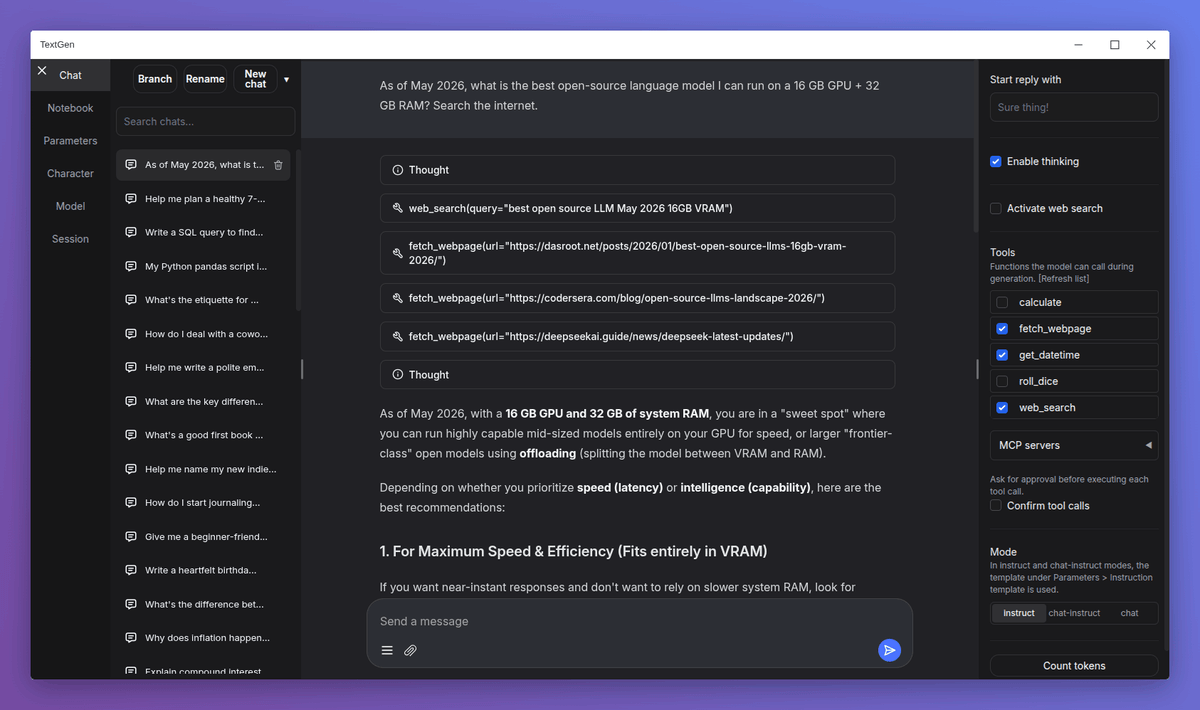
The most-starred local LLM interface drops the browser tab, ships a native desktop app, and gets a new name: TextGen.
Takeaways
- Renamed:
text-generation-webuiis now TextGen; old URL redirects, nothing breaks for existing users. - Native desktop app: v4.7.3 added an Electron wrapper — no browser tab needed to run the UI.
- v4.9 features: MTP speculative decoding for faster generation and a live tokens/s readout in the UI.
- Full API parity: Now serves both OpenAI- and Anthropic-compatible endpoints locally, with tool-calling support.
- 47.5k stars, 6k forks: Still the most starred open-source local LLM interface; AGPL-3.0, 100% offline.
- Portable builds: Download, unzip, double-click — CUDA, Vulkan, ROCm, and CPU-only builds for Linux, Windows, and macOS.
TextGen , the open-source local LLM interface formerly known as text-generation-webui , has been renamed and relaunched with a native Electron desktop app, a cleaner repo URL, and a wave of 4.x features that push it well beyond its browser-tab roots. With nearly 47,500 GitHub stars and 6,000 forks, it remains the most widely used self-hosted LLM interface in the open-source ecosystem.
Same project, new identity
The project was renamed "TextGen" in 2026, and the repo now lives at github.com/oobabooga/textgen , the old text-generation-webui URL redirects there, so existing clones, bookmarks, and install commands keep working. The project is actively maintained, not abandoned.
If Ollama is the "just works" option and LM Studio is the "pretty GUI" option, TextGen is the "give me all the knobs" option. That positioning hasn't changed , but the 4.x release cycle has significantly raised the ceiling on what those knobs can do.
What's new in the 4.x era
v4.7.3 brought a native Electron desktop app (no browser tab required), portable DGX Spark aarch64 builds, and llama.cpp tensor parallelism. v4.9, the latest release, added MTP speculative decoding and a live tokens/s readout in the UI. Speculative decoding is a technique where a smaller "draft" model predicts several tokens ahead, and the main model verifies them in parallel , effectively getting more output per GPU cycle without changing the model itself.