
Sipeed's PicoClaw Runs an AI Agent on a $10 Board Using Under 10MB
PicoClaw is an open-source AI agent runtime written in Go that runs on $10 hardware with under 10MB of RAM — 400x faster to boot than TypeScript alternatives
 Pro
Takeaways
- PicoClaw is an open-source AI agent runtime in Go that runs on $10 hardware with <10MB RAM and boots in under 1 second.
- It is 400x faster to boot than OpenClaw (TypeScript) and uses 99% less memory, making edge deployment practical for the first time.
- Supports 30+ LLM providers (OpenAI, Anthropic, DeepSeek, Ollama, etc.) and 19+ chat channels including Telegram, Discord, WhatsApp, and MQTT.
- Native MCP (Model Context Protocol) support lets you plug in any external tool server; a skills registry (ClawHub) extends agent capabilities further.
- Android APK is now available, letting old phones run as persistent AI assistants; hardware targets range from $5 RISC-V boards to Raspberry Pi.
- Pre-v1.0 — MIT-licensed on GitHub with 29.5K stars; not recommended for production until v1.0 per the team's own warning.
PicoClaw is a new open-source AI agent framework from Sipeed that flips the usual assumption about what it takes to run an AI assistant. Instead of requiring a beefy server or a Mac mini, it runs on a $10 RISC-V board, boots in under a second, and uses less than 10MB of RAM. It hit 25K GitHub stars within weeks of launch, and the project is moving fast.
The problem it solves
Most AI agent frameworks are written in Python or TypeScript. That's fine for cloud deployments, but it makes them completely impractical for edge hardware. OpenClaw (the TypeScript incumbent) needs over 1GB of RAM and takes more than 500 seconds to boot on a 0.8GHz single-core processor. NanoBot, the Python alternative, needs over 100MB and takes 30+ seconds. Neither will run on a $10 board. PicoClaw was built specifically to close that gap.

How it was built
PicoClaw is written entirely in Go , not a fork of anything. The team at Sipeed used a "self-bootstrapping" process where an AI agent itself drove most of the architecture migration and code optimization. According to the README, 95% of the core code was generated by an agent and then reviewed by humans. The result is a single binary that compiles to x86_64, ARM64, MIPS, and RISC-V with no runtime dependencies.
What makes it tick
A few design decisions make the numbers possible:
- Go instead of Python/TypeScript , Go compiles to native binaries with a tiny runtime, no interpreter overhead, and no garbage-collected heap ballooning under load.
- Single binary deployment , no Node.js, no pip, no virtual environments. One file, drop and run.
- Smart model routing , simple queries are automatically routed to cheaper, lighter models, so you're not burning API credits on GPT-4 for a "what's the weather" call.
- MCP (Model Context Protocol) support , the emerging standard for connecting agents to external tools. PicoClaw can plug into any MCP server to extend its capabilities.
- Vision pipeline , images and files can be sent directly to the agent, with automatic base64 encoding for multimodal LLMs.

The numbers at a glance
| OpenClaw | NanoBot | PicoClaw | |
|---|---|---|---|
| Language | TypeScript | Python | Go |
| RAM | >1GB | >100MB | <10MB* |
| Boot (0.8GHz core) | >500s | >30s | <1s |
| Min hardware cost | Mac Mini ($599) | ~$50 Linux board | $10 Linux board |
*Recent builds may use 10-20MB due to rapid PR merges. Optimization is planned.
What you can actually connect it to
PicoClaw supports 30+ LLM providers out of the box , OpenAI, Anthropic, Gemini, DeepSeek, Qwen, Groq, AWS Bedrock, Azure, and more. For local inference, Ollama and vLLM work with a simple config entry. On the messaging side, it connects to 19+ chat platforms including Telegram, Discord, WhatsApp, Slack, WeChat, DingTalk, Matrix, IRC, and MQTT. The gateway architecture means all of these share a single HTTP server, so you're not spinning up separate processes per channel.
Getting started
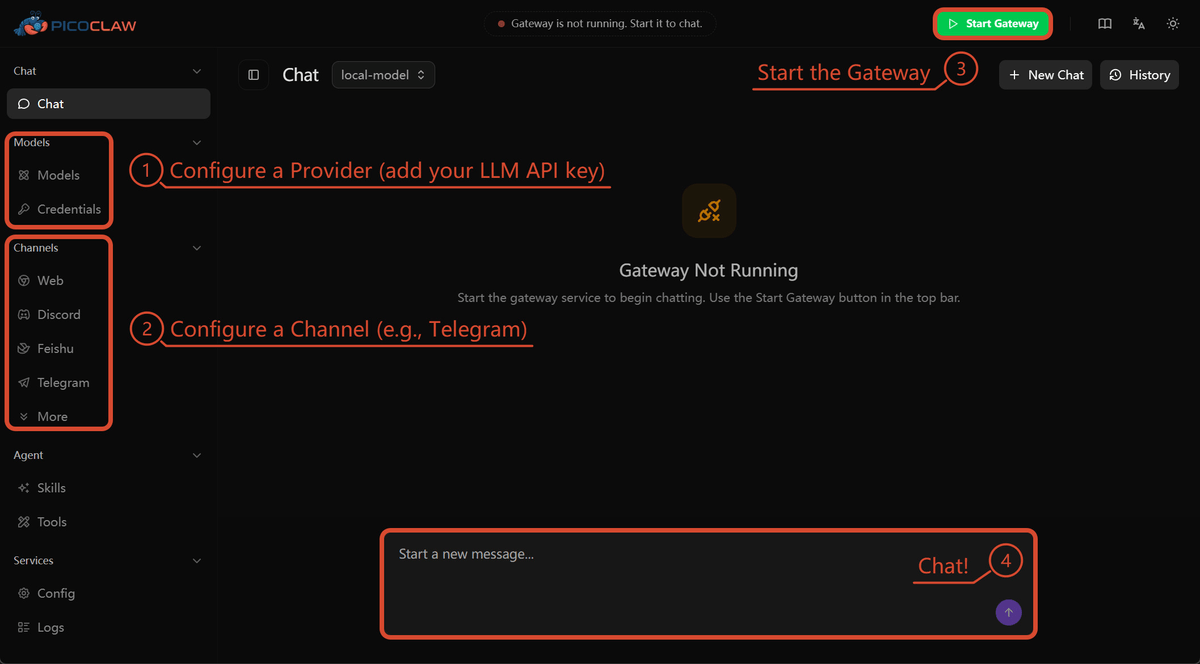
The fastest path is to download the binary from picoclaw.io , the site auto-detects your platform. Then run the launcher and open http://localhost:18800 in your browser. From there, you add an LLM API key, pick a channel (e.g., Telegram), start the gateway, and you're chatting.
For headless or embedded setups, the CLI workflow is three commands:
picoclaw onboard          # creates ~/.picoclaw/config.json
picoclaw agent -m "Hi"    # one-shot query
picoclaw gateway          # start the gateway for chat app integration
Docker is also supported via Docker Compose. Android users can sideload an APK directly from picoclaw.io/download , no Termux required. The hardware compatibility list covers everything from $5 RISC-V boards to Raspberry Pi to old Android phones.
Where it shines and where it doesn't
PicoClaw is a strong fit for:
- Home automation assistants on cheap embedded hardware
- Server ops bots running on a NanoKVM ($30-$100) for automated server management
- Smart surveillance on MaixCAM boards with the vision pipeline
- Scheduled task automation with natural-language cron jobs ("remind me every 2 hours")
- Giving old Android phones a second life as always-on AI assistants
Where to be cautious: PicoClaw is pre-v1.0 and explicitly warns against production deployments. The project is moving fast , it shipped v0.2.9 recently with MCP server management in the Web UI , but the rapid PR merges have temporarily pushed RAM usage to 10-20MB in some builds. Security hardening is ongoing, and the team added a .security.yml file in v0.2.4 to separate sensitive credentials from the main config. The official docs are the right place to track what's stable.
The bigger picture
The assumption baked into most AI tooling is that agents live in the cloud or on developer laptops. PicoClaw challenges that directly. If an agent runtime can fit in 10MB and boot in under a second on a 60-cent-per-hour equivalent chip, the economics of always-on personal AI change significantly. You don't need a subscription to a cloud service to have a persistent agent running 24/7 , you need a $10 board and an API key. That's a meaningful shift in who can deploy AI agents and where.
The project is MIT-licensed, available now on GitHub, and already has a growing skill registry called ClawHub for extending agent capabilities. If you're building anything at the edge or just want a lightweight agent that doesn't eat your RAM, it's worth a look.
