
OpenDataLoader PDF Tops 12-Tool Benchmark With 0.907 Accuracy Score
OpenDataLoader PDF hits #1 on extraction benchmarks with 0.907 accuracy, runs fully local, and is the first open-source tool to auto-tag PDFs for accessibility compliance
 Pro
Takeaways
- Benchmark #1: OpenDataLoader PDF scores 0.907 overall accuracy across 200 real-world PDFs, beating docling, marker, and pymupdf4llm.
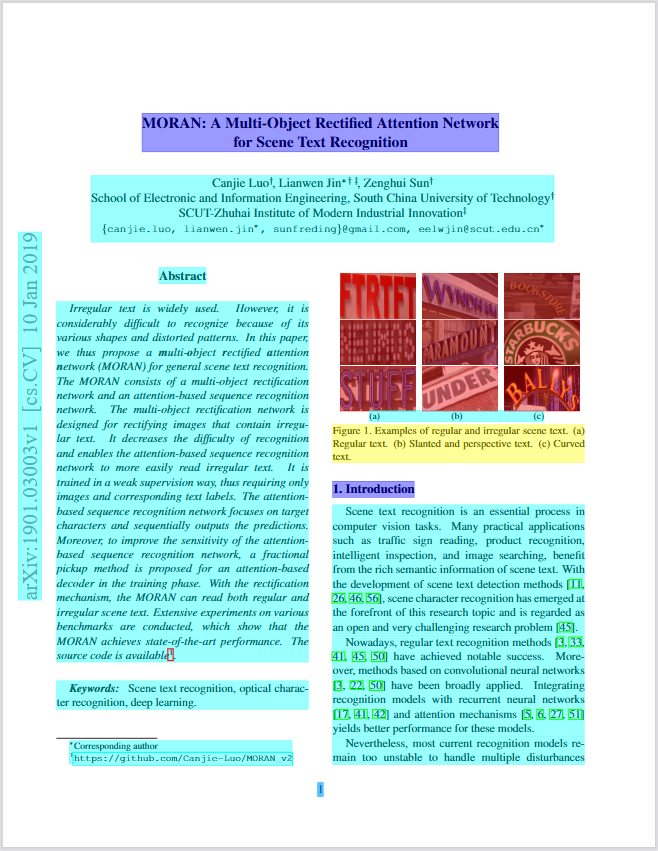
- Two modes: Local (0.015s/page, CPU-only) for standard PDFs; Hybrid (0.463s/page) routes complex pages to a local AI backend for near-doubling of table accuracy (0.489 → 0.928).
- Bounding boxes everywhere: Every extracted element (paragraph, table, image, formula) includes pixel coordinates, enabling source-citation UX in RAG pipelines.
- First open-source PDF auto-tagger: Converts untagged PDFs into Tagged PDFs end-to-end under Apache 2.0, validated against the PDF Association's Well-Tagged PDF spec using veraPDF.
- Built-in AI safety: Automatically filters hidden text, off-page content, and prompt injection payloads before output reaches an LLM.
- Free core, enterprise add-ons: All extraction and auto-tagging features are Apache 2.0; PDF/UA export and visual accessibility editor are enterprise-only.
OpenDataLoader PDF is an open-source PDF parser built specifically for AI pipelines. It extracts structured Markdown, JSON with bounding boxes, and HTML from any PDF, runs entirely on-device without a GPU, and just claimed the top spot across a 12-tool benchmark with an overall accuracy score of 0.907. On top of the data-extraction story, it is also the first open-source tool to auto-tag untagged PDFs into screen-reader-ready Tagged PDFs end-to-end, without touching a proprietary SDK.
The PDF parsing problem nobody talks about
Most PDF parsers hand you a blob of text. What they strip away is everything that makes that text useful: reading order across multi-column layouts, table structure, heading hierarchy, and the pixel coordinates of each element. For RAG (retrieval-augmented generation) pipelines, those coordinates are what let you build a "click to source" UX that highlights the exact paragraph an answer came from. Without them, you are guessing.
OpenDataLoader solves this with two modes:
- Local (fast) mode , pure Java, deterministic, no network calls, processes 60+ pages per second on CPU (0.015s/page). Great for standard digital PDFs.
- Hybrid mode , routes simple pages through the local engine and sends complex pages (borderless tables, scanned content, formulas, charts) to a locally-running AI backend. This is what achieves the #1 benchmark score.
Benchmark numbers worth looking at
The project benchmarked 12 PDF parsing tools across 200 real-world PDFs, including multi-column academic papers and complex tables. Scores are normalized 0–1 across reading order, table extraction, and heading detection.