
OpenClaw Studio Gives Self-Hosted AI Agents a Browser Control Panel
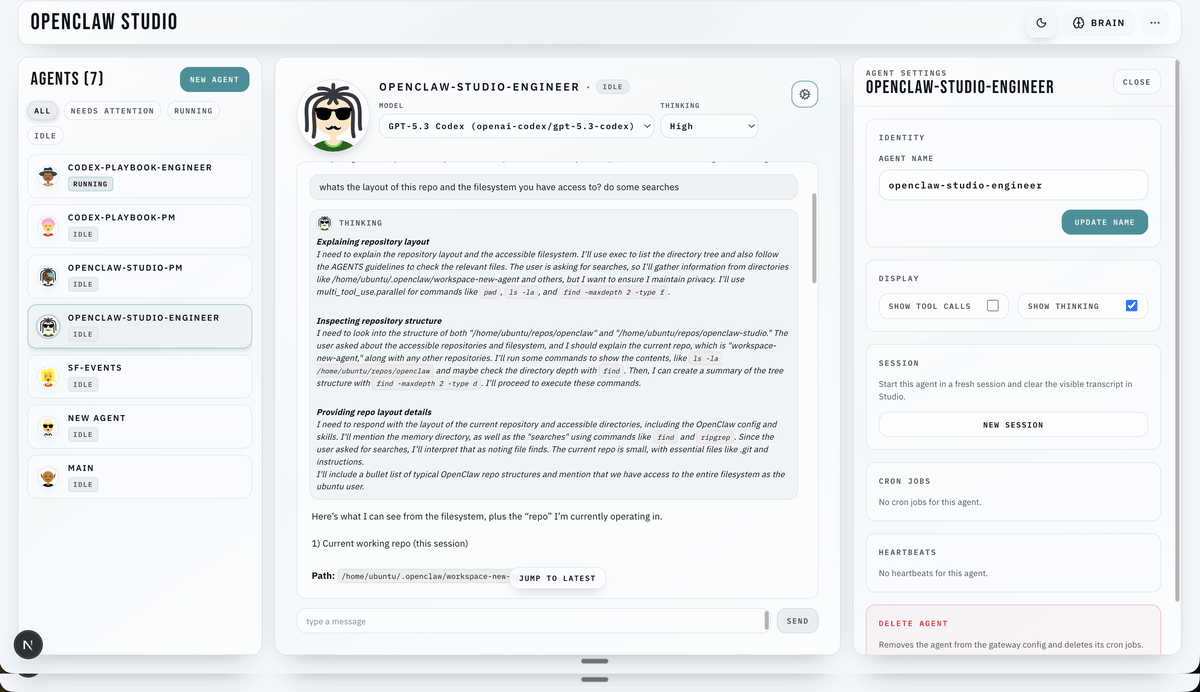
A TypeScript dashboard that plugs into an OpenClaw Gateway so you can chat with agents, approve tool calls, and schedule jobs from a browser.
 Pro
Takeaways
- OpenClaw Studio is an MIT-licensed web dashboard for the OpenClaw self-hosted agent framework.
- Installs with
npx -y openclaw-studio@latestand needs Node.js 20.9 or newer. - Browser talks HTTP plus SSE to Studio, Studio holds a single WebSocket to the Gateway.
- Ships agent creation, live chat streaming, cron jobs, and exec approval flows in one UI.
- Persists runtime history in a local SQLite
runtime.dbfor deterministic replay. - Supports local, hybrid, and cloud deployments, with Tailscale Serve as the recommended remote path.
Running a self-hosted agent stack usually means SSH sessions, config files, and grepping logs to figure out why a tool call stalled. OpenClaw Studio is a web dashboard that sits on top of an existing OpenClaw Gateway and gives you a single UI to connect agents, review approvals, and run jobs, without touching the CLI. It is MIT licensed, written in TypeScript, and installs with a single npx command.
What it plugs into
To understand why a dashboard matters here, it helps to know what OpenClaw itself is. OpenClaw is an open-source, self-hosted agent framework that connects large language models to external tools and messaging surfaces through a unified runtime, and has grown into a general-purpose agent platform since its launch in late 2025. At its core, a central Gateway process multiplexes WebSocket and HTTP communication on a single port, manages session lifecycles, tool dispatch, channel routing, and agent orchestration, while agents execute a multi-turn reasoning loop that emits tool calls until a text-only response terminates the loop.
The platform can connect to WhatsApp, Telegram, Slack, Discord, Signal, iMessage, and WebChat, and it also supports local and remote control clients. Studio is the browser-based control plane for all of that.