
OpenClaw's 14,000-Skill Registry Was a Mess, so the Community Fixed It
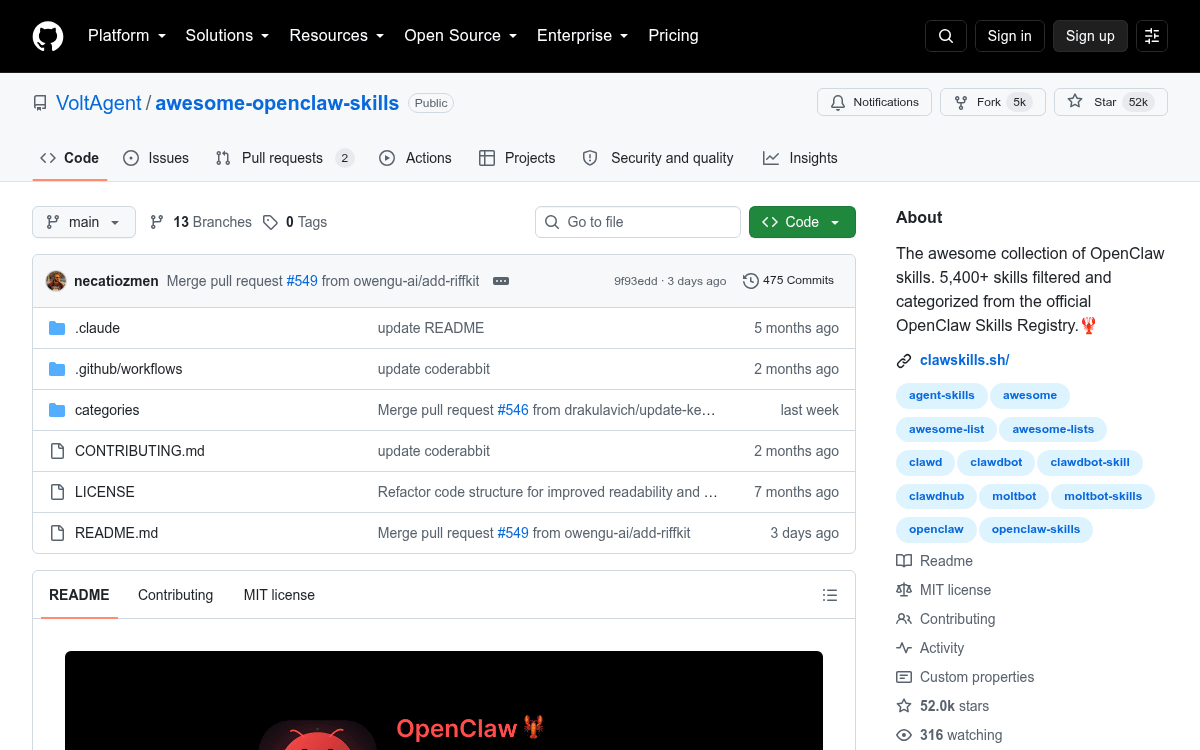
awesome-openclaw-skills curates 5,200+ community-built agent skills from ClawHub, filtered for quality and organized into 30 categories for OpenClaw users.
 Pro
Takeaways
- 5,200+ curated OpenClaw skills organized into 30 categories, filtered down from nearly 14,000 raw ClawHub registry entries.
- 7,215 skills were excluded — including 373 flagged as malicious by security researchers and 4,065 identified as spam or bot accounts.
- Install via CLI:
openclaw skills install <skill-slug>ornpx clawhub install <skill-slug>, or paste a GitHub URL into chat. - Biggest categories are Coding Agents & IDEs (1,184), Web & Frontend (920), DevOps & Cloud (393), and Search & Research (345).
- Security warning: skills are curated, not audited — check VirusTotal reports on ClawHub and review source code before installing anything sensitive.
- The repo has 51k+ GitHub stars; browsable at clawskills.sh.
awesome-openclaw-skills is a curated GitHub repository that cuts through the noise of OpenClaw's sprawling public registry. OpenClaw is a locally-running AI assistant that you can extend with community-built "skills" , small instruction bundles that let the agent interact with external services, automate workflows, and perform specialized tasks. The problem is that the official registry, ClawHub, has grown to nearly 14,000 entries, and a large chunk of them are spam, duplicates, or outright malicious. This list is the answer to that problem.
The Registry Problem It Solves
ClawHub's public registry hosts 13,729 community-built skills as of the data in the repo. That sounds great until you realize how messy it is in practice. The maintainers behind this list ran a filtering pass and removed over 7,200 entries before publishing. Here's what got cut:
- 4,065 flagged as possible spam , bulk accounts, bots, test junk
- 1,040 duplicates or near-identical names
- 851 low-quality or non-English descriptions
- 886 crypto/blockchain/finance/trading skills (a deliberate editorial choice)
- 373 identified as malicious by published security audits
What remains is a list of 5,200+ skills organized into 30 categories, browsable at clawskills.sh. The repo has picked up over 51,000 GitHub stars, which is a strong signal that the discovery problem here is real and widely felt.
What's Actually in It
The categories span a surprisingly wide surface area. The biggest by skill count are:
- Coding Agents & IDEs , 1,184 skills covering everything from academic paper search to Google Ads management to AI VTuber streaming
- Web & Frontend Development , 920 skills including browser automation, AEO content optimization, and agent-to-agent communication
- DevOps & Cloud , 393 skills for Docker, CI/CD, observability, and cloud infrastructure
- Search & Research , 345 skills including free self-hosted web search (zero API keys), arXiv paper digests, and Airbnb listing search
- Browser & Automation , 323 skills including CAPTCHA solving, Airtable automation, and iOS/Android device control
Beyond the developer-heavy categories, there are also skills for Apple apps and services, smart home/IoT (IKEA, Home Assistant, Dyson, Eight Sleep), health and fitness tracking, transportation (Deutsche Bahn, Amadeus flights, Austrian public transit), and even a Gaming section with persistent life simulation games for AI agents.
How to Install a Skill
There are three ways to get a skill into your OpenClaw setup. The cleanest is the CLI:
# Via OpenClaw directly
openclaw skills install <skill-slug>
# Or via the ClawHub CLI (works outside a full workspace)
npx clawhub install <skill-slug>
You can also copy the skill folder manually into ~/.openclaw/skills/ for global installs, or into <project>/skills/ for workspace-scoped installs. Workspace skills take priority over global ones. There's also a shortcut: paste the skill's GitHub URL directly into your OpenClaw chat and ask it to use it , the agent handles setup in the background.
The Security Angle You Shouldn't Skip
The maintainers are explicit about something important: this list is curated, not audited. Skills can be updated by their original authors at any time after being added here, and the list won't necessarily catch a malicious update. The security warning in the README is worth taking seriously , agent skills can carry prompt injection payloads, tool poisoning, hidden malware, or unsafe data handling patterns.
The recommended workflow before installing anything:
- Check the skill's ClawHub page for its VirusTotal scan report (OpenClaw has a VirusTotal partnership for this)
- Run it through Snyk's agent security scanner
- Review the source code manually, especially for skills that touch credentials, files, or external APIs
There's also a dedicated trentclaw skill in the Security & Passwords category that audits your full OpenClaw config and installed skill stack, returning fixes as diffs.
What This Signals About the Agent Ecosystem
The sheer scale of this list , and the fact that it needed to exist at all , tells you something about where the agentic AI space is right now. The official registry grew faster than it could be governed. Community-maintained curation lists are filling the gap that official tooling hasn't caught up to yet. This is the same pattern that played out with npm, PyPI, and Docker Hub: open registries attract volume, volume attracts noise and bad actors, and the community builds filters on top.
What's different here is the security surface. A bad npm package might break your build. A bad agent skill can exfiltrate data, inject instructions into your agent's reasoning, or quietly modify files. The 373 malicious skills that were filtered out before this list was published are a reminder that the threat model for agent skill registries is meaningfully different from traditional package managers. The ecosystem is still figuring out what governance looks like at scale.
For anyone building on OpenClaw or evaluating agentic tooling, this repo is the most practical starting point for finding what the community has actually built and validated. The filtering work alone saves significant time, and the category structure makes it navigable in a way the raw registry isn't.
