
OpenAI's Codex CLI Brings a Full Coding Agent to Your Terminal
OpenAI's open-source Codex CLI puts an agentic coding assistant directly in your terminal, with sandboxed execution, approval modes, and ChatGPT plan integration.
 Pro
Takeaways
- OpenAI's Codex CLI is an open-source, Apache-2.0 terminal coding agent that runs locally on your machine.
- Three approval modes (Suggest, Auto Edit, Full Auto) let you tune how much autonomy the agent has over your files and shell.
- Sandboxing uses bubblewrap on Linux and Docker devcontainers to isolate agent-executed code from the host.
- Auth works via ChatGPT Plus/Pro/Business/Edu/Enterprise plans, or an OpenAI API key with per-token pricing.
- Supports MCP servers, parallel tool calls, session resume, and shares config with the Codex IDE extension and app.
- Best for terminal-heavy workflows, CI, and SSH boxes; not a replacement for inline IDE autocomplete.
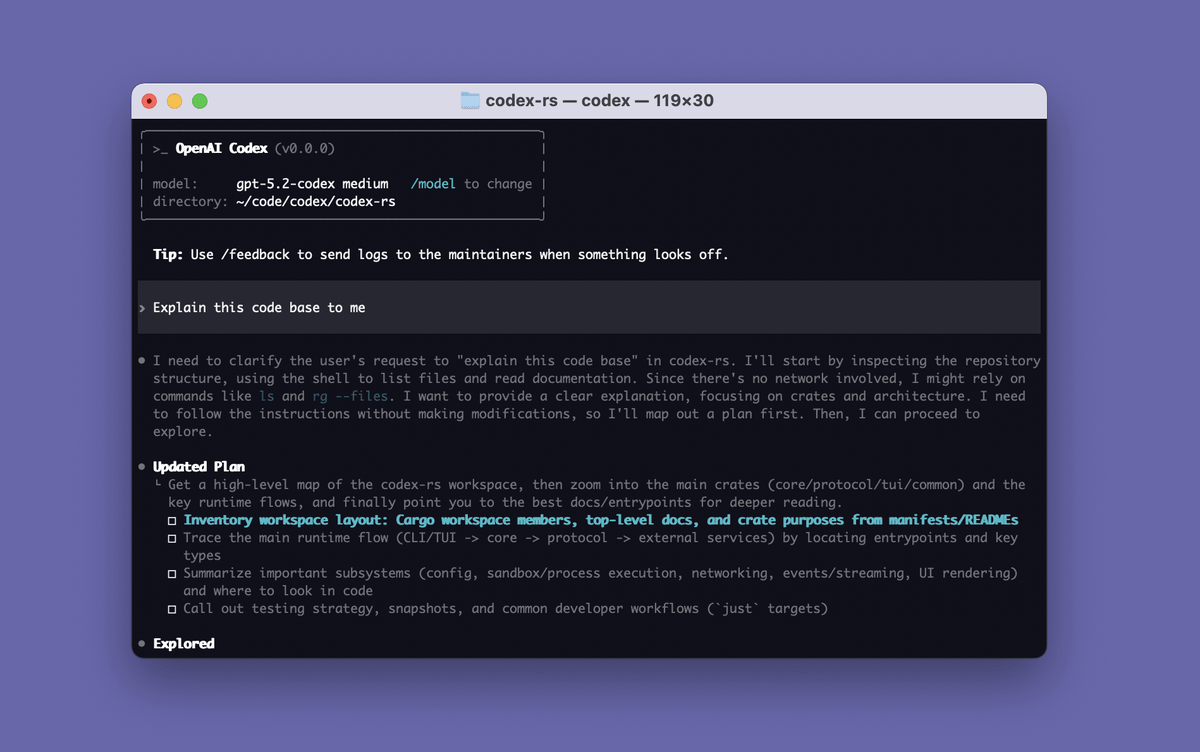
If your day mostly happens inside a terminal window, OpenAI's Codex CLI is worth a serious look. It's a coding agent that runs locally on your machine, with companion install options for VS Code, Cursor, and Windsurf if you want it in your IDE, plus a separate desktop experience through the Codex App page. The GitHub repo is the canonical home for the tool, and it has quietly become one of the more active open-source AI developer projects around.
What Codex CLI actually is
Codex CLI is an open-source command-line coding agent from OpenAI that launches a full-screen terminal interface where you can have a conversation about your codebase, ask it to implement features, fix bugs, review code, or explain unfamiliar logic. Rather than a chat window that spits out snippets you paste around, it plans multi-step changes across multiple files, runs commands, and verifies results.
A few properties are worth calling out because they shape how you'd use it day to day:
- Local-first execution: Codex runs on your machine, reading and modifying files in your working directory, and your source code never leaves your environment.
- Granular permissions with three approval modes, ranging from read-only consultation to full access.
- Session persistence: conversations are stored locally, and you can resume prior work with
codex resume --last