
fff Beats ripgrep by 900x to Fix How AI Agents Search Code
fff started as a Neovim plugin and grew into a full file-search SDK for AI agents, with sub-10ms queries, frecency ranking, and MCP server support across Rust, Python, Node, and C.
 Pro
Takeaways
- fff is a Rust-based file search SDK that keeps a warm in-memory index, delivering sub-10ms queries vs. 3-9s per ripgrep spawn on large repos.
- Now ships as an MCP server compatible with Claude Code, Codex, Cursor, and Cline, with one-line install via curl or Homebrew.
- Bindings available for Rust, C, Python (pip install fff-search), Node, and Bun, all sharing the same Rust core.
- Key features: frecency ranking, typo-resistant fuzzy matching, three grep modes (plain/regex/fuzzy), and git-status awareness without spawning the git CLI.
- Memory cost is real (~36 MB for 100k files) but in practice uses less RAM than repeated ripgrep bursts in long-running sessions.
- MIT-licensed and already powering file search in opencode and nushell; 10k stars on GitHub.
fff (Fast File Finder) started its life as a Neovim plugin people loved, then its author realized the same problem it solved for editors is the same one every AI coding agent runs into: file search that is called hundreds of times per session, backed by a tool that was designed to be called once from a terminal. The project has since evolved into a full file-search SDK with bindings for Rust, C, Python, Node, and Bun, plus an MCP server that plugs directly into Claude Code, Codex, Cursor, and Cline. It now sits at 10k stars on GitHub.
The problem with shelling out
Every time an AI agent or editor calls rg or fzf, it pays a fixed tax: fork a new process, re-read .gitignore, re-stat every directory, rebuild all in-memory state, then finally answer. That cost is negligible for a one-off terminal grep. It is catastrophic when an agent fires off dozens of searches per task.
On a 500k-file Chromium checkout, that overhead translates to 3-9 seconds per ripgrep spawn. fff keeps the file index and content cache resident in one long-lived process, so every subsequent search hits warm memory. The same Chromium query takes under 10 ms.
What the Rust core actually does
The entire search engine is written in Rust and exposed through a stable C ABI, which is then wrapped by the language-specific SDKs. The key capabilities baked into the core:
- Frecency ranking. Every indexed file carries an access score and a modification score. Files you open frequently and recently rank above cold results automatically, warmed up from git touch history on startup.
- Typo-resistant fuzzy matching. Path search uses SIMD-accelerated Smith-Waterman scoring that survives dropped characters and reorderings. A query like
shcemastill findsschema.rs. fzf would return nothing. - Three grep modes. Plain literal search uses SIMD
memmem; regex uses the Rustregexcrate; fuzzy uses Smith-Waterman per line. The engine auto-detects which to use and falls back to fuzzy on zero exact matches. - Multi-pattern OR search. SIMD Aho-Corasick lets you search for 20 identifiers simultaneously, faster than regex alternation and far faster than 20 separate ripgrep calls.
- Background file watcher. The index updates as files change via libgit2 directly, no
gitCLI spawning. Git status (modified, staged, untracked) is cached and returned with every result. - Definition classifier. A byte-level scanner tags lines that start with
struct,fn,class,def,impl, and similar patterns, so agents can prioritize definition hits over usage hits without any regex overhead.
The performance stack goes deep: mimalloc as the default allocator, platform-specific filesystem APIs (getdents64 on Linux, NTFS APIs on Windows), a single contiguous arena for string storage to maximize CPU cache hits, and memory-mapped content caching for large repos.
The memory tradeoff
fff keeps the index in RAM. That is the source of the speedup, and it is a real cost. The content index runs about 360 bytes per indexed file, so roughly 36 MB for a 100k-file repo. A 14k-file repo costs about 26 MB resident. A Chromium-scale repo will run into the hundreds of MB. Binaries and oversized files are skipped, and the index can be backed by a memory-mapped file if even that footprint is too large.
The counter-intuitive result: in practice, a long-running Neovim session with fff uses less total RAM than the equivalent burst of ripgrep invocations, because each rg spawn has its own overhead that adds up fast.
Five ways to use it
The project ships as a multi-layer SDK. Pick the layer that fits your stack:
- MCP server (
fff-mcp). One-line install, works with any MCP-capable agent. Exposesffgrep,fffind, andfff-multi-grepas agent tools. - Neovim plugin. The original use case. Drop-in replacement for Telescope or fzf-lua with frecency ranking baked in.
- Node / Bun SDK (
@ff-labs/fff-node). TypeScript wrapper over the C library. Build custom agent tools or IDE extensions. - Python bindings (
pip install fff-search). PyO3-based, ships as anabi3wheel for Python 3.10+. Async-friendly with a coroutine-based scan wait. - Rust crate (
fff-search = "0.6"). The lowest-overhead path, zero FFI cost.
The MCP server in practice
For agent use, the MCP server is the fastest path. Install it with a single curl command and wire it to your client:
curl -L https://dmtrkovalenko.dev/install-fff-mcp.sh | bash
# or via Homebrew
brew install dmtrKovalenko/fff/fff-mcp
Then drop this into your CLAUDE.md or equivalent system prompt:
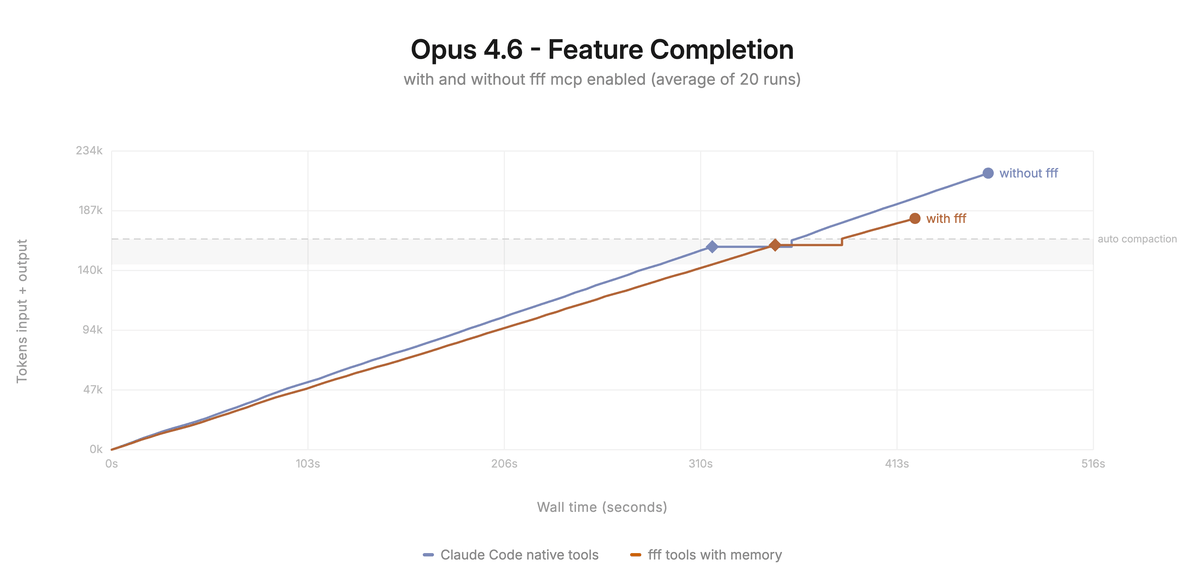
For any file search or grep in the current git-indexed directory, use fff tools.The agent picks up ffgrep, fffind, and fff-multi-grep automatically. Results come back with git status annotations, frecency scores, and definition classifications already attached, so the agent spends fewer tokens re-asking follow-up questions.
The query language
Both the Neovim picker and the SDK share the same constraint syntax, which is one of the more underrated features. You can mix and match:
git:modifiedto filter to files with uncommitted changes*.rsor*.{c,h}for extension filters!test/to exclude a directorysrc/**/*.rsfor glob patterns- Free-text fuzzy terms alongside any of the above
So a query like git:modified src/**/*.rs !src/**/mod.rs user controller is fully valid and does exactly what it says. fzf has no equivalent.
Where it fits and where it does not
fff is not a replacement for ripgrep in the terminal. If you are running a single grep from bash and exiting, rg is still the right call. fff pays for itself starting from the second search in the same process. The sweet spot is any long-running tool that searches the same repo repeatedly: AI coding agents, IDE extensions, pre-commit hooks, or custom CLI tools built on top of the SDK.
The project is MIT-licensed, free, and already powering file search in opencode and nushell. The GitHub repo has full documentation for each SDK layer, including the Rust crate docs on docs.rs.
