
ClawPanel Turns Local AI Agent Setup Into a One-Click Desktop App
ClawPanel is a free, open-source desktop GUI for managing AI agents locally, with a built-in AI assistant that can diagnose, fix, and even submit PRs on your behalf.
 Pro
Takeaways
- ClawPanel is a free, open-source Tauri v2 desktop app for managing local AI agent stacks (OpenClaw + Hermes Agent) with a visual GUI.
- A built-in AI assistant with 4 permission modes and 8 system tools can diagnose config issues, run shell commands, and auto-generate GitHub PRs.
- Supports dual-engine architecture: OpenClaw for model routing/gateway, Hermes Agent for persistent memory, persona, and session management.
- Connects agents to Telegram, Discord, Feishu, DingTalk, and QQ from a single messaging channel management page.
- Runs as a native desktop app (Windows, macOS, Linux) or headless web server on ARM64 devices and Docker, with no Rust needed for web mode.
- Free under AGPL-3.0; download from GitHub or claw.qt.cool.
ClawPanel is an open-source, cross-platform desktop application that gives you a full visual control panel for running and managing local AI agents. It wraps two agent runtimes, OpenClaw and Hermes Agent, in a single GUI, and ships with a built-in AI assistant that can read your config files, run shell commands, and fix problems autonomously. The repo has grown to 2.8k stars with 348 forks, and the project is actively maintained with 67 releases so far.
The problem it actually solves
Running a local AI agent stack is not a one-command affair. You need to install the runtime, configure API keys across multiple providers, start a gateway process, wire up messaging channels, and debug cryptic errors when something breaks. ClawPanel collapses all of that into a single app. First-launch setup auto-detects Node.js, Git, and OpenClaw, and flags anything missing with a one-click install button. From there, every piece of the stack is managed through a GUI: model providers, gateway start/stop, memory files, session logs, and messaging integrations.
A built-in AI assistant that can operate your system
The most distinctive feature is the embedded AI assistant, which is not a chatbot bolted onto the side. It has four operating modes with escalating permissions, and eight tools it can invoke against your local system. Think of it as an agent that manages your other agents.
The four modes are:
- Chat , pure Q&A, no system access
- Plan , can read files and logs, outputs a plan but writes nothing
- Execute , full read/write with a confirmation prompt before dangerous actions
- Unlimited , fully autonomous, no confirmation dialogs
The eight tools available to the assistant are ask_user, get_system_info, run_command, read_file, write_file, list_directory, list_processes, and check_port. You can independently disable terminal or file access regardless of which mode is active, so the mode table is a ceiling, not a floor.

The welcome screen exposes eight one-click skill cards: check config, diagnose gateway, browse directory, check environment, analyze logs, one-click troubleshoot, submit a bug report, and a PR assistant. The PR assistant is the most ambitious: it reads the error, locates the relevant code, generates a fix, and executes the git fork/branch/commit/push flow. You just click confirm at each step.
Dual-engine architecture
ClawPanel manages two separate agent runtimes that can run side by side. OpenClaw handles the core gateway, model routing, and API key management. Hermes Agent (from NousResearch) adds a second layer focused on persistent agent identity: long-term memory stored across three Markdown files (Notes, User Profile, and Soul), session history, and tool-call tracing. The Hermes panel lets you edit those memory files in-browser and track exactly what tools were called in each conversation turn.

The messaging channel system lets you connect the same agent to Telegram, Discord, Feishu, DingTalk, and QQ simultaneously, with per-platform bot credentials managed in one place. Cron-based scheduled tasks can push messages to any of those channels on a timer.
How it is built
The stack is Vanilla JS + Vite on the frontend (zero framework dependencies) and Rust + Tauri v2 on the backend. Tauri's IPC bridge and Shell plugin handle the communication between the UI and local CLI commands. The result is a native binary that packages to a .dmg, .exe, .msi, .AppImage, .deb, or .rpm depending on platform. The frontend is 60% JavaScript, 31% Rust, and 8% CSS.
For headless environments, there is a pure web mode. Running npm run serve starts a Node.js server on port 1420 with the same feature set, no Rust or Tauri required. This makes it compatible with ARM64 boards like Raspberry Pi, Orange Pi, and RK3588 devices, and deployable via Docker.
# One-liner Linux server deploy
curl -fsSL https://raw.githubusercontent.com/qingchencloud/clawpanel/main/scripts/linux-deploy.sh | bash
# Then visit http://your-server-ip:1420
Model provider support
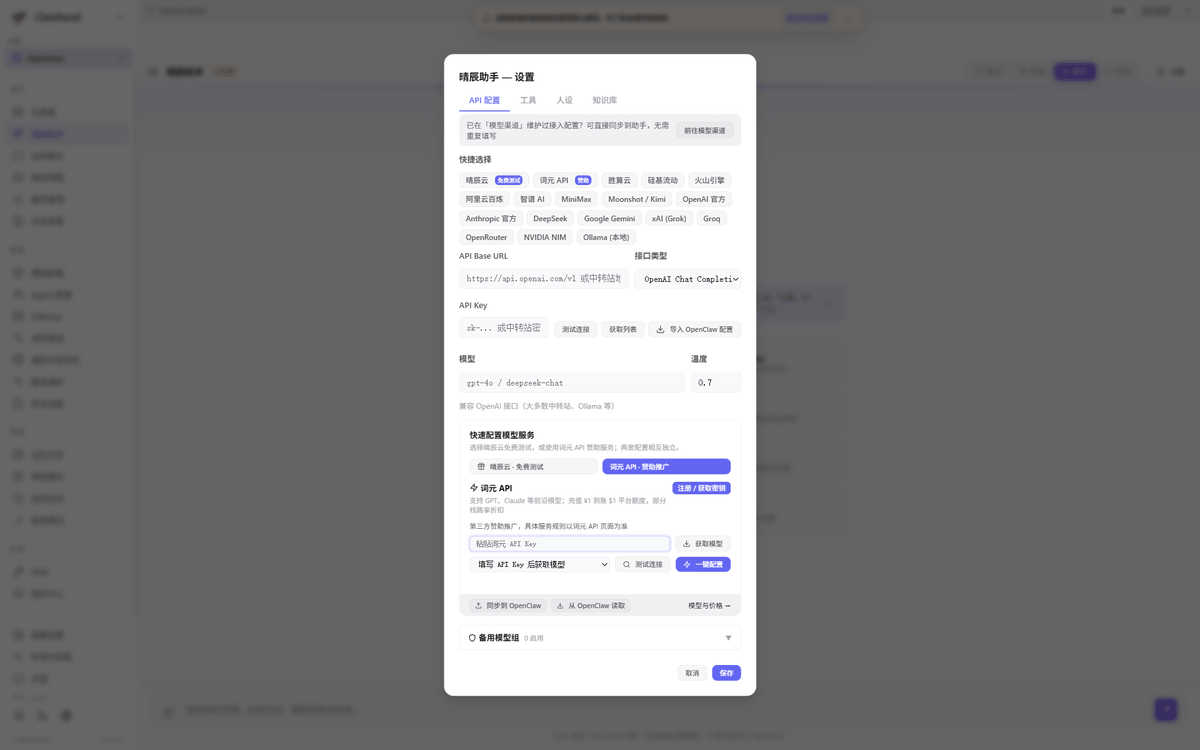
The model configuration page manages multiple providers in a single view, with batch connectivity testing and latency detection. Supported out of the box:
- OpenAI (and any OpenAI-compatible endpoint)
- DeepSeek
- Alibaba Tongyi (Qwen)
- MiniMax
- Ollama (local, no key required)
You can set a primary model and a fallback, and ClawPanel will auto-switch if the primary fails. API keys are stored locally in ~/.openclaw/openclaw.json and never transmitted externally.
What it is less good at
The project is primarily built for a Chinese-speaking audience, and while the README is available in 11 languages, the UI itself and community support channels are still mostly Chinese. The app is unsigned on macOS, so first-time users on Apple Silicon or Intel Macs will need to run sudo xattr -rd com.apple.quarantine /Applications/ClawPanel.app to bypass Gatekeeper. With 94 open issues at the time of writing, some rough edges remain, particularly around Windows npm permission errors and WebSocket reconnection in proxied deployments.
Getting started
Download the latest release from the GitHub Releases page or the official download center. First launch walks you through environment detection and OpenClaw installation. After that, add at least one model provider, start the gateway, and the chat interface is ready. The whole flow takes under five minutes on a machine that already has Node.js installed.
ClawPanel is free and open-source under AGPL-3.0. Commercial closed-source use requires a separate license from the maintainer. The project is available on GitHub with a Discord community and Telegram group for support.
