
cc-switch-cli Lets Developers Manage Six AI Coding Assistants With One Binary
cc-switch-cli is a free, open-source Rust CLI that manages providers, MCP servers, prompts, and proxies across Claude Code, Codex, Gemini, and three other AI coding assistants from a single tool.
 Pro
Takeaways
- What it is: cc-switch-cli is a free, MIT-licensed Rust CLI/TUI that manages Claude Code, Codex, Gemini, OpenCode, Hermes, and OpenClaw from one tool.
- Provider switching: One command swaps API keys and endpoints across all six assistants; includes latency tests and stream health checks.
- MCP + prompts: Unified management of MCP servers and system prompt presets synced to each app's native config format.
- Built-in proxy: Background daemon routes requests through a local port, enabling OpenAI-compatible models (DeepSeek, Qwen, OpenRouter) with Claude Code or Codex.
- Architecture: SQLite-backed state, atomic writes, and a service layer shared 100% with the original CC-Switch GUI; ships pre-built binaries for macOS, Linux, and Windows.
- Traction: Over 3,300 GitHub stars and 50 releases; install via
brew install cc-switch-clior a single curl command on macOS/Linux.
If you work with more than one AI coding assistant, you already know the pain: every tool has its own config file format, its own API key location, its own way of handling system prompts. Switching between a Claude Code provider and a Gemini endpoint means hunting through ~/.claude/settings.json, ~/.gemini/.env, and a handful of other scattered files. cc-switch-cli is a free, open-source Rust tool that collapses all of that into a single binary.
One binary, six assistants
The tool manages provider configurations, MCP servers (the protocol that lets AI assistants call external tools), system prompt presets, local proxy routes, and environment checks across six AI coding assistants:
- Claude Code (default,
--app claude) - Codex (
--app codex) - Gemini CLI (
--app gemini) - OpenCode (
--app opencode) - Hermes (
--app hermes) - OpenClaw (
--app openclaw)
The global --app flag lets you target any of them from the same command surface. Every subcommand works the same way regardless of which assistant you are managing.
Two modes: TUI and pure CLI
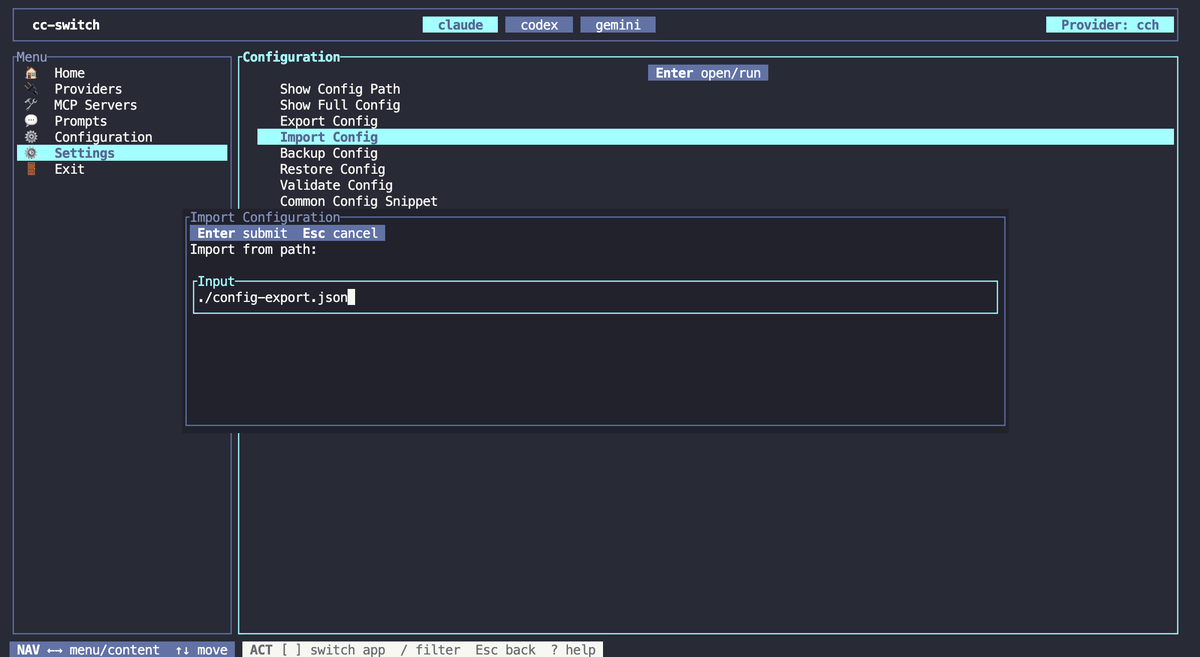
Running cc-switch with no arguments drops you into a full-screen terminal UI (TUI) built with ratatui. The dashboard shows your active provider, WebDAV sync status, and whether each CLI tool is installed and at what version. For scripting or repeatable workflows, every action is also available as a direct subcommand.

The most common daily operation is a one-liner provider switch:
cc-switch use my-relay-provider        # switch Claude Code
cc-switch --app codex use my-provider  # switch Codex
You can also run a latency test or stream health check before committing to a provider:
cc-switch provider speedtest <id>
cc-switch provider stream-check <id>
What it actually manages
Provider switching is the headline feature, but the tool covers a lot more ground:
- MCP server management: add, edit, enable, disable, and sync MCP servers across all six apps from one place. Supports all three transport types:
stdio,http, andsse. - System prompt presets: create named prompt presets and activate them per-app. These map to the right file for each assistant (
CLAUDE.md,AGENTS.md,GEMINI.md). - Skills management: install community-contributed skill packs and enable them per-app. Skills are stored in a single source of truth at
~/.cc-switch/skills/and synced to each app's directory via symlink or copy. - Session history: browse saved sessions across apps, preview messages, resume a session, and import local logs into token/cost usage statistics.
- Config backups: named backups with auto-rotation (keeps 10), plus WebDAV sync for sharing config across machines.

The proxy layer
One of the less obvious but more powerful features is the built-in local proxy. It runs as a background daemon and can route Claude Code, Codex, and Gemini through a local port, adapting OpenAI Responses API and Chat Completions providers on the fly. This means you can point Claude Code at a DeepSeek, Kimi, Qwen, or OpenRouter endpoint without touching the app's own config. The daemon starts automatically when the first proxy route is enabled and exits when no routes are active.
A common gotcha: if you have ANTHROPIC_API_KEY or OPENAI_API_KEY set as system environment variables, they will silently override whatever cc-switch writes to the config files. The tool has a dedicated command to catch this:
cc-switch env check --app claude
cc-switch env list --app claude
Under the hood
The project is a CLI fork of the original CC-Switch GUI by Jason Young. The fork reuses 100% of the service layer from the GUI version, meaning the business logic for every feature is shared. State is stored in a SQLite database at ~/.cc-switch/cc-switch.db. Writes use a temp-file-then-rename pattern to prevent corruption, and concurrent access is protected with RwLock guards.
The binary is built in Rust and ships pre-compiled for macOS (universal ARM + Intel), Linux x64 and ARM64 (musl and glibc), and Windows x64. Installation on macOS and Linux is a single curl command:
curl -fsSL https://github.com/SaladDay/cc-switch-cli/releases/latest/download/install.sh | bashHomebrew users can also do brew install cc-switch-cli. Building from source requires Rust 1.85+.
Caveats worth knowing
The tool will not write live config files for an app that has never been initialized. If you switch a provider for Codex but have never run codex --help, the change will not take effect and you will see a warning. The fix is to run the target CLI once to create its config directory, then switch again. Also, the built-in self-update (cc-switch update) should not be used if you installed via Homebrew, as it breaks Homebrew's own upgrade tracking.
The repo has grown quickly, sitting at over 3,300 stars and 194 forks on GitHub, with 50 releases shipped so far. It is MIT-licensed and free to use. For teams running multiple AI coding assistants in parallel, or individuals who hop between providers to manage cost, it is a practical way to stop manually editing JSON and TOML files every time you switch contexts.
