
Anthropic Opens 11 Claude Cowork Plugins Turning AI Into Role-Specific Specialists
Anthropic open-sources 11 role-specific plugins for Claude Cowork, covering sales, legal, finance, data, and more — all built from plain Markdown and JSON
 Pro
Takeaways
- Anthropic open-sourced 11 role-specific plugins for Claude Cowork, covering sales, legal, finance, marketing, data, bio-research, and more.
- Each plugin bundles skills (Markdown domain knowledge), slash commands, MCP tool connectors, and sub-agents into a single installable package.
- Plugins are plain Markdown and JSON files — no code, no build steps, no infrastructure required to create or customize them.
- Available now for all paid Claude users via claude.com/plugins or Claude Code's plugin CLI; Apache 2.0 licensed.
- Plugins are designed as org-customizable starting points: swap connectors, add company context, adjust workflows, or build new ones from scratch.
- Org-wide sharing and a private plugin marketplace are on Anthropic's near-term roadmap.
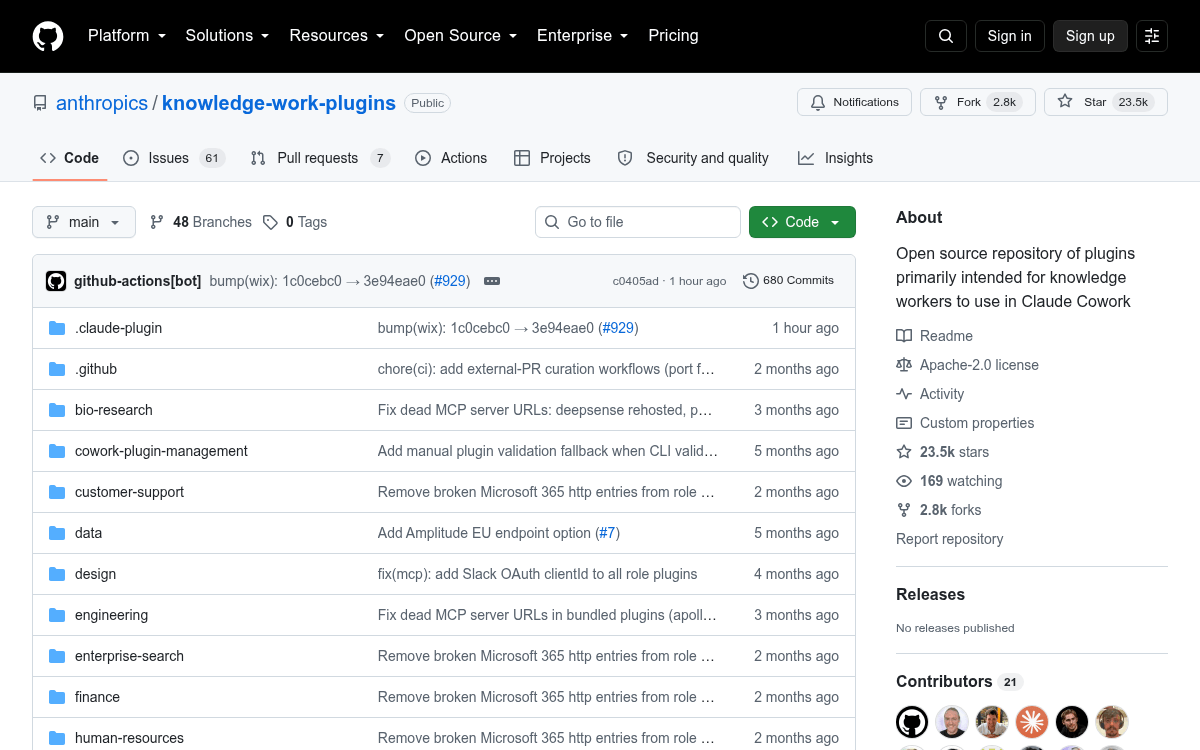
Anthropic has published knowledge-work-plugins, an open-source collection of 11 role-specific plugins for Claude Cowork. Each plugin turns Claude into a domain specialist , complete with pre-wired tool integrations, automatic domain knowledge, and explicit slash commands , for functions like sales, legal, finance, marketing, and data analysis. The repo has already crossed 9,800 stars on GitHub.
What Cowork actually is
Claude Cowork is an agentic tool built into the Claude desktop app that automates complex, multi-step tasks. Unlike standard chat, it can autonomously plan and execute work directly on your computer. Think of it as Claude Code , the terminal-based coding agent , but wrapped in a GUI that anyone can use. Anthropic saw an opportunity to bring these capabilities to a broader audience without requiring anyone to touch a terminal, and Cowork is that product, built on the same agent architecture but wrapped in the familiar Claude chat interface.
Without a plugin, Claude Cowork is a brilliant generalist , it can write, research, analyze, organize, and build. But it doesn't know your industry's terminology, your team's workflow, or the specific outputs your role requires. Plugins change that.
The 11 plugins, at a glance
The plugins bundle skills, connectors, slash commands, and sub-agents so people can use Cowork as a specialist for specific roles, teams, and companies. Here is what ships in the initial release:
- productivity , Task management, calendar, and personal context. Connects to Slack, Notion, Asana, Linear, Jira, Microsoft 365.
- sales , Prospect research, call prep, pipeline review, outreach drafts, competitive battlecards. Connects to HubSpot, Clay, ZoomInfo, Fireflies.
- customer-support , Ticket triage, response drafting, escalation packaging, knowledge base authoring. Connects to Intercom, HubSpot, Guru.
- product-management , Spec writing, roadmap planning, user research synthesis. Connects to Figma, Amplitude, Pendo, Linear.
- marketing , Content drafting, campaign planning, brand voice enforcement, performance reporting. Connects to Canva, Ahrefs, Klaviyo, HubSpot.
- legal , Contract review, NDA triage, compliance navigation, risk assessment. Connects to Box, Egnyte, Microsoft 365.
- finance , Journal entries, account reconciliation, financial statements, variance analysis, audit support. Connects to Snowflake, Databricks, BigQuery.
- data , SQL writing, statistical analysis, dashboard building, data validation. Connects to Snowflake, Databricks, BigQuery, Hex, Amplitude.
- enterprise-search , Single query across email, chat, docs, and wikis. Connects to Slack, Notion, Guru, Jira, Microsoft 365.
- bio-research , Literature search, genomics analysis, target prioritization for early-stage life sciences R&D. Connects to PubMed, ChEMBL, ClinicalTrials.gov, Benchling.
- cowork-plugin-management , Build and customize plugins for your org's specific tools and workflows.
How a plugin is actually built
Most people hear "AI plugin" and immediately picture backend APIs, OAuth flows, and weeks of engineering time. That mental model is wrong here. Claude Cowork flips the script entirely: a plugin is just a bundle of files you can read, edit, and share. No build steps. No infrastructure. No deployment pipeline. If you can describe how work should be done, you can package it into a plugin.
Every plugin follows the same four-component structure:
plugin-name/
├── .claude-plugin/plugin.json   # Manifest
├── .mcp.json                    # Tool connections (MCP servers)
├── commands/                    # Slash commands you invoke explicitly
└── skills/ # Domain knowledge Claude draws on automatically- Skills are Markdown files encoding domain expertise, best practices, and step-by-step workflows. They're the heart of the system , Markdown files containing procedural knowledge: what to do, how to do it, and what good output looks like. When Claude encounters a relevant situation, it draws on these skills automatically.
- Commands are explicit slash-command triggers. Type
/sales:call-prepor/finance:reconcileand Claude kicks off a specific workflow , the "buttons" on your plugin's control panel. - Connectors wire Claude to external tools via MCP (Model Context Protocol), Anthropic's open standard for connecting AI to external services. MCP is the standard that allows Claude to communicate with services like Gmail, Google Calendar, Slack, Linear, and others. Each connector authenticates securely via OAuth or API keys.
- Sub-agents handle parallelizable sub-tasks within a workflow, letting the plugin orchestrate multi-step work autonomously.
The design insight worth paying attention to
The design goal is consistency: you customize a plugin once for your org, and then Claude behaves like it understands your processes every time. This is the core problem these plugins solve. Without them, every team member has to re-explain context, terminology, and preferred output format on every session. A plugin bakes that context in once.
If Skills are onboarding guides and MCP is plumbing, Plugins are the finished product you hand to a team. That framing captures why this matters for anyone trying to roll out AI tooling at scale: instead of each person configuring Claude individually, an admin installs a plugin and the whole team gets identical, role-appropriate behavior from day one.
Making them yours
The plugins are explicitly designed as starting points, not finished products. The README lays out four customization paths:
- Swap connectors , Edit
.mcp.jsonto point at your specific tool stack instead of the defaults. - Add company context , Drop your terminology, org structure, and processes into skill files so Claude understands your world.
- Adjust workflows , Modify skill instructions to match how your team actually works, not how a textbook says to.
- Build new plugins , Use the
cowork-plugin-managementplugin or follow the file structure to create plugins for roles not yet covered.
Contributing is equally low-friction. The plugins are file-based and available on GitHub , fork the repo, edit some Markdown, open a PR.
Getting started
The feature is available as a research preview for all paid Claude users. Cowork is available for Pro ($20/mo), Max, Team, and Enterprise plan subscribers using the Claude Desktop app on macOS or Windows. You can install plugins directly from claude.com/plugins, or pull them into Claude Code:
# Add the marketplace first
claude plugin marketplace add anthropics/knowledge-work-plugins
# Then install a specific plugin
claude plugin install sales@knowledge-work-plugins
Once installed, plugins activate automatically. Skills fire when relevant, and slash commands are available in your session. Org-wide sharing and private marketplace support are in the works, according to the company.
If you're building internal AI workflows, this matters less because of the hype , and more because it shows a concrete packaging pattern for how teams will operationalize agentic work: skills + connectors + slash commands + sub-agents, versioned in a repo. The entire collection is Apache 2.0 licensed.
 X X post by @anthropicai