
World Mouse Turns Your Entire Room Into a Clickable Desktop
A CHI '26 paper introduces World Mouse, adapting the desktop mouse into a depth-adaptive cursor that treats real and virtual objects as one continuous surface.
 Pro
Takeaways
- Researchers introduce World Mouse, a cross-reality cursor system for XR headsets, at CHI '26.
- Maps 2D mouse deltas to a depth-adaptive 3D cursor using ray casting and Voronoi interpolation.
- Treats real objects as interactive surfaces via semantic segmentation and mesh reconstruction.
- Three behaviors: within-object surface tracking, between-object interpolation, 2D-to-3D window transitions.
- Prototypes include spatial clipboard, radial menus, 3-axis gizmos, IoT proxies, and smartphone-driven cursors.
- Design paper only, no user study or open-source release, but builds on public scene-understanding APIs.
Extended reality keeps pushing toward hands, eyes, and voice as the future of input, but a new research paper argues the humble desktop mouse still has a role to play, especially once your screen becomes the whole room. A team of researchers has published World Mouse: Exploring Interactions with a Cross-Reality Cursor, to be presented at CHI '26 in Barcelona, describing a cursor system that treats every real and virtual surface in a scene as a single interactable canvas.
The authors, Esen K. Tütüncü from the University of Barcelona's Institute of Neurosciences together with Mar Gonzalez-Franco, Khushman Patel, and Eric J. Gonzalez, frame the work as a rethink of a fundamental question in spatial computing: how do you point precisely at something when the pointer has to live in three dimensions and cross between digital and physical objects?
The precision gap in spatial computing
The paper opens with a critique of where XR input has landed. The current push for “natural” inputs has its trade-offs: touch is limited by human reach and fatigue, while gaze often lacks the precision for fine interaction. Hand-ray selection dominates today's headsets, but it induces the familiar gorilla-arm fatigue and struggles with fine control. Gaze-plus-pinch feels elegant for a few seconds and exhausting after an hour of CAD work or data annotation.
Meanwhile, the mouse has decades of tuning behind it: sub-pixel accuracy, no arm fatigue, and muscle memory that anyone who has used a computer already owns. Prior research such as In-Depth Mouse and Everywhere Cursor showed the mouse can beat hand tracking for seated VR work, but those systems stayed inside a single modality. World Mouse asks what happens when the cursor has to move fluidly across a passthrough view containing your actual desk, a virtual monitor floating above it, and a physical wall you want to stick a poster on.

How the cursor thinks in 3D
The system rests on what the authors call a blended scene graph, built by combining a semantically labeled mesh of the physical room with the virtual assets already in the scene. Unlike previous virtual-only approaches, World Mouse leverages semantic segmentation and mesh reconstruction to treat physical objects as interactive surfaces. The paper points to Meta's Scene API and Android XR's Scene Meshing as the kinds of runtimes that already expose the geometry they need.
On top of that unified geometry, three cursor behaviors do the actual work:
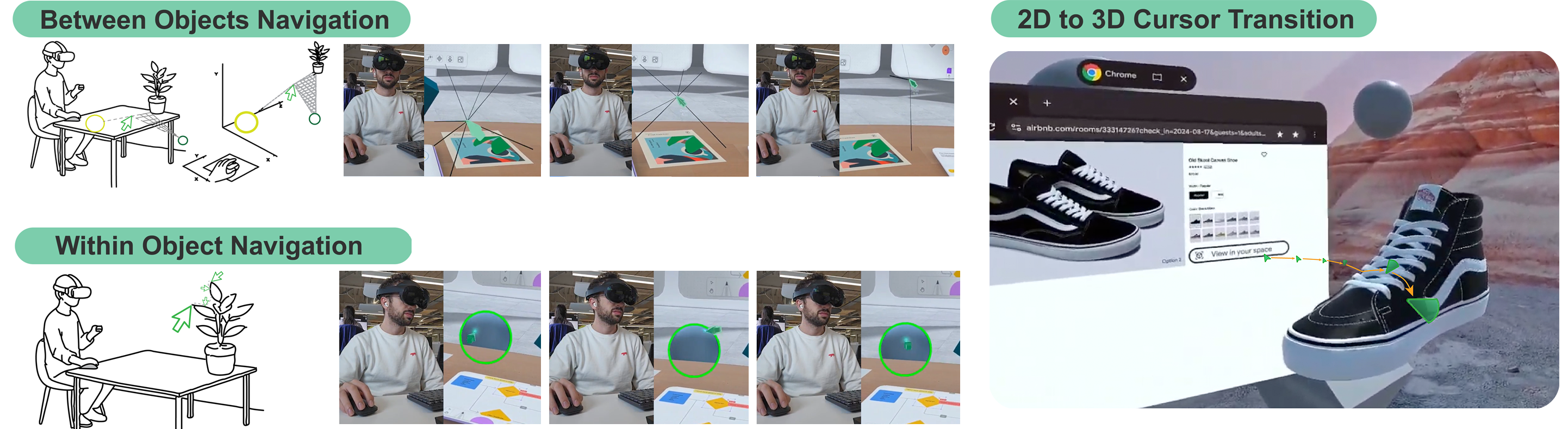
- Within-object navigation. When the cursor lands on an object, planar mouse movement traces the surface. Depth follows the geometry, and the cursor's orientation aligns with the local surface normal so you get visual feedback about the shape you are moving across.
- Between-object navigation. Empty space is bridged by interpolating along an invisible mesh connecting nearby geometry, so the cursor glides between a monitor and a whiteboard instead of shooting off to infinity.
- 2D-to-3D transition. The cursor can leave a flat panel like a browser window, slide into the room, and land on a real wall, all in one continuous gesture.
Building on the In-Depth Mouse approach, 2D mouse deltas are mapped to angular displacements of a ray cast from the user's viewpoint, converting flat motion into spherical rotation around the head. Voronoi-based interpolation infers depth in empty regions, and the physical world's convex-hull mesh gives a stable surface that does not need to be recomputed every time the user moves.
What you can actually do with it
The paper is prototype-driven rather than benchmark-driven, so instead of numbers it presents concrete workflows. Among them:
- A spatial clipboard that copies real-world objects, scanned through the headset, into virtual space and vice versa.
- Radial right-click menus that adapt based on the semantic label of whatever the cursor is hovering over.
- A scroll wheel repurposed to push objects deeper into the scene or zoom magnified views of physical space.
- A 3-axis gizmo for CAD-style manipulation, precise enough for spline editing and snapping vertices onto real-world meshes.
- IoT proxies attached to semantic labels, so clicking a lamp toggles the actual light, with an option to re-render passthrough to simulate the effect.
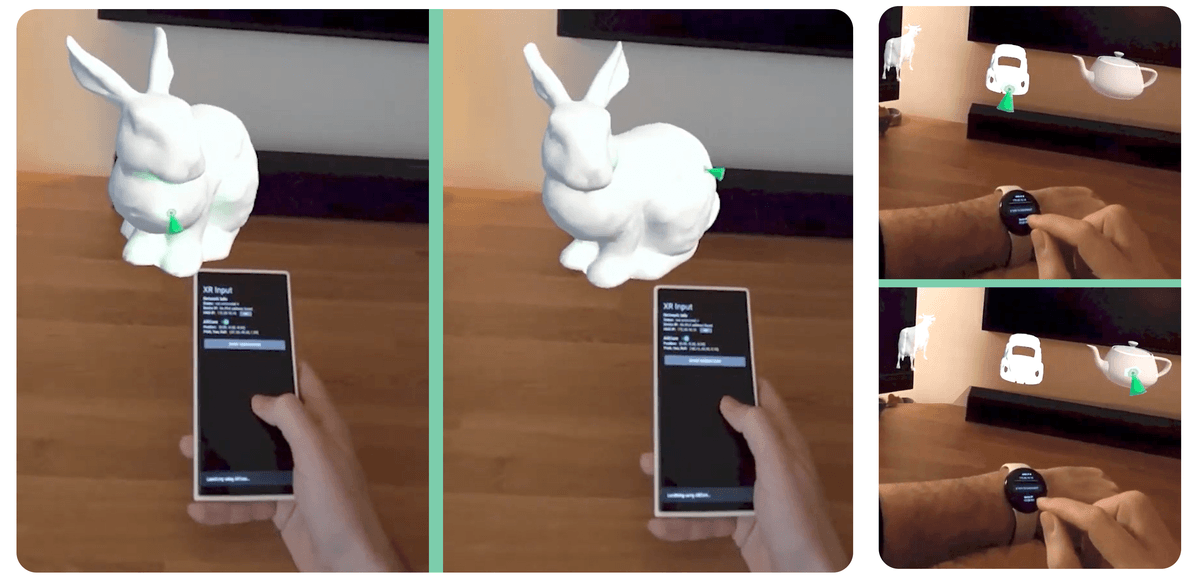
The authors also demonstrate driving the cursor from a smartphone or smartwatch touchscreen via their earlier XDTK cross-device toolkit, which they argue is a route to multi-user sessions where someone on a laptop can join a shared spatial scene without owning a headset.
Where it stops being the right tool
The paper is candid about scope. World Mouse is aimed at selection, confirmation, and precise manipulation. It is not meant to replace freehand input for tasks like mid-air sketching or sculpting, where continuous 3D motion is the whole point. There are no user studies with quantitative results yet either. The contribution is a design and an implementation sketch, backed by prototype demonstrations rather than task-completion times or error-rate comparisons.
Why it is interesting beyond XR
The broader argument is about grounding. As AI agents move into spatial environments, they need unambiguous references to physical things, and voice plus gaze often is not specific enough. A precise cursor that can point at exactly this chair leg, or this section of a wall, gives a language model or a vision system a clean deictic anchor. In that sense, the paper reframes the mouse not as a legacy device to be replaced but as a possible bridge between traditional interfaces and the agentic, mixed-reality workflows that a lot of the industry is currently prototyping.
The full paper is available on arXiv under CC BY 4.0. No source code has been released alongside it, but the techniques build on publicly documented scene-understanding APIs from major XR platforms, so the ideas are reproducible for anyone with a headset that exposes a semantic mesh.