
Waterloo's NeuralOS Runs a Full Ubuntu Desktop With No Real OS Underneath
Researchers at Waterloo trained an RNN plus diffusion model to generate Ubuntu desktop frames from mouse and keyboard input, even simulating a Doom app that was never installed.
 Pro
Takeaways
- NeuralOS pairs a hierarchical LSTM state tracker with a latent diffusion renderer to generate Ubuntu desktop frames from raw input events.
- Cursor localization reaches 1.6 pixel error on 512x384 frames thanks to an explicit Gaussian position map fed to the UNet.
- Trained on 122K episodes from Claude-3.5-Sonnet agents plus random exploration, using 17K H200 and 6K H100 GPU hours.
- Human raters were near chance (about 50%) on 10 to 20 second cropped clips comparing NeuralOS to real Ubuntu XFCE.
- Model learned a playable Doom application that was never installed, purely from synthetic demonstrations spliced with VizDoom.
- Code, checkpoints and interactive demo at neural-os.com and github.com/yuntian-group/neural-os.
What if the operating system itself was a neural network, drawing every pixel of your desktop from scratch in response to your mouse and keyboard? That is roughly what a team from the University of Waterloo and the National Research Council of Canada has built with NeuralOS, a generative model that predicts the next screen frame of an Ubuntu desktop given a stream of user input events, with no actual kernel or applications running underneath.
NeuralOS is a neural framework that simulates graphical user interfaces of operating systems by directly predicting screen frames in response to user inputs such as mouse movements, clicks, and keyboard events, combining a recurrent neural network that tracks computer state with a diffusion-based neural renderer that generates screen images. The most striking demonstration is a working Doom app that the underlying system was never told exists, learned entirely from fabricated training data.
Why simulate an OS in the first place
Generative video models like Sora and Veo produce smooth, predictable clips, and interactive game simulators like DIAMOND and Genie let you play inside a learned world. An OS is a harder animal. It has to respond instantly to unpredictable input, and a single click can trigger an abrupt, discontinuous visual change like launching Firefox. The authors frame the goal as a step toward interfaces that could eventually adapt themselves in real time to what a user is trying to do, rather than shipping a fixed set of menus and windows.
There is also a practical angle. A learned OS gives computer-use agents a sandbox where they can be trained and evaluated without touching a real machine, and it is a testbed for research on prompt-to-UI personalization.
Architecture: a kernel-shaped RNN and a rendering diffusion model
NeuralOS deliberately mirrors the split between an OS kernel and its display server. A hierarchical two-level LSTM tracks internal state such as which applications are open, while a UNet-based latent diffusion model paints the actual frame. Unlike transformers, whose inference complexity increases with context length, the RNN maintains constant complexity per timestep, which is crucial for continuous, long-horizon OS simulation. An ablation confirms that memory usage grows past 40 GB for a transformer at 1024 frames while the RNN stays flat at about 12 GB.
A few implementation choices matter:
- Latent space: A VAE downsamples each 512x384 screen by 8x into a 64x48 grid with 16 channels, so all modeling happens in latent space.
- Cursor Gaussian map: Instead of hoping the model infers the mouse position from a token, the cursor is baked into the input as a 2D Gaussian centered on its scaled coordinates. Without this, cursor error was around 130 pixels; with it, error drops to under 2.
- Attention over the last frame: The lower LSTM emits a query that attends over the previous latent frame, giving the model a way to look at what is currently on screen.
- Sizing: The RNN carries 2.2B parameters, the UNet renderer 263M.

A four-stage training pipeline
The team found they could not just plug the RNN into the diffusion model and hit go. Initial experiments showed that direct joint training led to the renderer ignoring RNN outputs, as indicated by negligible gradient flow into the RNN. They ended up with a staged recipe:
- RNN pretraining. The RNN learns to predict the next latent frame directly under an MSE loss, which gives it useful representations but blurry outputs.
- Joint training. The pretrained RNN is glued to the diffusion renderer and both are optimized under the standard diffusion loss. Now the renderer actually uses the state.
- Scheduled sampling. With a small probability the most recent input frame is swapped for the model's own generated frame, teaching it to survive its own mistakes at inference time.
- Context extension. The context window is stretched from 32 to 64 frames so the model can pick up longer-range dependencies.
A curriculum focuses training on high-signal transitions. Only about 2.8% of frames involve significant pixel change, so the model first sees those before being exposed to the full stream of tiny cursor jitters.
Data: agents plus random smashing
The training corpus was assembled from 64 parallel Docker containers running Ubuntu 20.04 with XFCE, each 30 seconds long at 15 fps. Two sources fed the pipeline: 2,000 demonstrations from Anthropic's Claude-3.5-Sonnet computer-use agent, guided through a search tree of GUI states, and 120,000 random exploration episodes with Bezier-curve mouse paths and stochastic key events. The random data turned out to be essential, because agent-only data made the model incorrectly associate hovering near the close button with actually closing a window. Total training cost was roughly 17,000 H200 GPU hours plus 6,000 H100 hours, over about four months.
What the numbers look like
On a held-out set of 730 challenging transitions, NeuralOS hits 37.7% exact state-transition accuracy against a majority-vote baseline of 1.4%. Cursor position error averages 1.6 pixels horizontally and 1.4 pixels vertically on a 512x384 canvas, which is less than half a percent of frame width.
The human evaluation is arguably the most interesting number. Raters were shown side-by-side clips of the same input trajectory, one from a real Ubuntu XFCE desktop and one from NeuralOS, and asked to pick the real one. On 10-to-20-second clips with the bottom 40 pixels cropped out (to hide diffusion artifacts in the free-space counter), participants scored around 51 to 53 percent, essentially chance. Inference runs at 18 fps on a single H100 using DDIM with two steps.
The Doom trick and why it matters
The headline experiment is that NeuralOS learned to run a Doom application that never existed on the underlying machine. The team fabricated training data by pasting a Doom icon onto desktop screenshots, inserting a synthetic double-click, splicing in VizDoom gameplay frames with matching input events, and ending each sequence with an ESC keypress returning to the desktop. After training, users can double-click the fake icon in the simulated desktop and actually play.

The broader point is that once a neural interface is trained end-to-end, any consistent set of demonstrations, real, edited, or fully synthetic, becomes a usable app. That inverts the traditional relationship between software and demonstrations.
Long memory from a short window
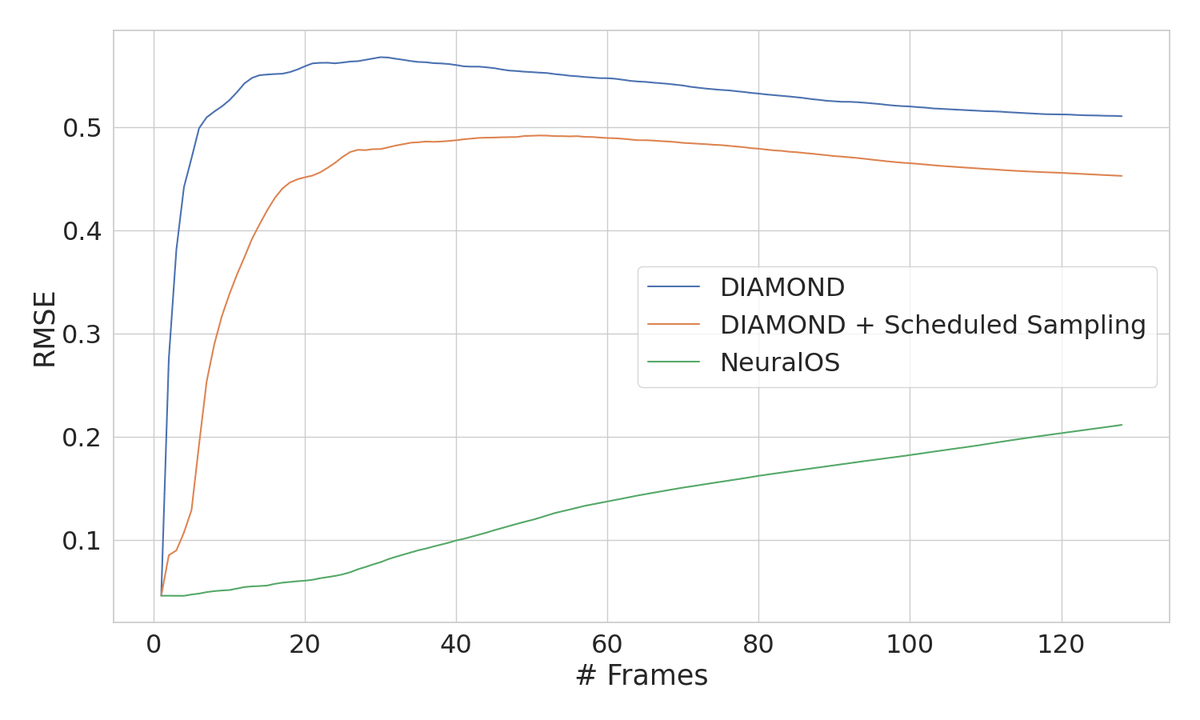
The RNN also carries state beyond the training horizon. In a folder-creation probe, the model saw only 8-frame delays during training but was tested with 64, 128, and 256-frame gaps between creating a folder in Documents, closing the file manager, and reopening it. It still correctly recalled folder presence 52 to 62 percent of the time at the longest gap, well past its 64-frame training context. A DIAMOND baseline adapted from action-conditioned game simulators cannot do this by design because its fixed context window loses the earlier event entirely.
What it is not good at yet
- Fine-grained keyboard input. Typing arbitrary characters into a terminal is not reliably supported.
- Resolution. The model runs at 512x384, which is far below real desktop resolutions.
- Deployment cost. Inference currently requires an H100-class GPU, so this is a research prototype, not something you would install.
- Application scope. Only four apps (Home, Trash, Terminal, Firefox, plus the synthetic Doom) are covered.
- External world. There is no way for the generative OS to talk to real HTTP APIs or storage.
Get the code and try it
Everything is public. Training code and data processing scripts are on GitHub, model checkpoints are on Hugging Face, and an interactive browser demo is hosted at neural-os.com, where you can point your cursor at a neural Ubuntu desktop and watch a diffusion model hallucinate the response in real time.