
UCT Researchers Release iDaVIE So Astronomers Walk Through Radio Data in VR
A South African-led astronomy team just shipped version 1.0 of iDaVIE, a room-scale VR tool that turns 3D FITS data cubes into physical objects you can walk through.
 Pro
Takeaways
- iDaVIE v1.0 is a VR tool for interactive analysis of 3D astronomical data cubes, released open-source under LGPLv3.
- Built on Unity and SteamVR with C++ native plug-ins for FITS parsing, WCS handling, and adaptive downsampling.
- Ray-marching shader keeps median framerate near 90Hz even on 1536³ cubes via block-based voxel aggregation.
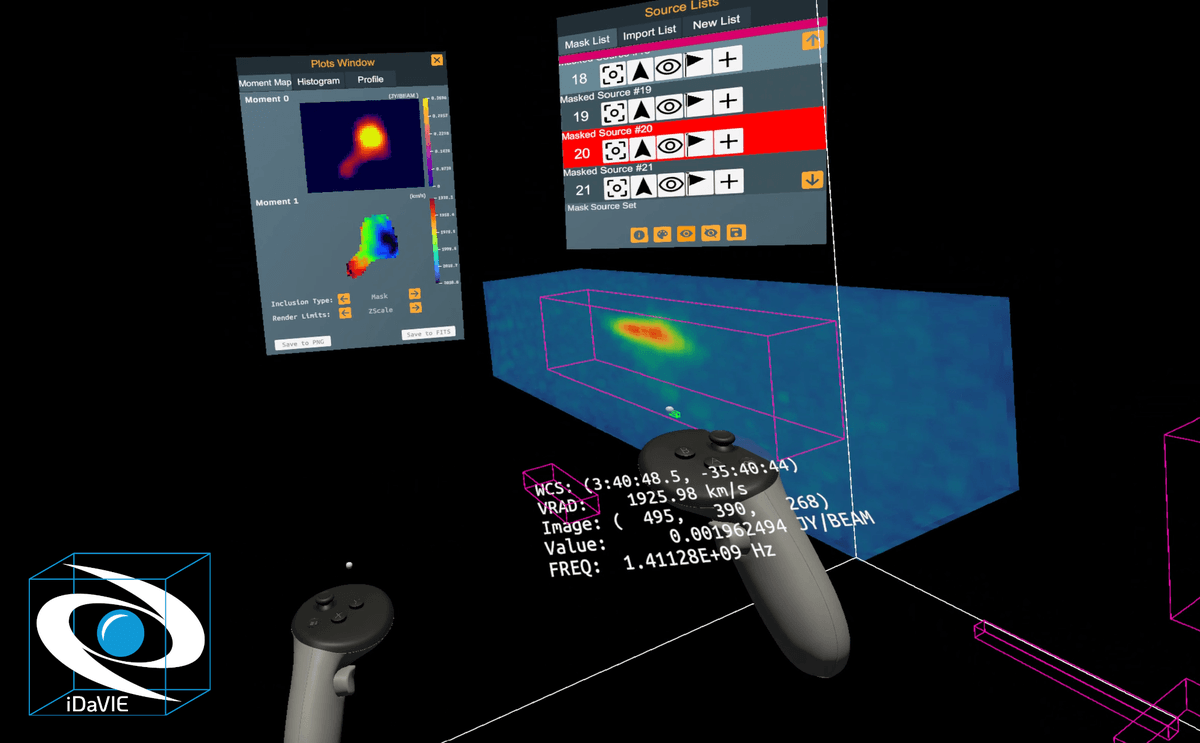
- Real-time voxel painting, selection boxes, moment maps, spectral profiles, and VOTable catalogue overlays inside VR.
- Already used with MeerKAT, ASKAP, and APERTIF data to find polar ring galaxies and refine SoFiA masks.
- Currently Windows-only PCVR; v1.1 targets subcube loading, HDU selection, and scripted camera videos.
Astronomy is drowning in cubes. Between MeerKAT, ASKAP, APERTIF, and the upcoming Square Kilometre Array, radio telescopes are churning out three-dimensional spectral data at a rate that traditional 2D viewers cannot keep up with. A team led by researchers at the University of Cape Town's IDIA Visualisation Laboratory has released version 1.0 of iDaVIE, a virtual reality suite that lets astronomers walk through their data cubes, paint masks on individual voxels, and export the results straight back into their pipelines.
Why flat screens broke down
The scale problem is stark. Twenty years ago, HI data cubes were limited to hundreds of spatial pixels and spectral channels, resulting in files around 100 MB that could be scanned by eye channel-by-channel. Today's instruments produce something very different: MeerKAT, ASKAP, the VLA, and APERTIF can generate cubes with the same spatial extent but up to 32,000 spectral channels.
Existing tools adapt by flattening. CARTA scrolls through channels sequentially on a 2D screen. SlicerAstro renders 3D volumes but relies on mouse-lassoed selections after picking a viewing angle. The authors argue that constant mental reconstruction of 3D structure from 2D projections consumes working memory that should be spent on actual science. VR removes the translation step by putting the cube in front of you at room scale.
How the pipeline is wired together
iDaVIE is built on Unity and SteamVR, with custom native plug-ins handling FITS parsing, downsampling, and statistical calculations. The heavy lifting happens in C++ plug-ins compiled to native DLLs, while Unity C# scripts manage scene objects and interaction. A ray-marching shader written in HLSL renders the cube volumetrically, casting rays from each VR camera pixel and returning the maximum (or mean) voxel value along each interval, then blending with a Matplotlib-derived colormap.

Unity imposes a 4GB texture ceiling from 32-bit memory addressing. To stay under it, iDaVIE runs an adaptive block-based downsampling pass that aggregates voxels by mean or max until the texture fits under a configurable limit (default 368MB). The full-resolution cube stays in RAM so users can crop into a subregion and see it at native resolution without reloading.
Inside the headset
The team deliberately did not port every mouse-and-keyboard action into VR. iDaVIE splits work between a desktop GUI (for file loading, parameter tuning, header inspection) and the immersive environment (for spatial exploration and mask editing). Inside VR, users have several modes driven by two state machines:
- Locomotion: grip one controller to translate the cube, grip both to pinch-zoom and rotate it, mirroring familiar touchscreen gestures in 3D.
- Selection: press and hold the primary button to spawn a rectangular selection box anchored where you clicked, with the opposite corner tracking your cursor.
- Paint mode: assign integer Source IDs to voxels with a resizable 3D brush, following the same masking convention as the SoFiA source-finder.
- Voice commands: keyword-triggered actions like cropping to a selection or switching colormaps, with a microphone indicator showing whether the system is listening.
A Feature system tracks regions of interest. Masked Features come from a loaded mask cube, Imported Features come from external VOTable catalogues, and User-Defined Features can be exported back to VOTable for downstream tools. Everything round-trips through FITS with WCS metadata preserved.
Performance on real hardware
The benchmarks were run on a laptop with an Intel Core Ultra 9 185H, 32GB DDR5, and an RTX 4070 Laptop GPU driving a Meta Quest 3 at 90Hz. Framerate held steady across cube sizes thanks to the downsampling strategy, with the pain shifting almost entirely to load time and RAM:
| Cube | Native voxels | Load (s) | Peak RAM (MB) | Median FPS |
|---|---|---|---|---|
| Synthetic S | 256³ | 1.09 | 820 | 90.5 |
| Synthetic M | 512³ | 2.05 | 1449 | 89.3 |
| Synthetic L | 1024³ | 10.34 | 7240 | 88.7 |
| Synthetic XL | 1536³ | 45.37 | 22040 | 88.9 |
| Fornax science | 1046×952×398 | 2.86 | 3151 | 90.6 |
Papers it has already shaped
iDaVIE is not vaporware. Several published papers have folded it into their pipelines. In the WALLABY Pilot Data Release, its interactive masking was used to distinguish anomalous gas from the main disc of two spiral galaxies, contributing to the discovery of two potential polar ring galaxies. A MeerKAT survey of the Fornax A group used it to add two HI sources that SoFiA had excluded on reliability grounds, and a serendipitous MeerKAT observation used it to help identify 49 HI-rich galaxies across several interacting groups.
The honest limitations
iDaVIE is Windows-only, requires a dedicated GPU and a PCVR headset, and cannot yet load a subcube from disk. That last point matters: if your cube is bigger than system RAM, the OS will page to disk and load times become miserable. The default max-value ray-marching also loses absorption features, since negative voxels get outshouted by positive noise, and the visualisation and analysis code are still tightly coupled inside the native plug-ins.
Version 1.1 is already targeting subcube loading, HDU selection for JWST-style multi-extension files (MUSE, NIRSpec, MIRI), a scripting API for smooth reproducible fly-through videos, and eventually multiplayer or planetarium streaming for collaborative analysis. The code lives on GitHub under LGPLv3, with docs at Read the Docs and a Zenodo DOI for the v1.0 release. While the analysis tools are HI-focused, the volumetric renderer is happy to eat any FITS cube, including MRI stacks and ice-core micrographs, which the team has already been exploring with biologists and neuroscientists.