

Z-Image-Engineer V6 Rewrites Flat Prompts Into Cinematic Scenes for Free
Z-Image-Engineer V6 is a fine-tuned text encoder that rewrites simple prompts into cinematic descriptions and slots directly into Z-Image-Turbo workflows

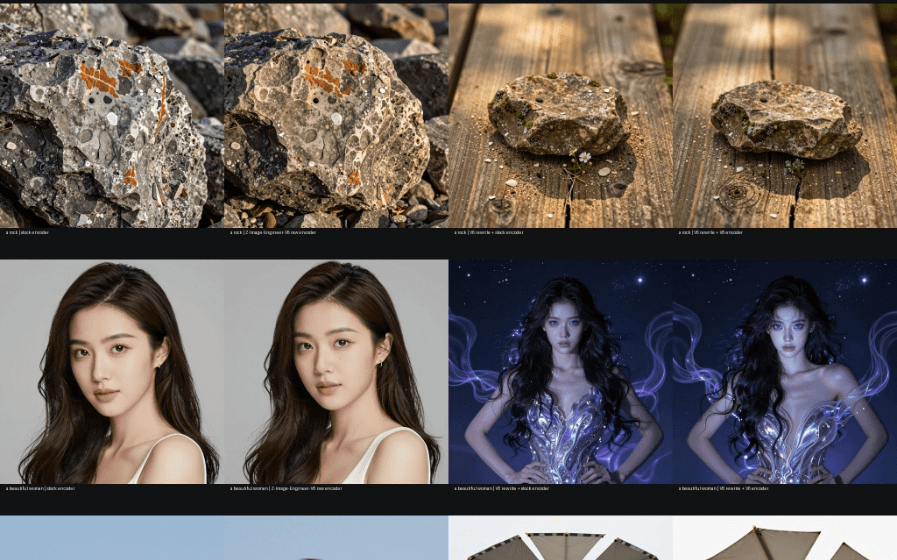
If you have been running Z-Image-Turbo and wondering why your outputs still look flat despite the model's raw capability, the bottleneck is almost certainly your prompt. Z-Image-Engineer V6 is a community-built fix for exactly that problem: a fine-tuned 4B text encoder that either rewrites your prompts into rich visual narratives, or replaces the stock encoder entirely inside your ComfyUI pipeline.
The model it plugs into
Z-Image-Turbo is Alibaba Tongyi Lab's efficient 6B-parameter image generation model that achieves performance comparable to closed-source flagship models with 20B+ parameters, excelling particularly at generating high-fidelity, photorealistic portraits. Its speed comes from a novel architecture called S3-DiT (Scalable Single-Stream Diffusion Transformer) that processes text and image data in a unified sequence rather than separate streams. On the Artificial Analysis Text-to-Image Leaderboard, Z-Image-Turbo ranked 8th overall and secured the top position as the #1 open-source model, outperforming all other open-source alternatives.
Released under an Apache 2.0 license, Z-Image Turbo is completely free to use, modify, and deploy commercially. You can run it locally on your own hardware or access it through various API providers at around $0.0036 per image. The catch: getting the best out of Z-Image requires a slightly different approach than SDXL. It responds well to natural language but benefits from specific structural cues. That is the gap V6 is designed to close.
What V6 actually does
Z-Image-Engineer V6 is a fine-tuned version of the Qwen text encoder that ships inside Z-Image-Turbo. It operates in two distinct modes that can even be stacked together:
- Prompt Enhancement: Feed it a short idea in LM Studio and it returns a structured, cinematically-described prompt ready for generation. No system prompt required.
- Text Encoder Swap: Drop the GGUF file into ComfyUI's
text_encoders/folder and it replaces the stock Qwen encoder entirely, conditioning the diffusion model differently from the same seed. - Hybrid Mode: Use V6 to rewrite your prompt, then use V6 again as the encoder. The model writes the scene and drives the image model simultaneously.
- Private Local Workflow: Built for LM Studio, ComfyUI, and
llama.cpp. No API logs, no external telemetry.
The practical effect is that a prompt like a unicorn gets transformed into a fully structured description with explicit scene composition, lighting direction, material texture, and depth separation. Crucially, it also strips out hollow filler tokens like "8k, masterpiece, trending on ArtStation" that waste context without improving outputs.
The training method behind it
V6 is built on a framework the author calls SMART DoRA. To understand what that means, it helps to know what DoRA is. Standard LoRA (Low-Rank Adaptation) fine-tunes a model by adding small low-rank weight matrices on top of frozen weights. DoRA goes further by decomposing the pre-trained weight into two components, magnitude and direction, for fine-tuning, specifically employing LoRA for directional updates to efficiently minimize the number of trainable parameters. By employing DoRA, both the learning capacity and training stability of LoRA are enhanced while avoiding any additional inference overhead. Think of it as LoRA that can independently adjust both how strong a feature is and which direction it points, giving it more expressive power for the same parameter budget.
On top of DoRA, the SMART system adds four auxiliary regularizers that push the model away from common failure modes during training:
- Entropic: Broadens output probability diversity, reducing repetitive loops and generic vocabulary.
- Holographic: Enforces structured, depth-wise feature logic to improve foreground/background hierarchy.
- Topological: Stabilizes coherent latent trajectories so prompts flow naturally instead of stalling out.
- Manifold: Regulates overall weight distributions to keep model behavior stable under high-pressure refinement.
The final model is not a single training run. It is a blended composite: a master-corpus SMART DoRA base pass, a retention pass to preserve numbers, colors, and named objects, a supervised cinematic style refinement (SceneClean SFT32), a binary anti-repeat pass (AntiRepeat Binary24), and a final 25%/75% blend of style restoration versus anti-repeat adapters.
How to use it right now
V6 is available for free on Hugging Face under an Apache 2.0 license. The full HF safetensors release lives in the main repo, and quantized GGUF versions (F16 down to MXFP4) live in the companion Z-Image-Engineer-V6-GGUF repo. For most local workflows, the Q8_0 GGUF is the recommended starting point.
Loading it via the Transformers library takes just a few lines:
from transformers import pipeline
pipe = pipeline("text-generation", model="BennyDaBall/Z-Image-Engineer-V6")
messages = [{"role": "userComments
