
Y Combinator Open-Sources QM, the AI Agent Harness Running Its Whole Company
Y Combinator open-sourced Quartermaster, the MIT-licensed agent harness it runs its own accounting, legal, and engineering on, with scoped sandboxes per employee and Slack room.
 Pro
Takeaways
- Y Combinator open-sourced QM (Quartermaster), the multiplayer agent harness it runs internally, under MIT license.
- Each employee and Slack room gets scoped memory, files, credentials, permissions, crons, and a durable sandbox.
- Harness-agnostic: Pi, OpenCode, Codex, and Claude Code all drive the same TypeScript core.
- Three security postures (Strict, Auto, Dangerous) plus a predeclared command policy for destructive actions.
- Memory is stored as a markdown notebook of atomic bullet facts in Postgres, no vector index required.
- Deploys to Fly or AWS via the
qmCLI in the operator's own cloud account.
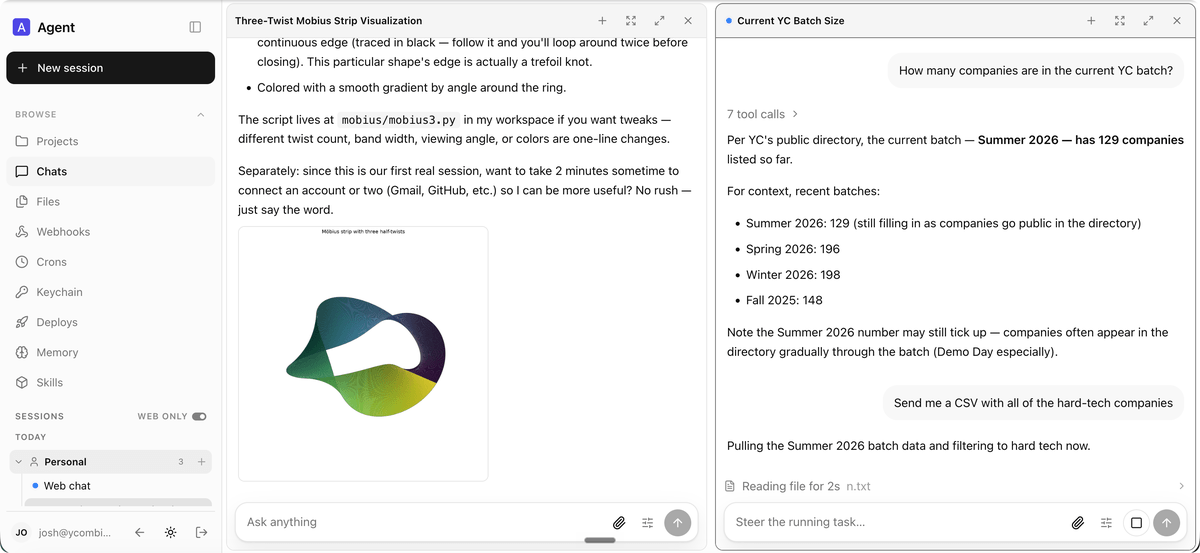
Y Combinator has released the software it uses to run its own company. QM, short for Quartermaster, is a multiplayer agent harness that gives an entire organization a shared fleet of AI agents living in Slack and a web UI, with strict boundaries between what each person and each room can see and do. The repo shipped under an MIT license and has already pulled in more than 13,000 GitHub stars.
QM lives inside Slack, where different employees and rooms get scoped memory and permissions across accounting, legal, events, and engineering work. YC has been running it internally for months, including building QM with QM, before pushing the code out.
Past the personal-assistant ceiling
Most agents today are shaped like personal assistants. Hand one to a whole company and context, credentials, and permissions immediately become the entire problem. QM is the harness YC built after running 50+ individual Hermes agents internally and hitting the ceiling of what personal assistants can do at organizational scale.
The design flips the primitive. Rather than one agent per person, QM is a single org-wide harness where each person and each room gets scoped memory, files, keychain view, permissions, crons, web apps, and a durable sandbox. Finance's email token never leaks into Engineering's sandbox. A shared Slack channel has its own memory that neither participant can silently exfiltrate to their private workspace.
How the pieces fit together
Under the hood, QM runs a headless core with a small, fixed tool surface. Every turn passes through that core, which handles API, identity, policy, and scheduling while driving an agent loop. A Postgres layer holds user data, session history, and other durable state. One of the tools is execute, which runs commands in the scope's own isolated sandbox, where installed tools stay installed.
The stack itself is unremarkable in a good way. The core runs TypeScript directly on Node and uses Fastify for HTTP. The Slack plugin uses Bolt; the web UI builds with Vite and renders with Lit. The web UI, admin panel, and public portal are optional plugins over the core's HTTP API. A single deployment directory carries all the org-specific config, custom tools, sandbox image, and infrastructure. Every substrate sits behind an interface, so production implementations swap in through one wiring file.
The harness is model-agnostic. The same core drives Pi, OpenCode, Codex, and Claude Code, so deployments avoid getting tied to a single vendor. You pick your coding agent, and QM handles the multiplayer plumbing around it.
Memory that reads like a notebook
One of the more interesting engineering choices is how QM remembers things. Long-term memory sits in a markdown notebook of atomic bullet facts with capture dates, persisted in Postgres. No vector index sits in the memory path. A consolidation pass runs after roughly 10 new facts and returns explicit UPDATE, DELETE, and ADD actions rather than rewriting the file.
The bet is that for organizational knowledge, human-readable, human-auditable notes beat opaque embeddings. When a scope's memory is a text file you can open and read, you can also review it, redact it, and reason about who saw what.
Three postures for trusting the agent
Security is where QM spends most of its code. Twice as much code governs access control as drives the model, and the threat model names its own gaps. The org picks one of three postures, and narrower scopes can only tighten from there:
- Strict: every harness tool call pauses for human approval, except the two no-effect turn enders.
- Auto (default): a classifier screens provenance-labelled external data and tool results before they reach the model; a deployment can point that at its own screening proxy.
- Dangerous: no content screening, no pauses between tool calls.
A predeclared command policy applies in every posture, including Dangerous, with approval rules and hard denials for things like recursive deletes or destructive SQL. QM follows the pattern of local coding agents: the agent acts as the person it works for, with their credentials and permissions, and everything is audited.
What you can actually build with it
The README's own list of use cases hints at how broad the surface is:
- Search internal notes, email, documents, databases, and the web together
- Retrieve information from a company brain via connectors
- Spin up internal apps, publish them to the right people, and keep their data current
- Learn a writing voice from past sends, then triage an inbox on a schedule with labels and reply drafts
- Work inside an existing repo: run tests, open PRs, monitor CI, check system logs
- Track a project in a shared channel with automated status updates and follow-ups
Skills are scope-owned and shareable by grant, with admin-gated promotion to the whole org, and skill packs can be imported directly from git repos. Crons and webhooks fire background work when nobody is watching.
Deploying it
QM is org software, not a desktop app. Deployment assumes a cloud account, Postgres, and someone comfortable with infrastructure. The best fit is a startup or mid-sized company, roughly 10 to 500 people, with at least one platform engineer on staff.
Setup goes through the qm CLI, which walks you through infrastructure, web sign-in, connector credentials, Slack access, and live verification without a source checkout:
npm exec --yes --package=@yc-software/qm@latest -- \
  qm init . --org <slug> --target <fly-or-aws>
npm install
Each deployment runs in the operator's own cloud account. No hosted YC version exists to sign up for, and there is no per-seat pricing. You pay for cloud hosting and model tokens.
Contributions, but only from humans
The contribution model is a small provocation. To keep the codebase coherent, QM only accepts human-written text as contributions, not code. You describe a change informally in a text or markdown file in the adrs/ directory, and if the maintainers agree, they handle the implementation. In a project explicitly designed to run coding agents at scale, that is a pointed statement about which parts of the loop still need humans.
Why this matters
The last two years have been dominated by per-user copilots bolted onto individual products. QM argues the useful unit is a shared org-wide harness where each employee has an isolated workspace, skills are scope-owned and shareable by grant, and admins gate promotion across the company.
YC is not the first team to build multiplayer agents, but it is one of the first credible operators to open-source the actual production code, name its own threat model, and admit the system is still an early experiment. For anyone weighing whether to buy an enterprise agent platform or roll their own, that reference implementation is worth reading before writing a check.