
TaxHacker Turns Messy Receipts Into Structured Data With Local AI
TaxHacker is a free, MIT-licensed, self-hosted app that uses LLMs to extract and organize data from receipts, invoices, and PDFs — with full control over your AI provider and prompts.
 Pro
Takeaways
- What it is: TaxHacker is a free, MIT-licensed, self-hosted app that uses LLMs to extract structured data from receipts, invoices, and PDFs.
- LLM flexibility: Supports OpenAI, Gemini, Mistral, and any local model via OpenAI-compatible API (Ollama, LM Studio, vLLM).
- Custom prompts: Every extraction field has an editable LLM prompt — you can add unlimited custom fields to pull any data you need.
- Multi-currency: Automatically converts 170+ currencies and 14 cryptocurrencies using historical exchange rates from the transaction date.
- Two-command deploy: Ships as a Docker Compose stack with PostgreSQL; runs on any server or home machine on port 7331.
- Cloud option: A managed cloud edition is available at €10/month for those who prefer not to self-host.
TaxHacker is an open-source, self-hosted accounting app that uses large language models to turn a pile of receipts, invoices, and PDFs into a clean, searchable database. It is designed for freelancers, indie hackers, and small businesses who want to automate expense and income tracking using the power of modern AI. The repo has crossed 6,100 stars and nearly 1,000 forks, signaling real traction in the self-hosted community.
Created by indie developer vas3k, TaxHacker addresses a critical gap in the market: while commercial solutions like Expensify or Receipt Bank require you to surrender financial data to the cloud, TaxHacker runs entirely on your own infrastructure. The self-hosted edition is free under the MIT license. A managed cloud edition is also available at €10/month for those who prefer not to run their own server.
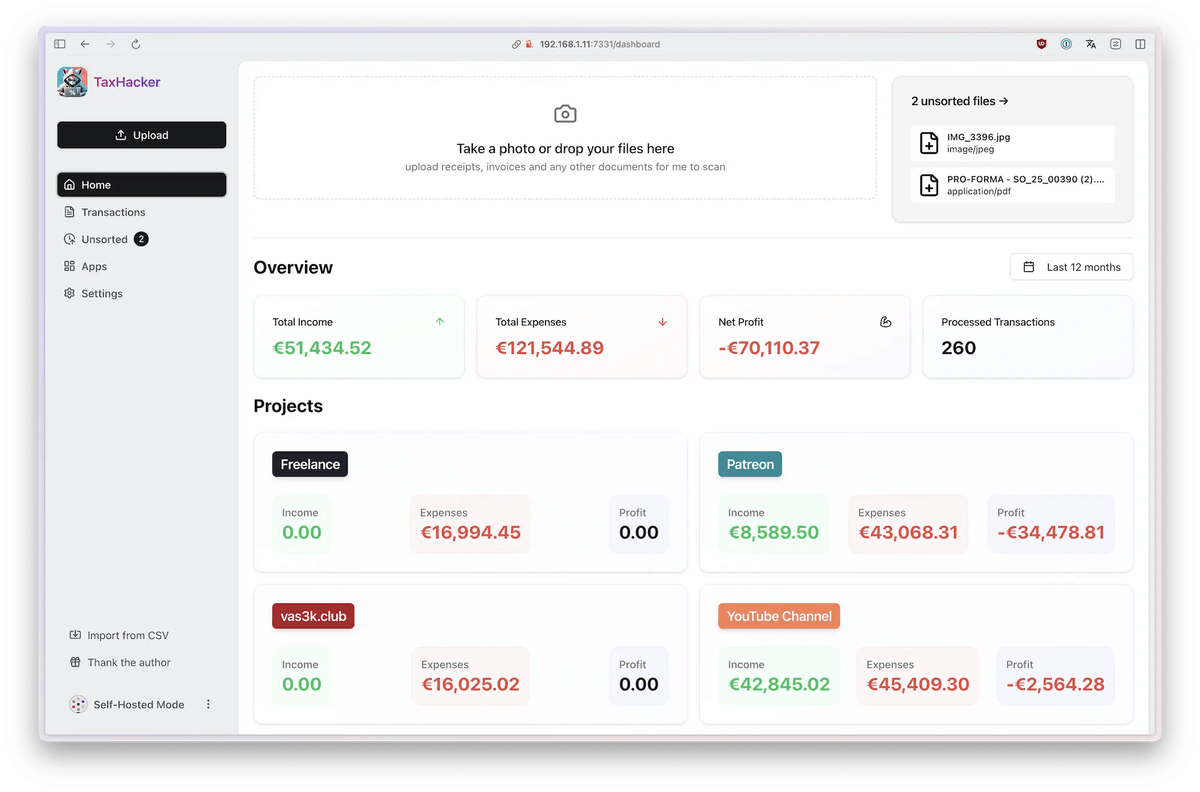
Drop a file, get structured data
Upload photos of receipts, invoices, or PDFs, and TaxHacker will automatically recognize and extract all the important data you need for accounting , product names, amounts, items, dates, merchants, taxes , and save it into a structured, Excel-like database. The pipeline handles a surprisingly wide range of inputs.
TaxHacker works with store receipts, restaurant bills, invoices, bank statements, letters, and even handwritten receipts. It handles any language and any currency.

Under the hood, the app sends the document image or PDF to an LLM of your choice. You can use OpenAI, Google Gemini, or Mistral, or even a local LLM in the self-hosted version. Local model support works with any OpenAI-compatible API endpoint , Ollama, LM Studio, vLLM, LocalAI , though the project notes that OCR quality with local models is not guaranteed.
The prompt customization angle is the real differentiator
Most AI document tools are black boxes. TaxHacker exposes the full prompt stack. What makes TaxHacker genuinely interesting is its prompt customization system , unlike black-box AI services, you can inspect, modify, and create custom LLM prompts for every extraction field.
You can create custom fields with your own AI prompts to extract any specific information you need. Want to pull a project code from an invoice footer, flag a transaction as billable, or classify expenses by your country's specific tax categories? You write the prompt, and TaxHacker uses it. The app is 100% adaptable to your unique requirements , whether you need to extract emails, addresses, project codes, or any other custom information from your documents.

Multi-currency, including crypto
TaxHacker automatically detects currencies in your documents and converts them to your base currency using historical exchange rates. It supports 170+ world currencies and 14 popular cryptocurrencies including BTC, ETH, LTC, and DOT. The conversion uses the rate from the actual transaction date, not today's rate , which matters for accurate bookkeeping.
What it's good at
- Bulk ingestion: Drop a folder of PDFs and let the AI process them in batch. Documents sit in an "unsorted" queue until you're ready.
- Structured output: Every document becomes a row in a filterable, searchable table with columns for merchant, date, amount, project, category, and any custom fields you define.
- Export for tax prep: You can filter transactions by date ranges, categories, projects, and amounts, then export to CSV with all attached documents included.
- Invoice generation: The app also includes an invoice generator that supports VAT/GST, multiple languages, and PDF export.
- Full-text search: Search across the actual recognized content of uploaded documents, not just metadata.
Where it falls short
The project is still in early development , use it at your own risk. Local LLM quality for OCR tasks is explicitly flagged as unguaranteed. The extraction accuracy depends heavily on which model you point it at; GPT-4o or Gemini 1.5 Pro will outperform a small local model on messy handwritten receipts. There is also no mobile app , uploads happen through the web UI.
Getting it running in two commands
TaxHacker can be self-hosted on your own infrastructure, and the team provides a Docker image and Docker Compose setup that makes deployment straightforward. The quickstart is literally:
curl -O https://raw.githubusercontent.com/vas3k/TaxHacker/main/docker-compose.yml
docker compose up
The compose file bundles the app container and a PostgreSQL 17 database, with volume mounts for persistent storage. The key environment variables to set are:
DATABASE_URL, your PostgreSQL connection stringUPLOAD_PATH, where uploaded files are stored on diskBETTER_AUTH_SECRET, a random secret for session authSELF_HOSTED_MODE=true, enables auto-login and custom API key input in the UI
The stack is built on Next.js 15, Prisma, and PostgreSQL, with Ghostscript and GraphicsMagick handling PDF-to-image conversion before the LLM sees the file. New Docker images are automatically built and published with every release , you can pin to a specific version tag like v1.0.0 or use latest.

Who should actually use this
TaxHacker is a strong fit if you are a freelancer, contractor, or small business owner who accumulates receipts across multiple currencies, projects, or clients, and who is uncomfortable sending financial documents to third-party SaaS platforms. Users can deploy the application on their own infrastructure, ensuring that financial data remains private and under their control rather than being processed by external services.
It is also a useful base for anyone who wants to build a custom document-extraction workflow. The exposed prompt system, MIT license, and clean Next.js codebase make it easy to fork and adapt. The maintainer explicitly asks contributors to open an issue before sending PRs , and bans AI-generated code submissions , which suggests a focus on code quality over volume.
The cloud edition at €10/month is worth considering if you want automatic updates and managed AI keys without the ops overhead. But for anyone already running a home server or a small VPS, the self-hosted path is free and takes minutes to stand up.