

Replit Ships Custom Skills So Developers Stop Re-teaching Their AI Agent
Replit Agent now remembers your team's coding conventions, design systems, and integration rules across every project automatically

- Agent Customization launches: Replit ships Custom Instructions and Skills to give its Agent persistent, workspace-wide context across all projects.
- Custom Instructions are always-on rules injected before every session; available to Pro and Enterprise users only.
- Skills are context-aware playbooks stored as
SKILL.mdfiles that activate only when relevant; available on all paid plans. - Partner skills included: Pre-built skills from Atlassian, Google, Mixpanel, PayPal, Resend, RevenueCat, and Stripe available in the Skills directory.
- Skills are portable: Plain text files you own, version-control, and share — not locked to Replit's platform.
- Enterprise controls: On Enterprise, only admins can create or edit workspace skills; on Core/Pro, any workspace member can.
Every time you start a new project on Replit, you've had to re-explain yourself. Use TypeScript strict mode. Don't commit secrets. Follow our design system. It's the kind of repeated friction that quietly eats hours. Replit's new Agent Customization , shipping now as Custom Instructions and Skills , is a direct fix for that problem.
Two tools, one goal: stop re-teaching your agent
The launch bundles two distinct features that solve different parts of the same problem.
- Custom Instructions are always-on rules that get injected into the agent's context before every session, on every project in your workspace. Write them once, and the agent applies them automatically , no prompting required.
- Skills are context-aware playbooks that only activate when relevant. A
design-systemskill fires when someone's building UI. Asecurity-reviewskill fires when someone's touching auth flows. The rest of the time, they stay out of the way.
Custom Instructions live in Workspace Settings → Customization and are available to Pro and Enterprise users. Skills, on the other hand, are available on all plans including Core.
What a skill actually is
A skill is a reusable set of instructions you write once that the agent applies whenever it's relevant , think of it like a one-page guide you'd hand a new engineer before they started a specific kind of task. The agent reads it before it works, and follows it.
Skills are a plain text file you can open in any editor, store in version control alongside your code, and share with your team , meaning skills you write for Replit are portable and yours.
Under the hood,
every skill is a folder containing a file called SKILL.md, plus any supporting files you want to reference. The main file has three things: a name (what you type after / to invoke it manually), a description (the only thing the agent reads when deciding whether to use a skill), and the actual instructions.
The description field is where most of the craft lives. A strong description says specifically when to use the skill and when not to , telling the agent not to fire a skill is often what separates a good description from a great one.
How the agent decides which skills to load
The agent doesn't load all your workspace skills upfront. It reads each description, decides which ones apply to the current task, and loads only those , meaning you can have many skills without them stepping on each other, as long as each description is sharp enough to match the right tasks.
Skills also stack.
If you're building a marketing page and your workspace has both a design-system skill and a landing-page-copy skill, both will load. This is why focused skills work better than giant catch-all ones: small, well-scoped skills combine cleanly.
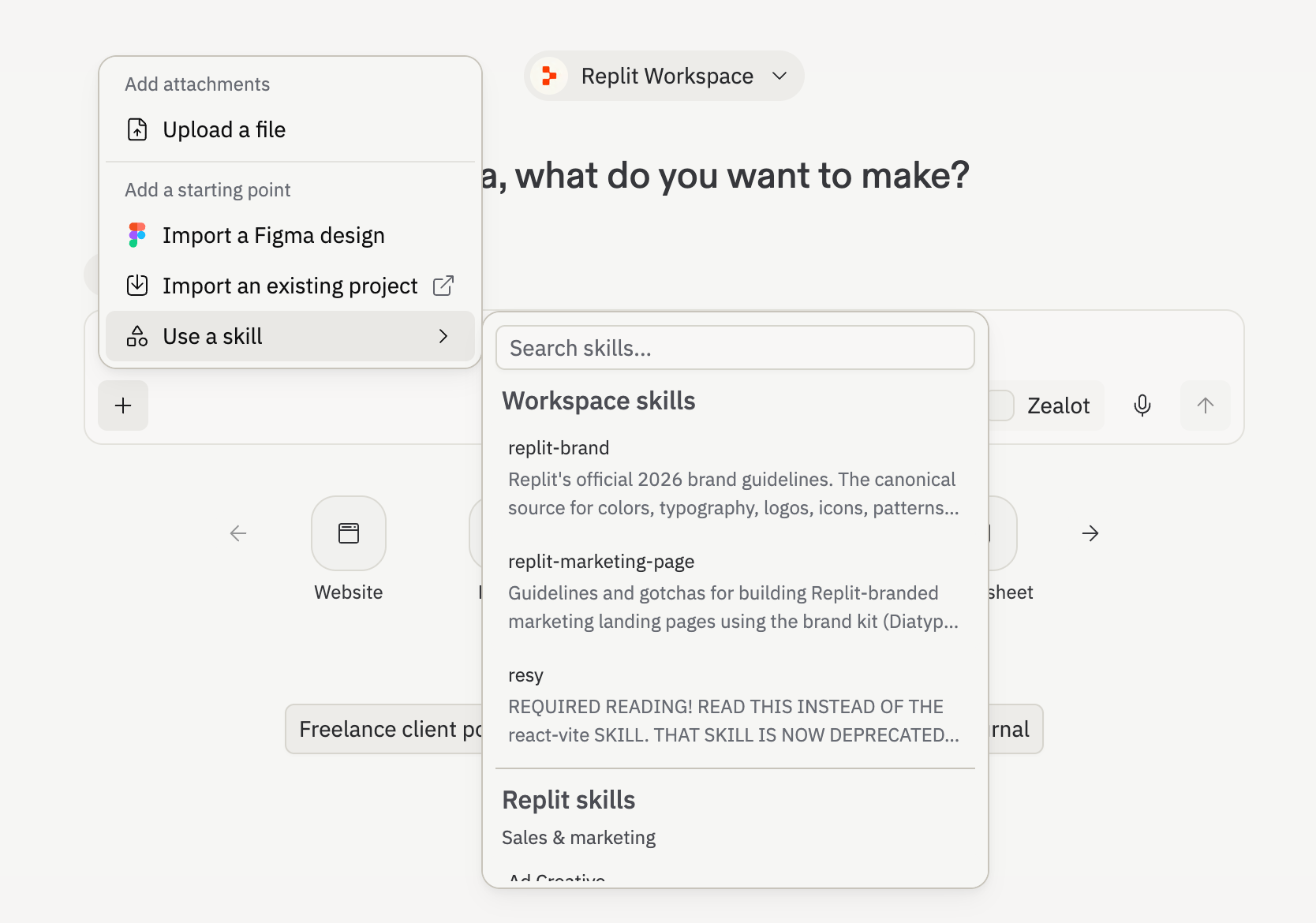
You can also bypass the automatic selection entirely by typing /skill-name in the chat, or picking a skill from the + button in the interface.
Three ways to create a skill
- Upload a pre-existing
SKILL.mdfile you've already written - Write a new skill from scratch in the customization pane
- Chat with the Agent and ask it to build a skill for you , describe what you want it to know, and it generates the
SKILL.md
When skills go wrong
A bad skill doesn't just sit idle , it actively degrades output by injecting vague or wrong instructions into the mix. Most skills fail in diagnosable ways: if the skill fires when it shouldn't, the description is too broad; if the skill fires but the output is off, the instructions are too generic; if two skills conflict, fix the descriptions so both don't fire on the same task.
Skills also go stale , treat them like documentation, something you actually maintain. Changes only apply to future chats, not ones already in progress.
Partner-built skills out of the box
Replit isn't launching this cold. The launch includes pre-built skills from Replit and partners including Atlassian, Google, Mixpanel, PayPal, Resend, RevenueCat, and Stripe , all available in the Skills directory. The idea is that you install one, try it, then edit it to fit how your team actually works.
Mixpanel's take on why this matters: "Builders move fast on Replit, and legacy analytics struggle to keep up. Our skill changes that so Replit's Agent knows how to implement Mixpanel the right way from the first prompt. Now, the data is clean, well named, and useful the moment a product goes live."
The real unlock for teams
Custom Instructions and Skills teach Agent your team's conventions so every app starts closer to your standards from the first prompt. That means security and compliance guardrails applied automatically, design systems that actually stick, and engineering conventions like linting standards and testing requirements written once and applied everywhere.
On Enterprise plans, only admins can create or edit workspace skills. On Core and Pro plans, any workspace member can , but either way, everyone gets access to the same playbooks.
This is part of a broader push by Replit into the enterprise. The company has over 50 million users worldwide, with users at 85% of Fortune 500 companies. Skills are a bet that the next competitive frontier for AI coding tools isn't raw capability , it's how well the agent fits into an existing team's way of working.
Availability and pricing
Replit offers a free Starter plan, a Core plan at $25/month ($20/month billed annually), a Pro plan at $100/month for teams, and custom Enterprise pricing. Skills are available on all paid plans. Custom Instructions require Pro or Enterprise. To get started, head to Workspace Settings → Customization or browse the Skills directory for pre-built options from Replit and its partners.
Comments
