
PlayCanvas's SuperSplat Turns Messy 3D Captures Into Shareable Web Scenes
SuperSplat is a fully browser-based, MIT-licensed editor for 3D Gaussian Splats — no install, no GPU setup, and now over 9,000 GitHub stars.
 Pro
Takeaways
- Browser-native 3DGS editor: SuperSplat lets you inspect, edit, optimize, and publish 3D Gaussian Splats with zero install at superspl.at/editor.
- GPU-accelerated editing: All selection and intersection testing runs on the GPU, keeping real-time performance on scenes with millions of Gaussians.
- SOGS streaming format: Supports scenes with 10M+ Gaussians via a streamed LOD format; a 26M-splat scene compressed from 7 GB to 600 MB.
- One-click publish with WebXR: Publish splats to a shareable URL and view them in AR (Meta Quest, Android) or VR (Meta Quest, Apple Vision Pro).
- Companion CLI tool: SplatTransform CLI handles format conversion between PLY, SPLAT, SOGS, KSPLAT, and CSV for developer pipelines.
- Completely free, MIT-licensed: Open source on GitHub with 9,100+ stars, commercial use allowed, no attribution required.
SuperSplat is a free, open-source editor for 3D Gaussian Splats that runs entirely in your browser. Built by the PlayCanvas team, it lets you load, clean, optimize, and publish photorealistic 3D scenes without installing a single dependency. With over 9,100 GitHub stars and 1,000 forks, it has quietly become the go-to tool for the Gaussian Splatting community.
What even is a Gaussian Splat?
3D Gaussian Splatting (3DGS) is a rendering technique introduced at SIGGRAPH 2023 that represents a real-world scene as millions of tiny, overlapping 3D ellipsoids , each with a position, color, opacity, and shape. It reconstructs 3D scenes from 2D images, similar to photogrammetry or NeRF, but represents the scene as millions of Gaussian distributions (fuzzy blobs of color and opacity) that are optimized to match the original images, then "splatted" onto the screen at render time. The key advantage is that it combines the visual quality of NeRF with real-time rendering performance. The raw output of any 3DGS training pipeline is a .ply file , and that's exactly where SuperSplat picks up.
A full editing pipeline, zero friction
SuperSplat is a free and open source tool for inspecting, editing, optimizing and publishing 3D Gaussian Splats, built on web technologies and running in the browser with nothing to download or install. The workflow is as simple as it gets: drag and drop a .ply file, edit, export. But under the hood, the feature set is surprisingly deep.
The editing tools are built around the core problem of 3DGS cleanup: raw captures are messy. Background noise, floating artifacts, and millions of unnecessary Gaussians are the norm. SuperSplat gives you surgical tools to deal with all of it:
- Selection modes: Select with a brush, a lasso, a sphere, or an eyedropper that matches color within a threshold you set.
- GPU-accelerated picking: Everything runs on the GPU, intersection testing included, so picking a subset of five million blobs stays real-time instead of turning your laptop into a space heater.
- Undo stack: Edits go through a proper history stack with unlimited undo.
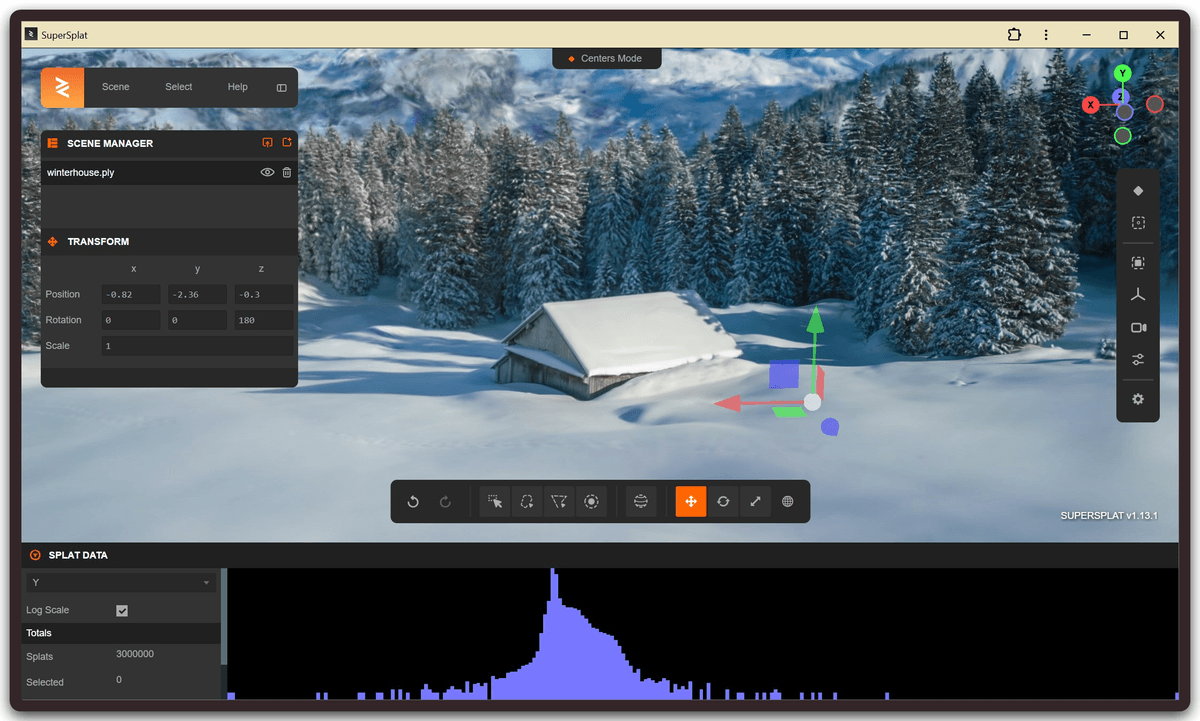
- Transform tools: SuperSplat can translate, rotate and scale splats. Select a splat in the Scene Manager and activate one of the gizmos via the horizontal icon bar. For fine-grain control, use the TRANSFORM panel.
- Post-processing: Post-processing effects include bloom, sharpen, vignette, color grading, and chromatic fringing.
- Camera animations: The Timeline makes it easy to author camera animations , select a frame, position the camera, set a keyframe, and repeat for as many frames as you want.
- Annotations: Up to 25 annotations and hotspots with titles, descriptions, and camera viewpoints for guided tours.
The SOGS format is the real unlock for large scenes
A streamed LOD format handles scenes past ten million Gaussians. This is the SOGS (Streamed Object Gaussian Splatting) format, and it's significant. The accompanying SplatTransform CLI tool handles format conversion between PLY, SPLAT, SOGS, KSPLAT, and CSV. The SOGS format enables streamed level-of-detail rendering for massive scenes with 10 million or more Gaussians, similar to how 3DTiles handles large point clouds in Cesium. To put that in perspective, a dataset of 26 million splats that originally weighed 7 GB compressed down to just 600 MB in SOG format.
For developers who prefer the command line, PlayCanvas brought some of SuperSplat's most powerful features to the command line with a tool called SplatTransform , fast, flexible, and designed for developers who need precise control over their Gaussian splat workflows.
Publish and share in one click
Publish your splat scenes with one click and share them via a link. You can also embed the interactive viewer on any website. The viewer is built on the PlayCanvas WebGL/WebGPU engine and is fully integrated with WebXR. Simply tap the viewer's AR button and you can spawn photorealistic 3D models directly into your environment, or dive straight into a splat in fully immersive VR. AR mode has been tested on Meta Quest 2 and 3 and Android smartphones. VR mode has been tested on Meta Quest 2 and 3 and Apple Vision Pro.
SuperSplat also ships as a PWA (Progressive Web App). The PlayCanvas team has added PWA support to SuperSplat, allowing users to have a native desktop app experience, and users can update their device settings so that .ply files are opened by default with SuperSplat.
What it's good at , and where it stops
SuperSplat shines in the post-capture cleanup and web delivery pipeline. A typical workflow: capture a real-world location with a smartphone, process it through Gaussian Splatting software, then import the raw splat into SuperSplat. Within minutes, artists can delete background elements, reduce the splat count from 5 million to 500,000, and export an optimized version.
But there are real limits to what you can do with any Gaussian Splat editor, SuperSplat included. For removing objects from a scene, you can delete Gaussians in a bounding box, but there is no inpainting to fill the gap yet. You cannot add new geometry or move objects , Gaussian Splats are view-dependent captures, not editable 3D models. If you need to change the content of a scene, you have to re-capture it. The tool is also less useful for very large scenes on low-end hardware, where GPU memory becomes the bottleneck.
The industry context
Gaussian Splatting is the fastest-growing 3D reconstruction method in 2026 , from smartphone apps to building-scale drone scanning. Industry analysts describe Gaussian Splatting as approaching a "JPEG moment for spatial computing" , 2023 proved the speed, 2024 added geometric accuracy and mobile support, 2025 brought standardization, and 2026 should see production-grade workflows mature.
glTF standardization arrived in August 2025 when Khronos officially added 3DGS to the glTF ecosystem via KHR_gaussian_splatting extensions. This signals that 3DGS is no longer a research curiosity , it's becoming infrastructure. And SuperSplat is positioning itself as the Photoshop of that infrastructure: the place where raw captures become polished, shareable, embeddable experiences.
Who should use it
SuperSplat is a strong fit for a wide range of workflows:
- Game developers: Indie studios and AAA developers use SuperSplat to convert photogrammetry scans into game-ready assets , capture a real-world location with a smartphone, process it, then import the raw splat into SuperSplat.
- Architecture and real estate: Architecture firms create immersive walkthroughs of unbuilt structures. SuperSplat's outlier removal eliminates scanning artifacts, while the decimation tool reduces datasets for smooth mobile viewing , one firm reported 85% file size reduction while maintaining visual fidelity.
- Remote teams: The browser-based nature means remote art teams can review and approve assets without syncing massive files.
- Web developers: The open-source nature means you're never locked into a vendor's roadmap. For web-first projects, SuperSplat's direct PlayCanvas integration provides a seamless path from editing to production deployment.
Getting started
The fastest path is to open superspl.at/editor in Chrome or Firefox and drag in a .ply file. You can also load a splat directly via URL using the load query parameter: https://superspl.at/editor?load=<PLY_URL>. For local development, the setup is minimal:
git clone https://github.com/playcanvas/supersplat.git
cd supersplat
npm install
npm run develop
# Open http://localhost:3000
SuperSplat is completely free and fully open-sourced on GitHub under the permissive MIT license. Commercial use is allowed with no attribution required. The project is on version 2.27.4 and actively maintained, with 153 releases shipped since the initial launch.