

OpenAI Gives Developers Hard Spend Limits to Stop Runaway API Bills
OpenAI now lets teams attribute spend down to individual API keys and enforce hard monthly caps that cut off traffic when hit.
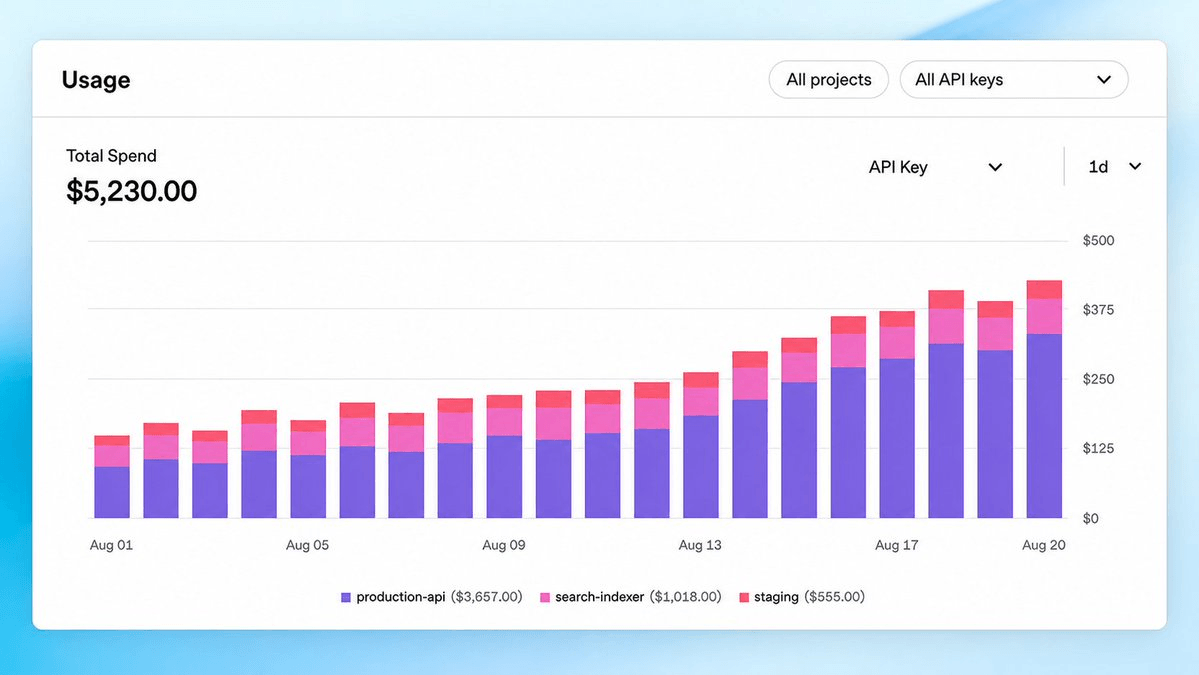
- OpenAI added per-API-key usage and spend tracking in the Usage dashboard.
- Monthly spend limits can now be set at the organization or project level.
- Hard limits fully stop API traffic when the cap is hit, not just alert.
- Everything is controllable through the Admin API for programmatic provisioning.
- Ships alongside a temporary GPT-5.6 Sol API price reduction for the next three months.
- Best used with one key per service so attribution maps to real workloads.
Cost attribution on the OpenAI API just got more granular. The Usage and Spend dashboards can now break down consumption by individual API key, so you can see which app, script, or teammate is quietly burning through your budget. Paired with new hard spend limits that actually stop traffic when hit, the update closes one of the longest-running gaps in OpenAI's billing tooling.
Until now, the finest slice most teams could get was per-project, which meant a single project running half a dozen internal tools left you guessing about which one was the cost hog. Per-key attribution surfaces the culprit directly inside the dashboard.
Hard limits that actually stop the meter
For anyone who has watched a runaway loop chew through a monthly budget in an afternoon, the second half of the update matters more. You can set monthly organization or project spend limits, including hard limits that halt traffic when reached. The controls are available in the API Platform and via the Admin API for programmatic workflows.
Hard limits go beyond alerts. When tracked spend hits the ceiling, affected API traffic stops, so review the spend limits guide before enabling one in production. That behavior fits internal experiments cleanly, but it is the last thing you want on a production endpoint serving paying users, so placement of these caps matters.
What you can do with it
- Attribute cost per API key inside the Usage dashboard, so a rogue background job or a chatty prototype no longer hides inside a project total.
- Set monthly spend caps at the organization or project level, with a choice between soft alerts and hard cutoffs.
- Drive all of this programmatically through the Admin API, so you can bake limits into your provisioning flow when minting a new key for a new service.
- Combine per-key tracking with the existing Usage API to pipe spend data into your own dashboards or FinOps tooling.
Cheaper tokens, louder meters
The timing lines up with a pricing shift. OpenAI paired this release with a temporary price reduction on the GPT-5.6 Sol API for the next three months, and the two announcements are meant to be read together. Cheaper tokens usually mean more tokens, and more tokens mean it is easier to lose track of where the money goes.
Who should turn this on today
If you run a single hobby key against a personal account, per-key tracking is a nice-to-have. For any team of more than one, it is close to mandatory. A few patterns worth adopting:
- Mint one API key per service or per environment (staging, prod, batch jobs) so per-key attribution maps to something meaningful.
- Put hard limits on development and CI keys, and softer alert-only limits on production keys where you would rather page a human than drop traffic.
- Use the Admin API to enforce these defaults automatically, instead of relying on engineers to remember when they create a key in the console.
None of this changes what the models can do, but for anyone scaling API usage past hobby-project levels, cost visibility has quietly been the ceiling. That ceiling just got a lot higher.
Comments
