

OpenAI Codex Now Reads and Writes Across Multiple Project Folders at Once
Codex local projects can now span multiple folders, letting the agent read and write across them while keeping one Git root in charge.

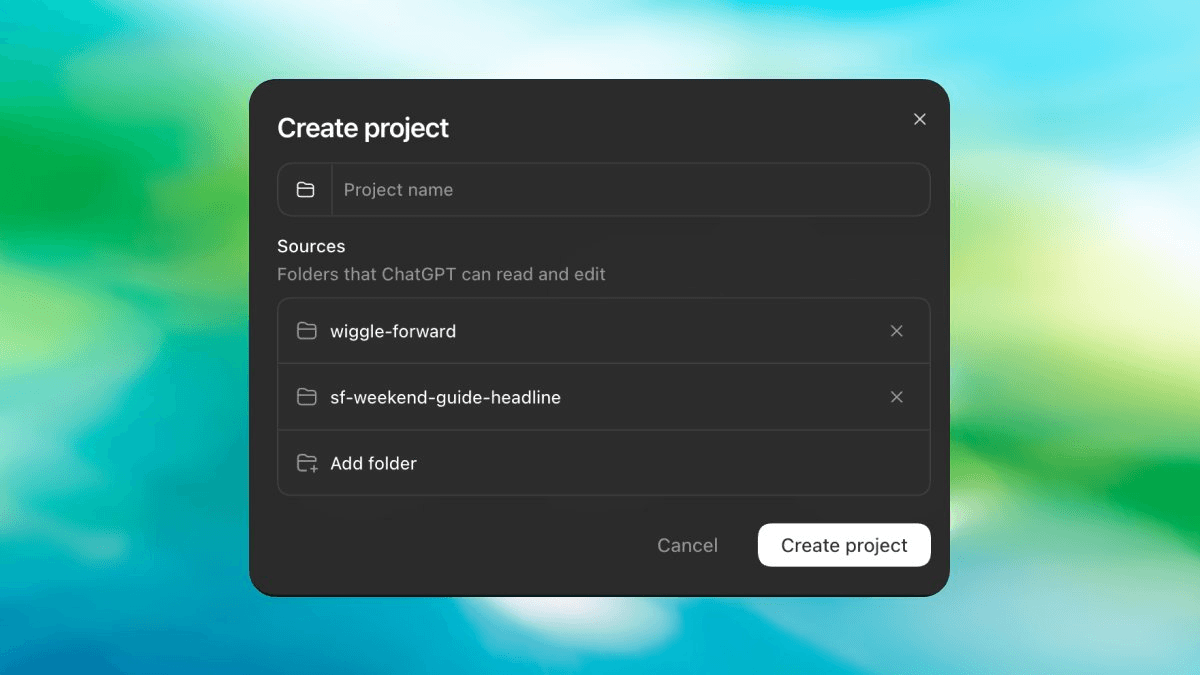
- Multi-folder projects: Codex local projects can now include code, docs, and reference files from multiple directories at once.
- Primary folder rules: One folder stays the Git root and handles PRs, review,
AGENTS.md, and skill discovery; others are readable/writable by the agent. - Desktop app only: Configured via the ChatGPT desktop app settings pane; CLI already had
--add-dirsupport. - Config is shareable: The setup is stored in
.codex/at the project root and can be checked into Git for team use. - Key use cases: Split frontend/backend repos, shared libraries, documentation vaults, and cross-project refactoring.
- Availability: Included in existing ChatGPT Pro ($200/mo), Team ($25/user/mo), and Enterprise plans.
OpenAI Codex shipped a quality-of-life update many users had been requesting: local projects can now include files from multiple folders at once. Previously, a Codex project was locked to a single directory, so the agent could only read and write within that one folder. Now you can bring in related code, docs, and reference files from sibling or parent directories into a single project view.
One project, many roots
The Codex app previously allowed selecting only one project folder per workspace, which created real friction for setups where source code lives in one folder and documentation or shared libraries live in another. A common example: an AI workspace for current deliverables paired with a knowledge vault as a sibling folder. The vault might be a long-term reference base shared with other tools, but Codex had no way to read it while writing output to the workspace.
Multi-folder support resolves this. You designate one folder as the primary and add as many secondary folders as needed. The agent can read and write across all of them.
The primary folder runs Git
There is a clear hierarchy. The primary folder handles all Git operations: commits, pull requests, branch management, and review. It also hosts AGENTS.md and is where skill discovery happens. Secondary folders are available to the agent for context and edits, but they carry no Git ownership.
- Primary folder: Git root, pull requests, review,
AGENTS.md, skill discovery - Secondary folders: readable and writable by the agent, no Git ownership
This maps cleanly onto real-world project layouts: a monorepo where backend, frontend, and shared library sit in separate directories, or a project where a codebase and its documentation live side by side in separate repos.
What this unlocks
The practical use cases include:
- Frontend and backend split repos where the agent needs to understand the API contract while working on one side
- Shared library development alongside the projects that consume it
- Documentation co-located with code so the agent can update docs when it changes an implementation
- Knowledge vaults or reference files that inform the agent without being part of the codebase itself
Cross-project refactoring previously required running separate sessions or workarounds. That limitation is now lifted for local projects in the Codex desktop app.
How to set it up
Multi-folder support is available only through Codex in the ChatGPT desktop app. Select Codex before configuring a local environment, then open the app's settings pane to add secondary folders alongside your primary project folder.
Codex stores this configuration inside the .codex folder at the root of your project, so you can commit it to Git and share the setup across your team.
The Codex CLI already supports --add-dir and sandbox_workspace_write.writable_roots for multi-directory access. This update brings the desktop app to parity with those CLI capabilities.
Availability and cost
OpenAI Codex is available to ChatGPT Pro, Team, and Enterprise subscribers. Pro costs $200/month and includes generous Codex usage. Team plans start at $25/user/month with limited Codex access. The multi-folder feature is part of the existing Codex app, so no additional cost applies beyond your current plan.
Comments
