

NVIDIA's DALI 2.1 Cuts Training Time by 72% Moving Data Prep to GPU
NVIDIA DALI v2.1 brings a new imperative Dynamic Mode API, torchvision compatibility, and CUDA 13 support to GPU-accelerated data pipelines
 PRO
PRO- DALI v2.1 released: NVIDIA ships a major update to its GPU-accelerated data preprocessing library with a new imperative Dynamic Mode API.
- Dynamic Mode goes mainstream: The new
nvidia.dali.experimental.dynamicAPI lets you write inline, PyTorch-style preprocessing instead of declaring static computation graphs. - Torchvision compatibility: v2.1.0 adds a torchvision-like API for composing pipelines, lowering migration cost for existing PyTorch users.
- CUDA 13.2 and JAX 0.9 support: The release extends compatibility to the latest CUDA and JAX versions, plus adds free-threaded Python support.
- Proven speedups: Benchmarks show 37-72% training time reduction on ResNet models and up to 2x speedup in medical imaging workloads.
- Linux-only, Apache 2.0: Free and open source, installable via
pip install nvidia-dali-cuda120, but does not support Windows or macOS. GitHub
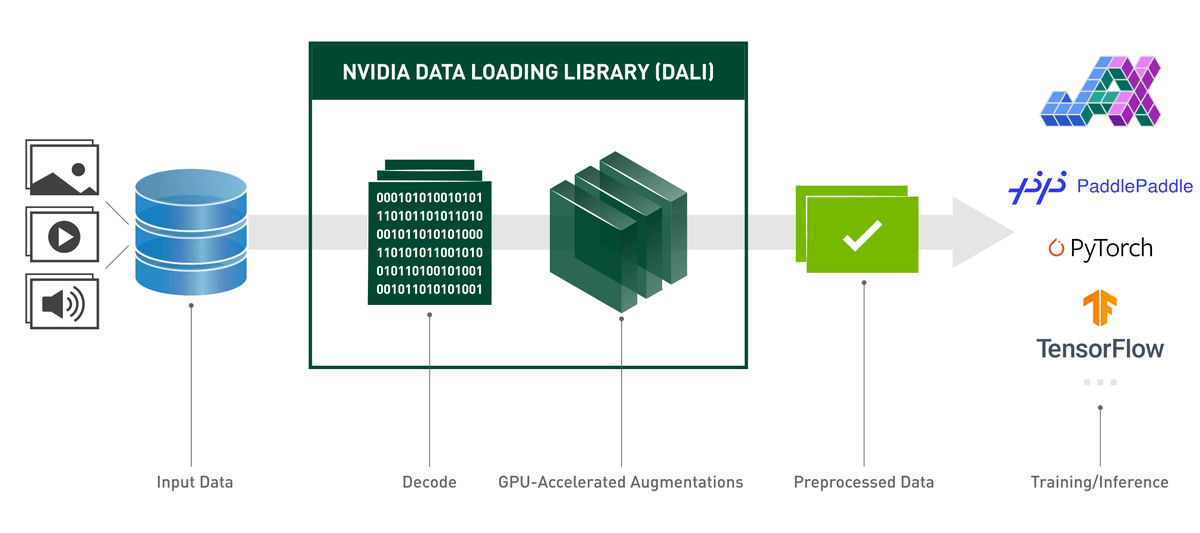
NVIDIA DALI (Data Loading Library) has shipped version 2.1, the latest update to its GPU-accelerated data preprocessing library. The release formalizes a new imperative programming model called Dynamic Mode, adds a torchvision-compatible API, upgrades thread management, and extends support to CUDA 13.2. If your training runs are GPU-starved because your CPU can't feed data fast enough, this is the library worth knowing.
The Problem That Won't Go Away
GPU compute speeds have increased more than 15x from 2018 to 2023 (from NVIDIA V100 to H100), while CPU compute speeds have only grown by roughly 2.23x over the same period. That gap is the core tension DALI was built to address. DALI tackles the CPU bottleneck by offloading data preprocessing to the GPU, relying on its own execution engine built to maximize the throughput of the input pipeline.
When deploying models in production, preprocessing often becomes the bottleneck. While TensorRT can run model inference in just a few milliseconds, CPU-based preprocessing (resize, pad, normalize) can take 2-10ms per image, especially at high resolutions. NVIDIA DALI solves this by moving the entire preprocessing pipeline to the GPU. The gains are real: benchmarks on SageMaker showed training time improvements of 72%, 37%, and 43% for ResNet18, ResNet50, and ResNet152 respectively.
Two APIs, One Library
DALI now ships with two distinct programming models. Understanding the difference matters for how you integrate it into your workflow.
The original Pipeline Mode uses a declarative, graph-based API. You define a pipeline as a computation graph using the @pipeline_def decorator, compile it once, and then run it repeatedly. DALI optimizes the graph at compile time, enabling aggressive prefetching and overlap between CPU and GPU work. This is the right choice for stable, high-throughput training loops where the pipeline shape doesn't change between batches.
This story is for Pro members
You've reached the end of the free preview. Upgrade to AlphaSignal Pro to read the full article - and everything else behind the paywall.
Comments
