Nous Research's Hermes Agent Stops Relearning the Web With 400+ Browser Skills
Nous Research's Hermes Agent gains 400+ browser skills from Browserbase's open catalog, cutting per-task token costs by up to 45% through reusable web playbooks.
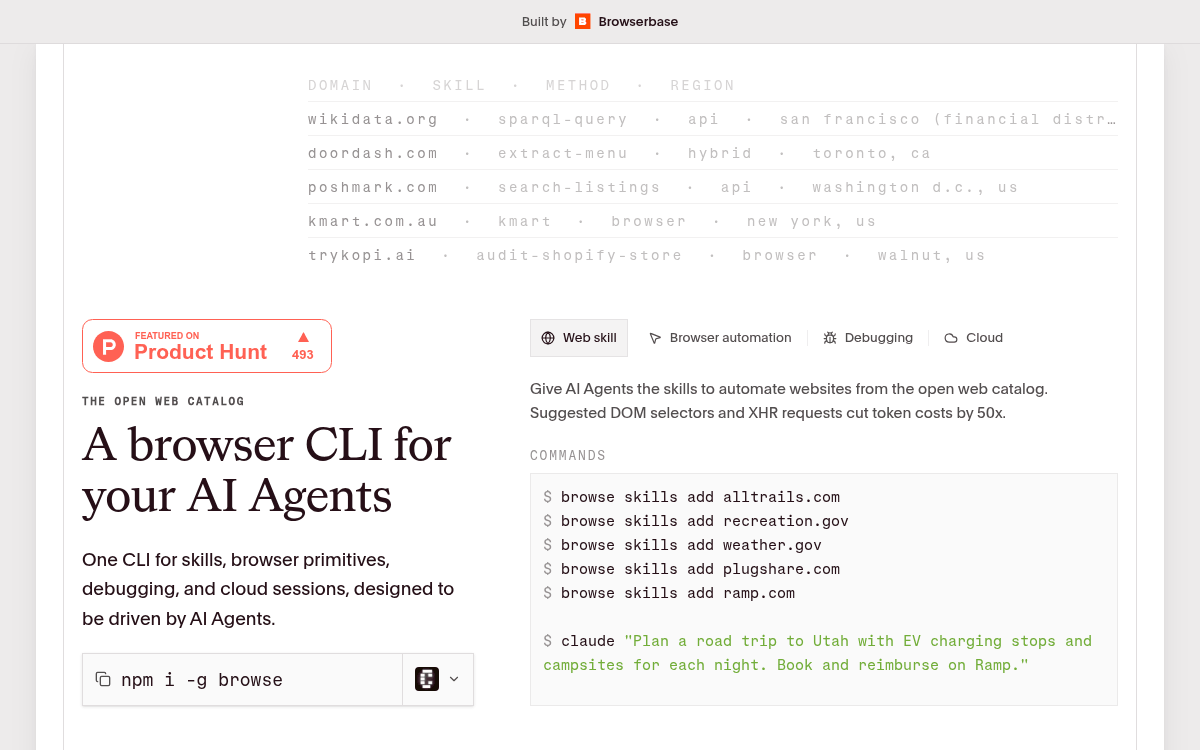
- Hermes Agent + Browse.sh: Nous Research's Hermes Agent now has native access to 400+ browser automation skills from Browserbase's browse.sh catalog.
- 45% cost reduction: Skills cut per-run token costs by encoding site-specific shortcuts -- the Craigslist benchmark dropped from $0.22 to $0.12 per run.
- Skills are plain-text playbooks: Each SKILL.md captures exact selectors, undocumented API endpoints, CAPTCHA workarounds, and site-specific gotchas -- readable by humans and agents alike.
- Autobrowse generates skills automatically: Browserbase's AI system iterates on real tasks until workflows converge, then writes durable skills; suggested DOM selectors cut token costs by 50x.
- Catalog spans 400+ sites: Coverage includes Amazon, Airbnb, GitHub, IRS, USPTO, OpenTable, Ramp, and hundreds more across marketplaces, travel, government, and SaaS.
- Free and open: Install via
npm i -g browse; Hermes users get skills pre-seeded and can contribute their own to the public catalog.
Every browser agent has the same dirty secret: it re-discovers the web from scratch on every single run. Open a browser, poke around, find the button, close the session, forget everything. Then do it again tomorrow. Nous Research and Browserbase just shipped a fix for that, and the numbers behind it are hard to ignore.
Hermes Agent now has access to hundreds of browser skills through Browserbase's new browse.sh hub, so agents can more reliably perform any task on the internet. The integration is live and available today.
The amnesia problem
The core issue is one of memory, not intelligence. Browse.sh is fully integrated into Hermes Agent -- prompt Hermes to find the browser skill you need from the catalog and run it. But to understand why this matters, you need to understand what was broken before.
Browserbase benchmarked the problem on a concrete example: Craigslist search. A generic agent loop has to discover that the search page is fully JS-rendered, stumble onto a hidden JSON API, figure out positional array decoding, and work around IP-based geo-scoping. A generic agent loop searching listings costs ~$0.22 per run. After four Autobrowse iterations, the graduated browse.sh skill does the same job for ~$0.12 per run -- a 45% cost reduction that comes entirely from better memory.
What a "skill" actually is
A skill is not a Playwright script or a vector embedding. Browse.sh is Browserbase's catalog of 200+ site-specific browser-automation SKILL.md files (Airbnb, Amazon, arXiv, 12306.cn, Etsy, Xero, and many more). Each skill describes how to drive one website end-to-end and is suitable for use with Hermes' browser tools.
Each SKILL.md is a plain-text playbook containing the exact steps, gotchas, API endpoints, selectors, and fallback strategies an agent needs for a specific site. Here's a real excerpt from the Craigslist skill that shows what gets captured:
## Site-Specific Gotchas
- Snapshot returns 0 refs on /search/: page is fully JS-rendered.
- item[0] is NOT the postingId -- it's an offset from data.decode.minPostingId.
  Treating it as the ID produces 404s.
- API geolocates by request IP. Add postal=<zip> to override.
- Rate-limit: keep ≤ 1 req/s sustained.
That is knowledge that takes a human engineer hours to reverse-engineer, and an agent dozens of dollars in tokens to discover from scratch. Once it's in a skill, it's free forever.
How Autobrowse generates skills
Skills don't get written by hand. Browserbase built a system called Autobrowse that uses AI to iterate on real tasks until it converges on the cheapest, fastest path. You give it a real task on a real site. It runs the task end-to-end, studies its own trace, iterates on its strategy, and keeps going until the workflow becomes reliable. Once it converges, it writes out a durable skill.
The suggested DOM selectors and XHR requests embedded in each skill cut token costs by 50x compared to a generic agent loop that has to re-derive everything from the page structure on each run. That's the compounding advantage: the first run pays the discovery cost, every subsequent run is nearly free.
What's in the catalog right now
The catalog launched with 100 skills and has since grown past 400. Coverage spans:
- Marketplaces: Amazon, eBay, Craigslist, Etsy, Poshmark, StockX, Depop
- Travel: Airbnb, Booking.com, Google Flights, Kayak, Skyscanner, Southwest
- Food & dining: OpenTable, DoorDash, Resy, Yelp, Wolt
- Government: IRS refund status, USCIS case lookup, SAM.gov contracts, USPTO patents
- Developer tools: GitHub PR review, arXiv search, Hugging Face model browser, OpenRouter
- Finance: GoodRx drug prices, NerdWallet credit cards, Bankrate savings rates
- Enterprise SaaS: Ramp reimbursements, Xero login, Ashby ATS, Amplitude analytics
Partner skills from companies like Ramp, Lovable, Poke, and Reducto ship with a verified badge. The rest are community-contributed or Autobrowse-generated.
How to use it in Hermes
Identifiers use the form browse-sh/<hostname>/<task-id> and match the slug exposed by the browse.sh catalog. The workflow is three commands:
# Search the catalog
hermes skills search airbnb --source browse-sh
# Preview before installing
hermes skills inspect browse-sh/airbnb.com/search-listings-ddgioa
# Install
hermes skills install browse-sh/airbnb.com/search-listings-ddgioa
Once installed, skills become slash commands inside Hermes. You can also use them through natural language:
hermes chat -q "Find apartments under $3,000 in SF with 2+ bedrooms"
# Hermes loads the Zillow skill automatically and runs it
By default every profile is seeded with the bundled skill catalog, and each hermes update adds any newly bundled skills. You can also install the Browse CLI independently with npm i -g browse and use it outside of Hermes entirely.
The bigger picture
Hermes browser sessions include built-in stealth -- random fingerprints, CAPTCHA solving, and residential proxies via Browserbase. If you have a paid Nous Portal subscription, you can use browser automation through the Tool Gateway without any separate API keys.
The industry context here matters. Skills as a primitive are gaining traction fast -- Claude Code ships with them, OpenAI Codex supports them, and the AgentSkills standard is formalizing the format. Browse.sh is the first large-scale open catalog specifically for browser automation, and the Hermes integration is the first time a general-purpose agent has shipped with 400+ web skills pre-wired.
The assumption that needs updating: better models alone won't fix browser agent reliability. Even a perfect model still has to discover, on every new site, what it would already know if it had been there before. The real bottleneck for production browser agents isn't reasoning -- it's memory. Browse.sh is a direct bet on that thesis, and the cost numbers suggest it's paying off.
Don't see the skill you need? Type any domain and task into browse.sh, and Autobrowse will generate a skill for you. It runs the task against the live site, iterates until it converges, and publishes the result to the public catalog for anyone to use.
Comments