

Moonshot AI Turns Kimi Browser Extension Into a Chat-Driven Web Agent
Moonshot rebrands Kimi WebBridge as the Kimi Browser Extension, adding a sidebar chat, recordable skills, and cross-agent support that runs locally.
- Kimi WebBridge rebranded to Kimi Browser Extension, adding a chat sidebar for end users.
- New skill recorder lets you save repetitive web tasks and replay them later.
- Runs locally via Chrome DevTools Protocol, so cookies and sessions never leave your machine.
- Agent-agnostic: works with Claude Code, Cursor, Codex, Hermes, and Kimi Code CLI.
- Free to install from Chrome Web Store or Edge Add-ons; pairs with a local daemon.
- Powered by Kimi K2.6, which Moonshot claims scales to 300 parallel sub-agents.
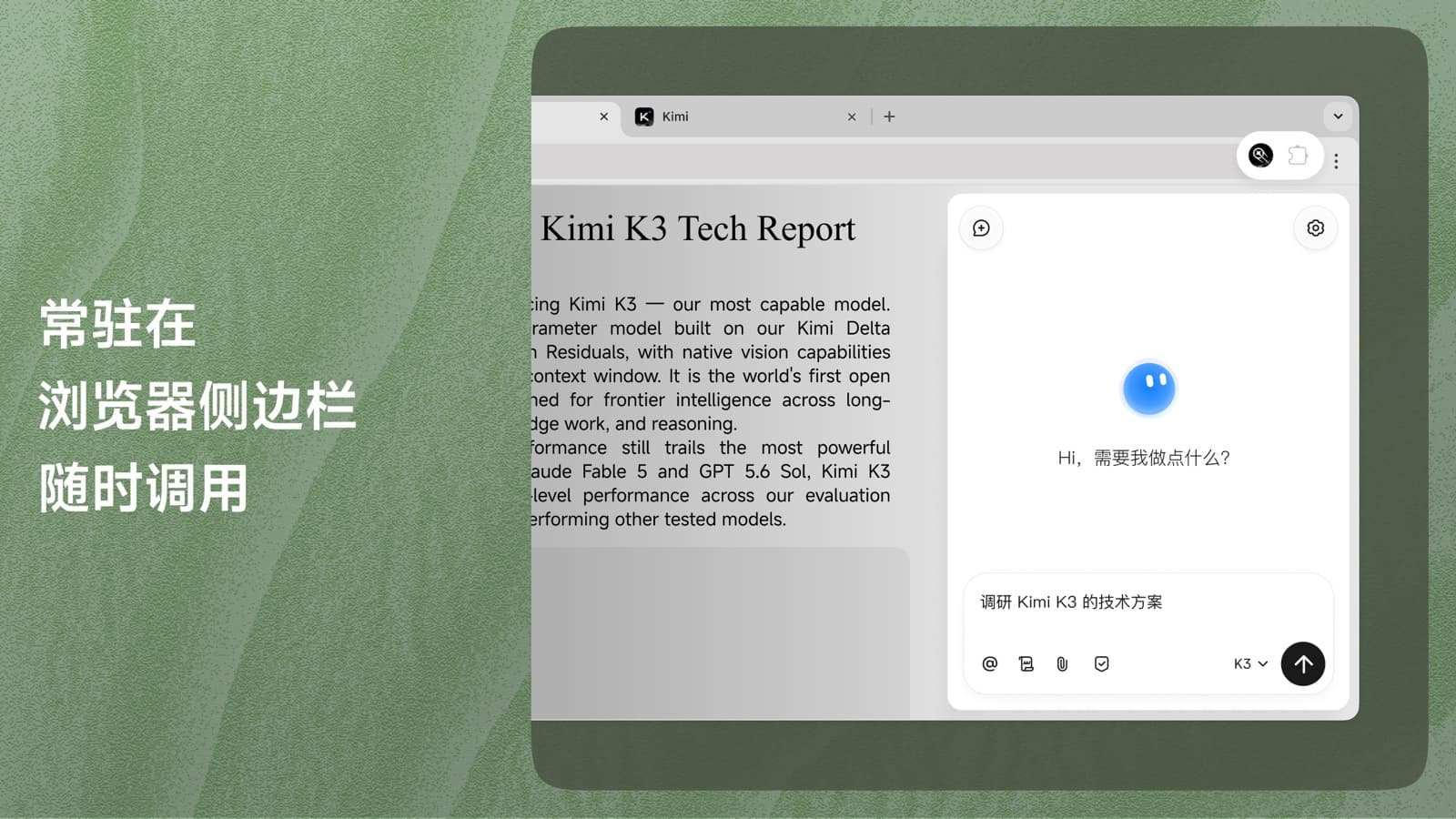
Moonshot AI has renamed Kimi WebBridge to the Kimi Browser Extension and added a sidebar for controlling websites through chat. Users can ask Kimi to navigate pages, enter data, and complete multi-step workflows, then save recorded actions as reusable skills.
For developers, the release adds a user-facing entry point without replacing the existing local bridge. Supported coding agents can continue controlling Chrome or Edge through the same integration, and recorded skills reduce the need to describe recurring workflows in every prompt.
The bridge gets a sidebar
The original WebBridge focused on developer tools such as coding agents and command-line assistants. It paired a browser extension with a local background service, giving those agents access to an existing browser session. The renamed product retains that architecture and adds direct interaction through a sidebar tied to a Kimi account.
Four changes shape the release
| Feature | What it does | Why developers care |
|---|---|---|
| Browser sidebar | Accepts natural-language requests about the active page. | Lets users start browser tasks without opening a separate coding agent. |
| Recorded skills | Captures a completed sequence and saves it for later use. | Turns recurring browser work into a reusable workflow. |
| Instruction generator | Converts page structure and a requested outcome into commands the agent can execute. | Reduces the amount of page-specific automation code required. |
| Backward compatibility | Preserves the existing local-agent interface. | Allows current WebBridge integrations to continue without migration work, according to Moonshot. |
How commands reach the page
The extension and its local background service communicate with Chrome or Edge through the Chrome DevTools Protocol. CDP is the browser control interface used by developer tools and automation frameworks. It can open pages, click elements, scroll, type, capture screenshots, and inspect page content.
- A user sends a request through the Kimi sidebar, or a supported external agent calls the bridge.
- The agent converts that request into browser actions.
- The local service sends those actions to the existing browser session through CDP.
- The extension returns page state, extracted content, or screenshots needed for the next step.
Browser actions execute on the local machine, and authentication cookies remain in the browser profile. Data can still leave the machine when page text, screenshots, or prompts are sent to Kimi or another model provider. The effective privacy boundary therefore depends on the selected agent, model endpoint, account settings, and requested task.
Local sessions change the trade-offs
Using an existing browser profile preserves logged-in sessions and can reduce repeated authentication during automated workflows. It also avoids transferring raw session cookies into a separately hosted browser. Websites may still present CAPTCHAs, require fresh multifactor authentication, or block automated behavior.
Access to an authenticated profile gives the agent substantial authority, so deployments should limit that authority deliberately:
- Use a separate browser profile for automated work.
- Keep banking, email, administration, and production consoles outside that profile.
- Require confirmation before purchases, messages, submissions, deletions, or account changes.
- Treat page content as untrusted because malicious text can attempt to redirect an agent through prompt injection.
- Review extension permissions, model retention policies, and logs before handling confidential data.
One bridge, several agents
Moonshot lists support for Kimi Code CLI, Claude Code, Cursor, Codex, and Hermes. During setup, the installer can place the relevant skill definitions into supported agent environments, allowing those tools to discover the browser interface without a custom adapter.
The agent-neutral interface gives teams a common browser layer across multiple model providers. Model quality, tool-calling behavior, context limits, and usage charges still vary by provider, so the same recorded workflow may need testing with each agent.
Recorded skills suit stable routines
Good candidates for recording include collecting research sources, filling predictable forms, comparing product listings, compiling job posts, and gathering data for analysis. A saved skill can preserve the steps and expected sequence, making repeated runs more consistent than starting from a fresh natural-language request.
Recorded actions remain sensitive to website changes. Revised layouts, renamed controls, dynamic content, and new authentication checks can interrupt playback. Workflows that publish content, move money, or modify records should include validation and a human approval step before the final action.
Installation has two parts
The setup requires the Chrome or Edge extension plus Moonshot’s local bridge service. Distribution links for the browser add-ons and the macOS desktop application are available from the product page.
Moonshot provides the following PowerShell command for Windows:
irm https://kimi-web-img.moonshot.cn/webbridge/install.ps1 | iexBecause the command downloads and immediately executes a remote script, developers should inspect the script and verify its source before running it. macOS users install the Kimi Desktop App, which supplies the local component used by the extension.
Moonshot lists the extension and local service as free. Kimi subscriptions, API usage, or charges from another connected model provider may still apply.
Where it fits in an agent stack
Browser agents generally rely on either hosted browser sessions or software attached to a local browser. Moonshot’s design favors the second approach, combining an authenticated local session, an interface for several agents, a Kimi sidebar, and recordable workflows.
Evaluation should focus on the data sent to the selected model, the permissions granted to the extension, recovery from changed page layouts, confirmation controls for consequential actions, and compatibility with existing agent tooling. Those factors determine whether the extension is suitable for routine browsing, internal automation, or higher-risk authenticated workflows.
Comments
