

Microsoft Ships Teams SDK to Make AI Agents Real Workplace Teammates
Microsoft's new Teams SDK and CLI let developers build agents that join conversations, react to messages, and run long-lived workflows — now GA in Python, JS, and C#.

- Teams SDK now GA: Microsoft's new Teams SDK for building collaborative agents is generally available in Python, JavaScript, and C#.
- New interaction primitives: Agents can now send targeted private messages to specific users in group chats, use slash commands, emoji reactions, and maintain context across long-running sessions.
- New CLI tool: The Teams developer CLI automates app registration, manifest creation, and deployment, cutting setup time significantly.
- Work IQ integration: Agents are powered by Work IQ, giving them access to organizational context across emails, meetings, files, and chats; API billing starts via Copilot Credits.
- Sovereign cloud support: GCC High and DoD environments now supported in the Agents Toolkit and Developer Portal, no manual workarounds needed.
- Partner agents live now: GitHub Copilot, Atlassian Rovo, Cursor, and Linear agents are already available in the Teams agent marketplace; Lovable agent coming this month.
For most of AI's recent history, agents have lived in sidebars, separate apps, or dedicated chat windows , places users have to go out of their way to find. Microsoft is making a direct bet against that model. Announced at Microsoft Build 2026, the company is shipping a new Teams SDK and developer CLI designed to turn agents into genuine participants in everyday work, not just tools you query on the side.
The friction problem it's solving
Building an agent today can mean juggling registration, credentials, manifest creation, and deployment across multiple tools, slowing developers down before they even get to the interesting work. That setup tax is the core problem the new tooling targets.
- The Teams SDK accelerates the path from idea to working prototype and is now generally available in Python, JavaScript, and C#.
- The Teams developer CLI helps automate setup tasks like app registration and configuration, reducing context switching and repetitive work.
- The CLI is a text-based command line interface that can help scaffold, validate, and deploy applications for Microsoft 365 from the terminal or a CI/CD process.
- The Microsoft 365 Agents Toolkit for Visual Studio Code enables you to scaffold, run, debug, and deploy custom Teams apps directly from Visual Studio Code.
You can install the CLI with a single npm command and get scaffolding, manifest wiring, and deployment in one place:
npm install -g @microsoft/m365agentstoolkit-cli
atk -h
Agents that actually feel like teammates
The SDK is not just a deployment wrapper. It introduces a set of new interaction primitives that change what agents can actually do inside a conversation.
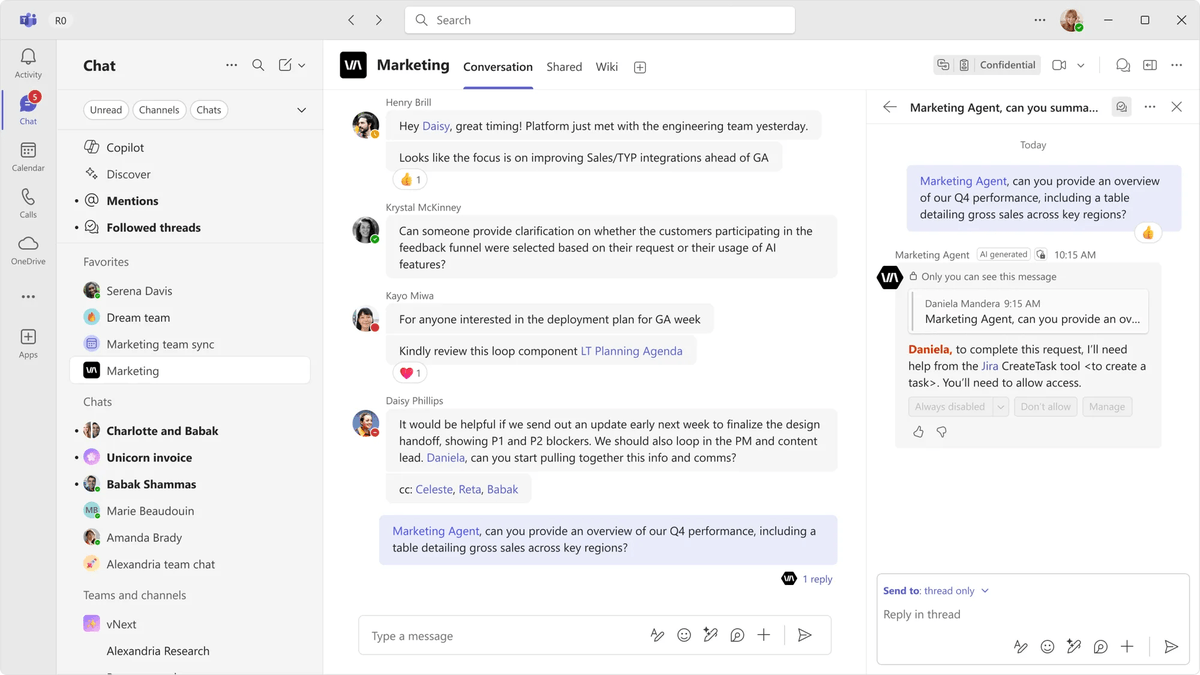
Agents can now have 1:1 interactions with individuals in a group setting through targeted messages , for example, an agent can message an individual user in a Teams channel if they need access to a tool to complete a task, without cluttering an ongoing conversation. Think of it as a private whisper inside a public room.
Agents can send private, targeted messages to a specific person in a channel, group chat, or meeting without distracting everyone else, sharing timely prompts, reminders, or next steps only with the people who need them. As situations change, agents can update or remove these messages so guidance stays relevant and accurate.
Beyond targeted messages, the SDK surfaces several other interaction patterns:
- Slash commands , manifest-declared commands users run from the compose box, enabled by setting
supportsTargetedMessages: truein your app manifest. Teams shows them in the slash menu when a user types/. - Emoji reactions and feedback , lightweight signals that make interactions feel more natural and drive engagement over time.
- Agent sessions , context-aware interactions that allow agents to maintain continuity and track progress across long-running workflows, rather than treating every message as a fresh conversation.
- Threaded conversations and quoted replies , enabling human-in-the-loop patterns like approvals, clarifications, and iterative decision-making.
Work IQ: the context layer underneath
With the Microsoft Teams SDK, you can build intelligent agents powered by Work IQ that work across chats, channels, and meetings using a single, consistent platform. Work IQ is the intelligence layer that matters here , it's what gives agents organizational memory rather than just session memory.
Work IQ is the intelligence layer that gives agents contextual understanding of everything happening across your Microsoft 365 environment: emails, meetings, files, chats, and organizational relationships. Starting June 16, 2026, the Work IQ API will be available through consumption-based billing using Copilot Credits, the common currency across Copilot Studio capabilities and Work IQ APIs across your tenant.
Sovereign cloud support, finally
One of the quieter but significant pieces of this release is government cloud support. Previously, developers building for regulated customers had to choose between shipping in commercial cloud or rebuilding from scratch for government environments.
Microsoft 365 Agents Toolkit and Developer Portal now support sovereign high-cloud environments, including GCC High and DoD, enabling developers targeting these tenants to run the same agent creation and update flows with built-in cloud-aware handling without the need for manual workarounds. This implementation updates authentication endpoints, token scopes, and cloud-specific service routing so provisioning and runtime behaviors align with sovereign requirements.
Partners already shipping
As a developer, you can build an agent in Teams for your own organization or publish it to the agent store for users everywhere. Partners like Linear, Cursor, and more are already showing what's possible when agents live directly inside the flow of work , participating in conversations, completing tasks, and moving work from discussion to action.
The partner lineup shows the range of what's already live in the Teams agent marketplace:
- GitHub Copilot , operates as an on-demand coding collaborator within Teams chats and channels, turning conversation context into pull requests, bug fixes, and code iterations.
- Atlassian Rovo , brings Jira and Confluence context into the flow of Teams chats and channel conversations, enabling users to update issues and draft content.
- Cursor , enhances collaborative engineering execution by enabling your team to fix bugs, investigate code, and ship features without leaving your Teams discussions.
- Linear , brings product development workflows into Teams, turning conversations into action by capturing issues, updating projects, and helping teams stay aligned.
- Lovable , coming this month, will let users describe what they want to build in a Teams chat and ship a working web app directly from that conversation.
What's actually new here
The real shift is architectural. Previous Teams bots were reactive , they answered when called. These agents are designed to be proactive participants: they can initiate targeted messages, maintain state across sessions, react to conversation events, and operate inside private and shared channels that cross organizational boundaries.
In addition to giving query responses, agents in Teams can summarize conversations, draft documents, manage tasks, automate processes, and provide personalized insights. Agents built for Teams can also be extended beyond Teams into other Microsoft 365 hubs, such as Outlook, using Microsoft 365 Agents SDK.
For developers ready to build, the official quickstart covers building your first agent with the Teams SDK across standard, private, and shared channels. The SDK is GA today , the main cost consideration is the Work IQ API, which moves to consumption-based Copilot Credits billing, requiring a Microsoft 365 Copilot license to access.