
iOS-OCR-Server Turns Your Idle iPhone Into a Free Private OCR Engine
iOS-OCR-Server turns any iPhone into a local HTTP OCR endpoint, giving your scripts free, private, on-device text extraction via Apple's Vision Framework
 Pro
Takeaways
- What it is: iOS-OCR-Server turns any iPhone into a local HTTP OCR server using Apple's Vision Framework.
- How to use it: Install the app, POST images to
http://<IP>:8000/upload, get back JSON with text and pixel-level bounding boxes. - Cost: Free on the App Store (iOS 18.4+); source is MIT-licensed on GitHub. Optional $4.99 tip jar.
- New in recent updates: Document paragraph detection via
/docOCRendpoint (iOS 26+), using Apple's newRecognizeDocumentsRequestAPI. - Privacy: 100% local processing -- no data leaves the device or the local network.
- Limitations: Requires screen-on for continuous operation; document paragraph mode needs iOS 26; single-device throughput is limited.
iOS-OCR-Server is a Swift app that turns an idle iPhone into a local OCR server. You install the app, it spins up an HTTP server on port 8000, and any machine on the same network can POST an image and get back structured JSON with extracted text, bounding boxes, and pixel coordinates. No API keys, no cloud bills, no data leaving your LAN.

The hardware angle nobody talks about
Most developers reach for Tesseract or a cloud API when they need OCR. Both have real costs: Tesseract requires tuning and struggles with real-world photos, while cloud APIs charge per page and ship your documents to a third party. The insight here is that the iPhone you already own is running a genuinely capable on-device ML stack 24/7. Apple's proprietary OCR implementation provides excellent accuracy and speed compared to other on-device OCR engines such as Tesseract. iOS-OCR-Server just puts an HTTP interface in front of it.
Apple's Vision OCR is impressively good, and actually considered better than ABBYY FineReader even for basic OCR. That's the engine powering this server, running entirely on-device with no round-trips anywhere.
How it actually works
The app turns your iPhone into a powerful local OCR server using Apple's Vision Framework, with no cloud dependencies, unlimited usage, and complete privacy. Under the hood, the app uses Apple's RecognizeTextRequest API (the modern replacement for the older VNRecognizeTextRequest), which runs a neural text detection and recognition pipeline entirely on the Neural Engine of the iPhone's chip. The app wraps this in a Vapor-based HTTP server, so any HTTP client can talk to it.
The workflow is straightforward:
- Launch the app -- the server starts automatically
- The app displays the device's WiFi and Ethernet IP addresses
- Any device on the same network can hit
http://<IP>:8000/upload - POST a
multipart/form-dataimage, get back JSON - Enable iOS Guided Access mode to keep the screen on and the server running continuously
The JSON response is richer than you might expect. Beyond the raw text, each detected word comes with pixel coordinates -- specifically x, y, w, h for the axis-aligned bounding box, plus a rect object with all four corner coordinates that preserves the original orientation of skewed or rotated text. That makes it useful for layout-aware document processing, not just plain text extraction.
A minimal Python call looks like this:
import requests
url = "http://10.0.1.11:8000/upload"  # your iPhone's IP
with open("doc.png", "rb") as f:
    resp = requests.post(url, files={"file": f}, headers={"Accept": "application/json"})
data = resp.json()
print(data["ocr_result"])   # plain text
print(data["ocr_boxes"])    # list of {text, x, y, w, h, rect}
Document paragraph detection -- the iOS 26 bonus
Since RecognizeTextRequest returns bounding boxes and contextual information, it's possible to group texts together -- but the new RecognizeDocumentsRequest introduced at WWDC 25 makes such manual operations obsolete. iOS-OCR-Server exposes this through a separate /docOCR endpoint (iOS 26+ only), which uses paragraph-aware document recognition instead of line-by-line extraction. You can also toggle it from the built-in web UI. The result is a single ocr_text string with paragraphs intact, which is far cleaner for feeding into downstream LLMs or document pipelines.

What it's good at -- and where it falls short
The Vision Framework handles automatic language detection across a wide range of languages, including English, Chinese, Japanese, Korean, and major European languages. Multi-language recognition supports 16 languages including English, Chinese, Japanese, Korean, and European languages. It also applies intelligent language correction by default, which helps with common misreads on clean printed text.
That said, there are real constraints to keep in mind:
- Network-only: The server is only reachable on your local network. It's not a public API.
- Single device bottleneck: One iPhone processes one request at a time. For high-throughput workloads, the README suggests building a cluster of multiple iPhones.
- Screen-on requirement: The app needs the screen to stay on for continuous operation, which means battery drain unless the phone is plugged in.
- Handwriting: Apple's Vision OCR is optimized for printed text. Handwriting recognition is significantly weaker.
- Mixed-language documents: Vision's OCR engine attempts to perform OCR using languages in order of priority -- for images containing a mix of English and another language, it's best to specify
en-USas the last language on the list. - Document paragraph detection requires iOS 26 or later.
Real-world use cases
The community has already found some interesting applications. A feature request was filed to integrate iOS-OCR-Server as an OCR provider for paperless-gpt, a document management tool, citing its clean API and the fact that it has no cloud dependencies and unlimited usage. That's a pattern worth noting: this fits naturally as a drop-in OCR backend for self-hosted document pipelines like Paperless-NGX.
Other practical scenarios:
- Dev and testing environments: Spin up a local OCR endpoint without any cloud account setup
- Air-gapped or privacy-sensitive workflows: Legal, medical, or financial documents that can't leave the building
- Home automation pipelines: Extract text from camera feeds, receipts, or meter readings on a local network
- Batch processing: Script a loop that POSTs a folder of images and collects results -- the server handles the queue
- Multi-device clusters: Load-balance across several old iPhones to increase throughput
Getting it running
The app is free on the App Store with in-app purchases, and requires iOS 18.4 or later. The only in-app purchase is a $4.99 "buy me a coffee" tip -- there's no paywall on any functionality. The source code is MIT-licensed on GitHub, so you can build and sideload it yourself if you prefer. The app is currently on version 1.3.9 after 14 releases, with the changelog showing a steady cadence of improvements: bounding box data, per-core CPU monitoring, a switch from Swifter to Vapor for the HTTP layer, and the new document paragraph detection mode.
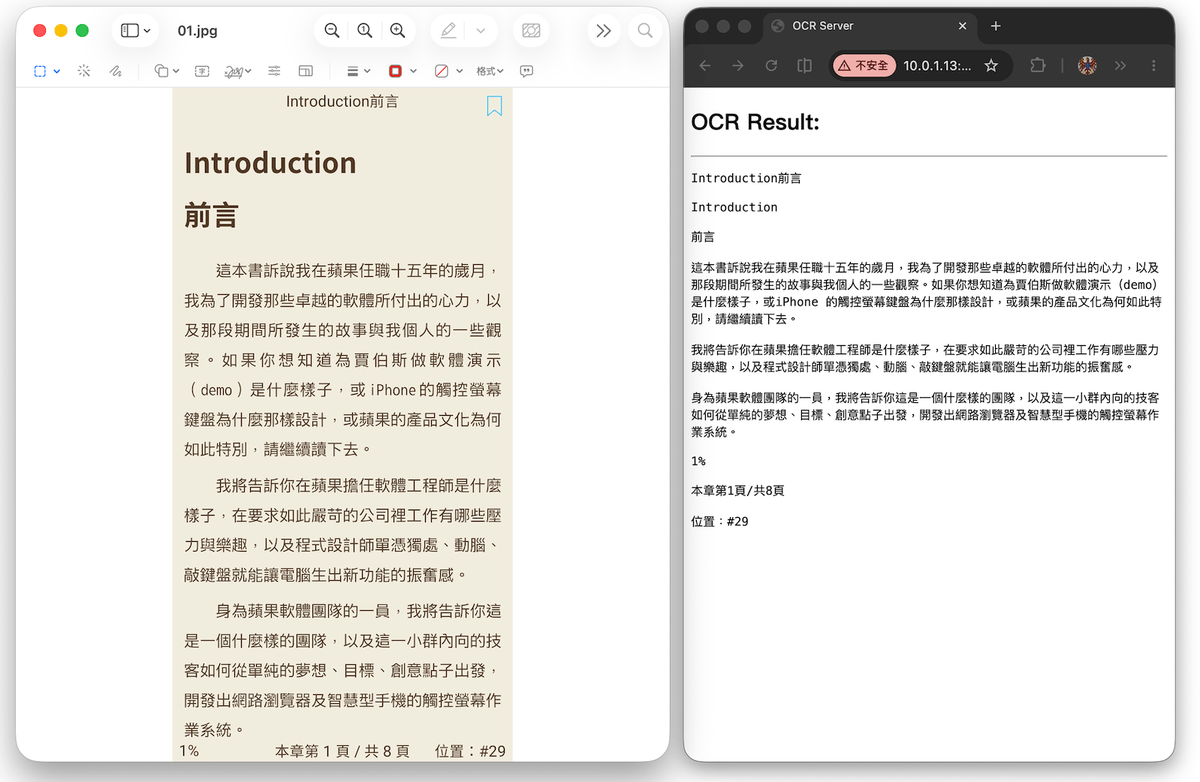
The web interface at http://<IP>:8000 also doubles as a test playground -- you can upload an image directly from a browser and see the OCR output without writing a single line of code. For teams that want to validate quality before integrating the API, that's a useful starting point.
The broader takeaway is that the iPhone in a desk drawer is a surprisingly capable compute node for on-device ML inference. iOS-OCR-Server is a clean, no-friction way to put that hardware to work -- and the App Store listing makes it accessible to anyone, not just Swift developers.