
Google Ships agents-cli to Turn Any Coding Assistant Into an ADK Expert
Google's agents-cli injects 7 expert skills into any coding assistant, turning it into a full-stack ADK agent engineer that can scaffold, evaluate, and deploy to Google Cloud
 Pro
Takeaways
- Google released agents-cli, a CLI + 7-skill pack that turns coding assistants (Claude Code, Gemini CLI, Codex) into ADK deployment experts on Google Cloud.
- Skills inject structured expert knowledge into the coding assistant at runtime, covering scaffolding, ADK code patterns, evaluation, deployment, and observability.
- Works with any coding agent supporting the Agent Skills spec; also runs fully standalone from the terminal without a coding assistant.
- Local development requires only a free AI Studio API key; Google Cloud is only needed for deployment to Agent Runtime, Cloud Run, or GKE.
- Limitations: tightly coupled to ADK and Google Cloud; generated code still needs human review before deploying, especially eval criteria and security settings.
- Released at Google Cloud Next under Apache 2.0, currently v0.1.3 (pre-GA); available via PyPI with one-command install.
Building an AI agent is one thing. Knowing which of the 40+ components in Google's Agent Platform to use, in what order, with what configuration -- that's the part that actually takes time. agents-cli is Google's answer to that problem: a CLI and a set of seven specialized skills that you install into your coding assistant, turning it into an expert at the full ADK agent lifecycle from first scaffold to production deployment.
A tool that teaches tools
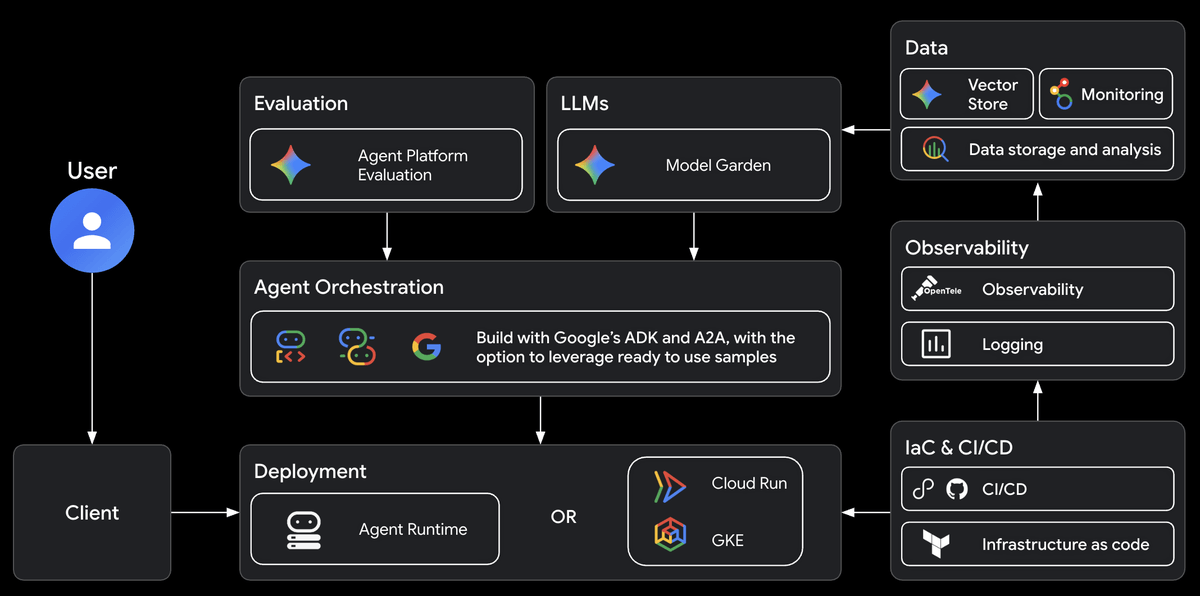
agents-cli provides a unified, machine-readable interface for AI development tools to interact with ADK, encapsulating expert knowledge of ADK, agent evaluation, and deployment to Google Cloud so that coding assistants can perform complex actions from natural language prompts. The key insight is that this is not another agent framework, not another SDK -- it is a tool that teaches tools.
The hard part about building an agent in 2026 is not writing SDK code -- it is knowing which of the 40+ Agent Platform components to use, in what order, with what configuration. Scaffolding a project, wiring up evals, configuring deployment targets, registering with Agent Platform -- each step has its own docs, its own CLI commands, its own gotchas. agents-cli collapses all of that into a set of skills your coding agent can read and execute.
The skills layer
agents-cli is a CLI and skills package for building, evaluating, and deploying AI agents on Google Cloud. Agents are built with Google's Agent Development Kit (ADK) -- agents-cli handles everything around it: scaffolding, evaluation, deployment, and observability. ADK (Agent Development Kit) is Google's open-source framework for defining agent logic, tools, and orchestration in Python. agents-cli is the layer that wraps ADK and knows how to wire it into the rest of Google Cloud.
agents-cli bundles 7 skills that give your coding agent deep knowledge across the full ADK lifecycle. Here's what each one covers:
- google-agents-cli-workflow -- Development lifecycle, code preservation rules, model selection guidance
- google-agents-cli-adk-code -- The ADK Python API: agents, tools, orchestration, callbacks, state management
- google-agents-cli-scaffold -- Project scaffolding via
create,enhance, andupgradecommands - google-agents-cli-eval -- Evaluation methodology: datasets, metrics, LLM-as-judge scoring, trajectory comparison
- google-agents-cli-deploy -- Deployment to Agent Runtime, Cloud Run, and GKE, plus CI/CD and secrets
- google-agents-cli-publish -- Registration with Gemini Enterprise so end users can discover the agent
- google-agents-cli-observability -- Cloud Trace, logging, and third-party integrations
"Skills" here refers to the Agent Skills open specification -- structured context files that coding assistants read at runtime to understand a domain. When you ask Gemini CLI or Claude Code to "build a support agent," the installed skills fire automatically, guiding the assistant toward correct ADK patterns instead of letting it guess.
How it actually works
agents-cli skills provide the necessary context for your AI development tool to use appropriate ADK patterns, structure evaluations, and configure deployments. The practical loop looks like this: you describe what you want to build in plain English, and the coding assistant uses the skills to make the right architectural decisions at each step.
A concrete example from the official docs: you type "scaffold a customer-support agent that calls our order-status MCP server and logs to Observability." The skills fire in sequence and produce:
- A correct initial layout -- folder structure, pyproject.toml, ADK config, compatible version pins
- An explicit choice between sequential, collaborative (multi-agent), or dynamic graph orchestration -- with rationale for when each fits
- A valid Runtime config with sub-second cold start, scaling, and observability on day one
- Least-privilege permissions by default: scoped tokens and isolated execution of generated code
- Correct integration of MCP, A2A, and native connectors -- no more pasting tutorial YAML
The eval skill is particularly useful. The coding assistant activates the google-agents-cli-eval skill and creates test cases covering quality metrics, then configures LLM-as-judge criteria. LLM-as-judge means a separate model scores your agent's outputs against rubrics you define -- a standard technique for evaluating open-ended responses where there is no single correct answer. The coding assistant adjusts the agent's instructions, re-runs agents-cli eval run, and iterates until the desired quality is achieved.
Getting started in three commands
Installation is a single command that sets up both the CLI and the skills for whichever coding assistants you have installed:
uvx google-agents-cli setupOr, if you only want the skills and let your coding agent handle the rest:
npx skills add google/agents-cliagents-cli works seamlessly with Gemini CLI, Claude Code, Codex, Antigravity, and any other coding agent. Platform support covers macOS, Linux, and Windows (WSL 2). You can also skip the coding assistant entirely and drive everything from your terminal directly -- every command works standalone.
For local development, you can use an AI Studio API key to run Gemini with ADK locally without a Google Cloud account. Cloud is only required for deployment.
A minimal agent project spins up like this:
agents-cli scaffold my-agent
cd my-agent
agents-cli install
agents-cli run "What can you help me with?"
What it's good at -- and where to be careful
For enterprises, agents-cli eliminates the complexity of configuring dozens of Agent Platform components, providing the shortest and most secure path to deploying production-ready agents on Google Cloud. The practical use-cases it covers well include:
- RAG agents that answer questions from internal docs using the
agentic_ragtemplate - Multi-agent systems that interact with other agents using the
adk_a2atemplate - Incident triage, support, and workflow automation agents deployed to Cloud Run or Agent Runtime
- Teams standardizing on the Gemini Enterprise Agent Platform who want consistent project structure and eval coverage from day one
That said, there are real limitations to know about. Your coding agent still needs supervision. The skills give it accurate ADK context so it stops guessing at CLI commands and deployment configs -- fewer hallucinations, not zero. Review generated code before deploying, especially eval criteria and security settings. And if you are using a non-ADK framework like LangGraph, CrewAI, or AutoGen, agents-cli is not for you -- it is tightly coupled to ADK and the Google Cloud stack.
The bigger picture
The announcement came from Addy Osmani (Director, Google Cloud AI) at Google Cloud Next, complementing the Agent Platform launch. Agent Skills, the open specification that agents-cli relies on, got its own GitHub CLI integration the same week. Google's official skills repository launched alongside it.
Google shipped all of this with tabs for Claude Code, Codex, and Antigravity right next to Gemini CLI in the getting-started docs -- they don't care which coding agent you use, as long as you deploy to Google Cloud. That is a deliberate strategy: make the deployment target sticky by making the developer experience as smooth as possible, regardless of which AI assistant a team prefers.
The deeper shift agents-cli represents is that the knowledge gap in agentic development -- not the code itself, but the architecture decisions, the eval setup, the deployment configuration -- is now something that can be packaged and distributed as structured context. MCP docs, ADK docs, gcloud docs, Runtime docs all live in four separate places today. agents-cli collapses that at the moment it matters: when the developer is asking the editor to generate code. That pattern, packaging expert domain knowledge as skills for coding assistants, is likely to spread well beyond Google's own tooling.
The project is available now on PyPI under the Apache 2.0 license, currently at v0.1.3. It is listed as a pre-GA offering, so the public interface is stable but the internals are still moving fast -- pin your versions in production.