

Google's Gemini Spark Now Controls Your Real Chrome Browser to Run Web Tasks
Gemini Spark now controls your real Chrome browser to handle web tasks, and rolls out to AI Pro subscribers in 160+ countries
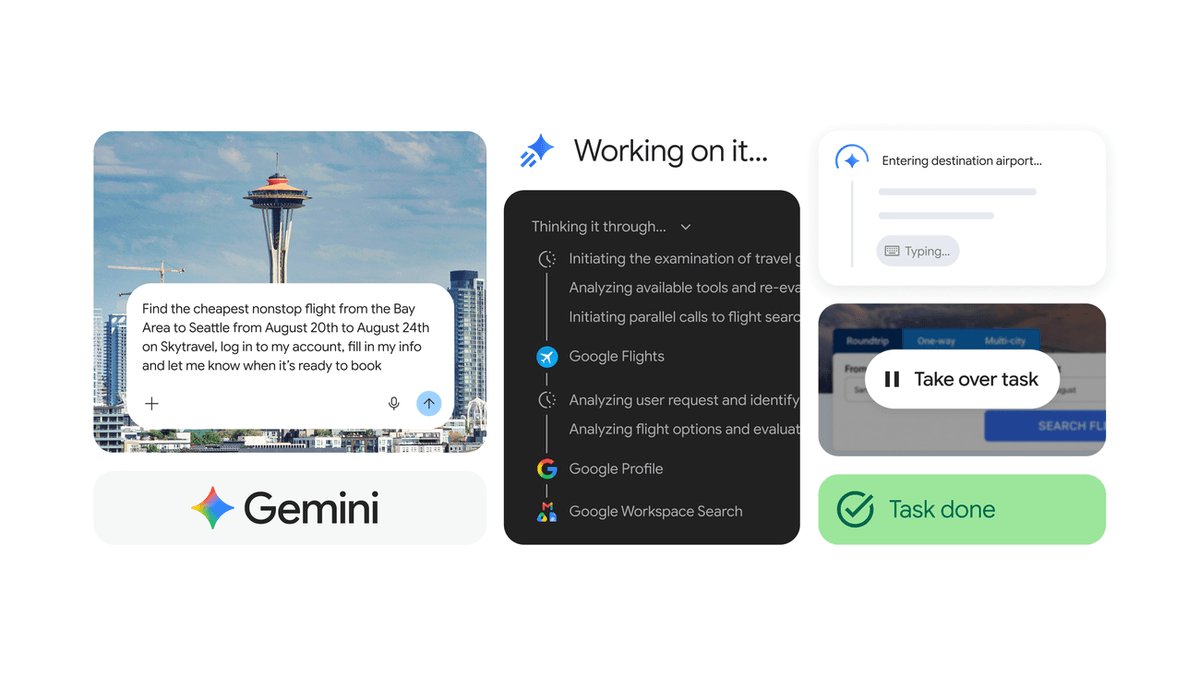
- Chrome integration: Gemini Spark can now control your real desktop Chrome browser -- not a remote sandbox -- using your logged-in sessions and saved passwords.
- Global rollout: Spark is now available to Google AI Pro subscribers in 160+ additional countries, down from Ultra-only access since May 2026.
- Entry price drops to $20: Previously restricted to the $249/mo AI Ultra tier, Spark is now bundled with the $20/mo Google AI Pro plan.
- Key use-cases: Scheduling apartment viewings, researching and pre-filling flight bookings, updating online orders -- any multi-step web task you'd rather not do yourself.
- Safety guardrails: Payments and social media posts require manual confirmation; Google uses multi-layer prompt injection defenses to prevent malicious websites from hijacking the agent.
- Still excluded: Users in the EEA, UK, Nigeria, and Switzerland cannot access Spark on any plan; the Chrome integration is US-only for now. Official blog
Gemini Spark, Google's 24/7 agentic assistant, can now take control of your actual Chrome browser to complete multi-step web tasks on your behalf. Google is also pushing Spark access to over 160 additional countries for AI Pro subscribers, the biggest geographic expansion since the agent launched.
From sandboxed cloud to your real browser
Until now, Gemini Spark browsed through a remote, sandboxed cloud instance with no access to your sessions, cookies, or saved credentials. The new integration runs inside desktop Chrome on your device, where your logged-in accounts and saved passwords are available. That difference determines what the agent can actually do.
With local Chrome access, Spark can handle multi-step errands like scheduling apartment viewings across listing sites or researching flights and pre-filling booking forms. For sensitive actions like payments or social media posts, Spark pauses and hands control back to you before anything irreversible happens.
How auto browse works, step by step
You trigger auto browse by describing a task when prompting Gemini in Chrome. A cloud-hosted Gemini model then drives your local browser, scrolling, clicking, and entering text on your behalf. The process looks like this:
- Gemini confirms "Task started" and opens a new tab marked with a cursor and sparkle icon. An indicator in the top-right corner of your Chrome window shows that auto browse is active.
- A glow appears around the active tab while the Gemini side panel displays each step in real time.
- Auto browse can use Google Password Manager to fill credentials, but you must authorize this first.
- You can take over the task at any point, and you can continue visiting other sites while auto browse runs in the background.
Auto browse joins the other tools already in Spark's toolkit: Connected Apps (Workspace and Search), Personal Intelligence, remote computer with code execution, and Canvas. Unlike those, the Chrome integration can reach any website, not just Google's own services.
The safety layer built around your browser
Giving an AI agent access to a logged-in browser creates a real security surface. Google has built guardrails around two specific risks: accidental high-stakes actions and malicious websites hijacking the agent.
- Human-in-the-loop for sensitive actions: Gemini requires you to press the buy button when shopping, or the post button when sharing to social media. The agent prepares; you confirm.
- Prompt injection protection: Prompt injection is an attack where hidden instructions embedded in a webpage attempt to redirect the agent's behavior. Attackers can plant these instructions in content a user encounters, not just in direct queries. Google's defenses are specifically designed to detect and block this.
- Defense in depth: Guarding against indirect prompt injections requires multiple overlapping protections: model hardening, input/output classifiers, and system-level guardrails working together.
No system is perfect, and agentic use cases raise the stakes. The more autonomy an agent has over real accounts and live data, the more attractive a target it becomes. Google acknowledges the urgency of making these models more robust as their capabilities grow.
What it handles well
Auto browse is best suited to tasks that span multiple pages, require form-filling, or involve pulling context from different sources:
- Scheduling apartment viewings across multiple listing sites
- Researching flights and pre-filling booking forms
- Finding parking or updating online orders
- Booking travel by pulling details from an old email, checking Google Flights for options, and drafting a follow-up message to colleagues
That last example shows where the Google ecosystem integration matters most. Spark can read your Gmail, cross-reference live web data, and act on both in a single flow, pulling from Connected Apps including Calendar, YouTube, Maps, Google Shopping, and Google Flights.
Current limits
The Chrome integration is desktop-only and, for the auto browse and Spark combination, US-only for now. Payments, social media posts, and other irreversible actions always require explicit confirmation. The broader country expansion also has gaps: users in the European Economic Area, Nigeria, Switzerland, and the UK cannot access Spark regardless of which Google AI plan they subscribe to.
Pricing and availability
Gemini Spark is rolling out to Google AI Pro subscribers in over 160 additional countries starting today, following a full US rollout earlier this month. The agent debuted at Google I/O in May 2026 as a beta feature for Ultra subscribers. It runs on Gemini 3.5 and operates in the cloud, so tasks continue running after you lock your phone.
Spark has no separate price. Access is bundled with eligible paid plans in supported countries, with Google AI Pro setting the entry point at $20 per month. Since launching in May, Spark has added MCP integrations and Mac app support for local desktop control, with auto browse in Chrome the latest addition to that list.
Why the Chrome integration matters
Google's core advantage in the AI agent space is that a large share of its users already live inside Gmail, Calendar, Drive, Docs, and Search. Spark can draw on all of that context. The Chrome integration extends that reach to the rest of the web, turning a tightly integrated productivity bundle into something closer to a personal operating system. Whether it earns that description depends on how reliably auto browse performs in practice, but the architecture is now in place to try.
Comments
