

Google Bundles Firebase Agent Skills Into Android Studio With Zero Setup
Android Studio's Agent Mode now ships with Firebase skills pre-installed, letting the AI agent set up Firestore, Auth, and security rules with zero extra configuration
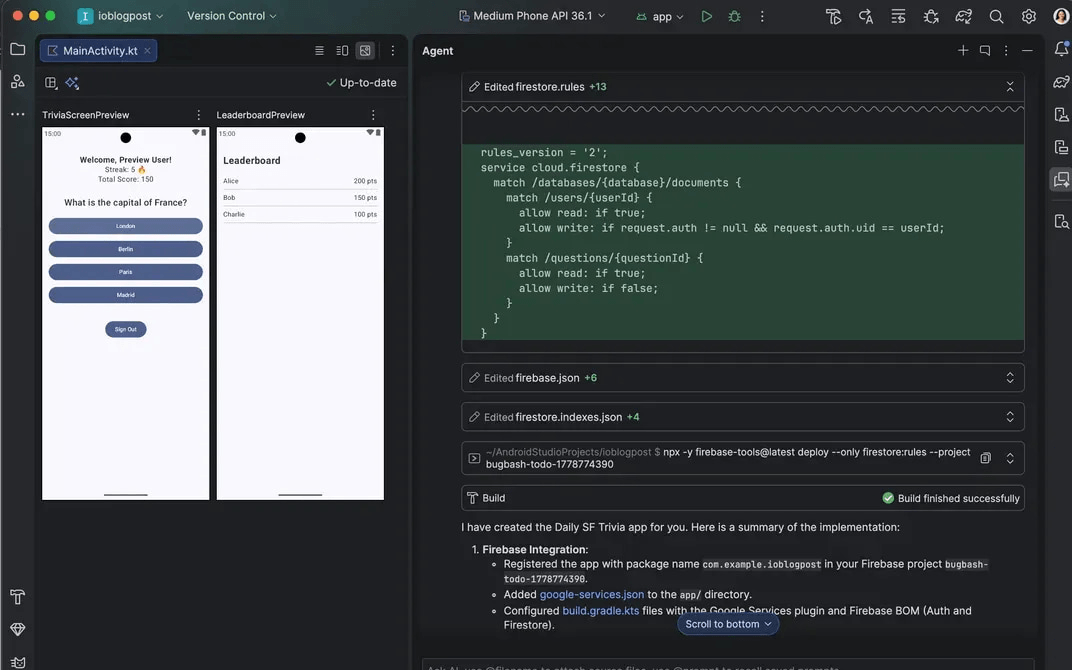
- Zero-setup Firebase in Android Studio: Agent Skills for Firebase now ship pre-bundled in Android Studio Canary (Quail), requiring no manual installation.
- Agent handles full backend setup: The AI agent can configure Firestore, Firebase Auth, generate Firestore queries, and write security rules from a single prompt.
- Mobile skills are new: Firebase Agent Skills expanded from web-only to now cover Android, iOS, and Flutter with higher accuracy and lower token usage.
- Crashlytics and Remote Config added: Agent Skills now include Crashlytics (with in-IDE debugging assistance) and Remote Config setup.
- Parallel Agent Mode conversations: Android Studio now supports multiple simultaneous agent threads, so you can run tests, plan features, and write docs concurrently.
- Cross-agent compatibility: Firebase skills also work with Claude Code, Codex, Cursor, and Gemini CLI via a single install command: firebase.google.com/docs/ai-assistance/agent-skills
Setting up a Firebase backend from scratch has always been one of those tasks that pulls Android developers out of their flow: switch to the console, configure Auth, wire up Firestore, write security rules, come back to the IDE, and hope nothing broke. Google just collapsed that entire loop into a chat prompt. Android Studio's I/O Edition ships Firebase Agent Skills pre-bundled into Agent Mode, meaning the AI agent inside your IDE can now handle backend setup end-to-end without any additional configuration.
What are Agent Skills, exactly?
Agent Skills are modular instruction sets that ground LLMs in specialized workflows and domain-specific knowledge. By adding skills to a project, you can teach the agent to follow specific best practices, architecture patterns, or library workflows, enabling more accurate, context-aware code generation and automated skill activation for an appropriate task.
Think of them as plug-in expertise modules for the agent. This structure allows Agent Mode to maintain a large number of specialized capabilities without cluttering the model's immediate context window. The model autonomously decides when to employ a skill based on your request and the skill's description, and when a relevant skill is identified, it dynamically pulls in the full instructions and resources required to complete the task.
Firebase agent skills are portable, self-contained modules of Firebase-specific knowledge, instructions, and workflows, designed to help AI assistants understand Firebase best practices and execute complex tasks with higher accuracy and lower token cost.
What the Firebase agent can now do inside Android Studio
Firebase services like Authentication and Cloud Firestore databases can be enabled and configured directly in Agent Mode in Android Studio using Firebase agent skills. The agent can help you complete Firebase integration and configure backend services, letting you build robust, full-stack Android apps without leaving your IDE.
Concretely, here is what the agent handles autonomously:
- Set up and configure Firestore databases
- Enable and configure Firebase Authentication
- Generate Firestore query and write code
- Author Firestore security rules
- Set up Crashlytics and Remote Config with agentic assistance
Crashlytics skills enable debugging assistance inside IDEs so you can resolve issues faster, without interrupting your coding or requiring you to switch to viewing the Crashlytics dashboard.
Zero setup is the headline
The key word here is no additional setup. Previously, using Firebase skills required manual installation via CLI commands or copying skill files into a ~/.agents/skills directory. Google has bundled many of the top Android and Firebase agent skills in the latest Android Studio Canary build, so you can skip straight to building.
Android developers can now use Agent Mode in Android Studio and get Agent Skills for Firebase with no additional setup, getting agentic assistance to configure their Firebase backend directly in Android Studio.
Firebase agent skills also work with any AI assistant that supports skills, including Antigravity, Claude Code, Codex, Cursor, and Gemini CLI, so the skills themselves are not locked to Android Studio. But the zero-friction bundling is exclusive to the new Studio release.
The bigger picture: full-stack from a single prompt
The Firebase integration is one piece of a broader push toward what Google is calling "agentic development." The New Project Agent in Android Studio has been upgraded significantly alongside this release.
This advanced capability is significantly amplified by its new integration with Firebase Agent Skills, allowing developers to seamlessly build, debug, and deploy complete full-stack applications directly from a single prompt to final production.
You can also run multiple conversations in Agent Mode in parallel, enabling more effective multitasking inside the IDE. For example, you can kick off a long-running task like generating tests in one conversation, use a second conversation to plan a new feature, and use a third conversation to draft documentation, all at the same time.
Firebase's reach is also expanding beyond Android Studio. Google Antigravity is the platform built for the next era of how you build, work, and automate agents, and Antigravity 2.0 is a new standalone desktop app and central home for agent interaction. Antigravity's new onboarding flow now features a one-click Firebase setup which installs all of the necessary components, a packaged bundle of Agent Skills and MCP servers, so you can build with Firebase directly within its platform.
Mobile skills are new territory
Until now, Firebase Agent Skills only covered web development. Now, you can give coding agents specialized context needed to expertly integrate and build with Firebase on Android, iOS, and Flutter with higher accuracy and lower token usage. This is a meaningful expansion: mobile Firebase integrations have historically been more complex to scaffold correctly than their web counterparts, particularly around security rules and offline persistence.
The skills architecture also solves a real LLM failure mode. Models tend to generate plausible-looking but subtly wrong Firebase security rules, or use deprecated SDK patterns. Skills provide LLMs with authoritative expertise on how to use Firebase, while MCP provides LLMs with tools to set up, configure, and use Firebase services. Agent Skills for Firebase can teach models how to effectively use the Firebase CLI and Firebase MCP tools to accomplish complex tasks efficiently.
How to get started
The Firebase Agent Skills are available now in the Android Studio Canary build (Quail). No manual skill installation is required. To use Agent Mode:
- Download the latest Android Studio Canary (Quail) build
- Open Agent Mode in the IDE chat panel
- Prompt the agent to set up Firebase, e.g.
"Add Firestore to this project and write security rules for authenticated users" - Review and approve the agent's proposed changes before they are applied
For teams using other agents, Firebase agent skills are documented and installable via a single CLI command across Claude Code, Codex, Cursor, and Gemini CLI. The skills themselves are open and hosted on GitHub under the Firebase organization.
Pricing follows existing Firebase and Android Studio tiers. Agent Mode in Android Studio is free to use with Gemini, subject to standard rate limits. Google has bundled the top Android and Firebase agent skills in the latest Android Studio Canary build, so there is no separate charge for the skills themselves. Heavier agentic sessions that consume more tokens can be backed by a Google AI Pro or Ultra subscription for dedicated capacity.
The practical upshot is that the wall between "writing Android UI code" and "configuring a production-grade backend" just got a lot thinner. Whether that translates to better security rules in the wild, or just faster scaffolding of insecure ones, will depend on how carefully developers review what the agent produces.
Comments
