

GitHub Copilot's Accessibility Agent Catches Bugs Across 3,535 Pull Requests
GitHub's experimental Copilot accessibility agent has reviewed 3,535 PRs with a 68% resolution rate — here's the multi-agent architecture behind it
- 68% resolution rate: GitHub's internal accessibility agent has reviewed 3,535 pull requests and automatically resolved accessibility issues in 68% of them.
- Two-tier multi-agent design: A parent orchestrator routes work between a read-only Reviewer sub-agent and a write-capable Implementer sub-agent using structured schema templates.
- LLMs default to inaccessible code: Every major LLM is trained on decades of inaccessible code; the agent counteracts this by grounding itself in GitHub's own manually audited issue corpus.
- 36% of WCAG criteria can't be auto-detected: Deterministic checkers miss over a third of level A and AA success criteria; LLM agents are making inroads on this gap.
- Hardcoded no-go zones: The agent refuses to auto-fix drag-and-drop, toasts, rich text editors, tree views, and data grids — patterns LLMs can't reliably make accessible.
- Not yet public: The agent is an internal GitHub pilot; open-sourcing is planned as part of GitHub's accessibility pledge.
Accessibility bugs are notoriously easy to ship and expensive to fix after the fact. GitHub is tackling this head-on with an experimental general-purpose accessibility agent built on top of GitHub Copilot , and the numbers are already compelling. To date, the agent has reviewed 3,535 pull requests, with a 68% resolution rate.
The agent has two jobs: providing engineers with reliable, just-in-time answers to accessibility questions in the GitHub Copilot CLI and the Copilot VS Code integration, and catching and automatically remediating simple, objective accessibility issues before they go to production. For the second goal, it is set to automatically evaluate changes that modify front-end code.
The problem no linter can fully solve
WCAG (Web Content Accessibility Guidelines) is the international standard for web accessibility, organized into success criteria at levels A, AA, and AAA. Most teams rely on automated checkers to catch violations , but those tools have a hard ceiling. Of the 55 total WCAG level A and AA success criteria, only 35 can be detected via deterministic automated code checkers, meaning roughly 36% cannot be discovered automatically.
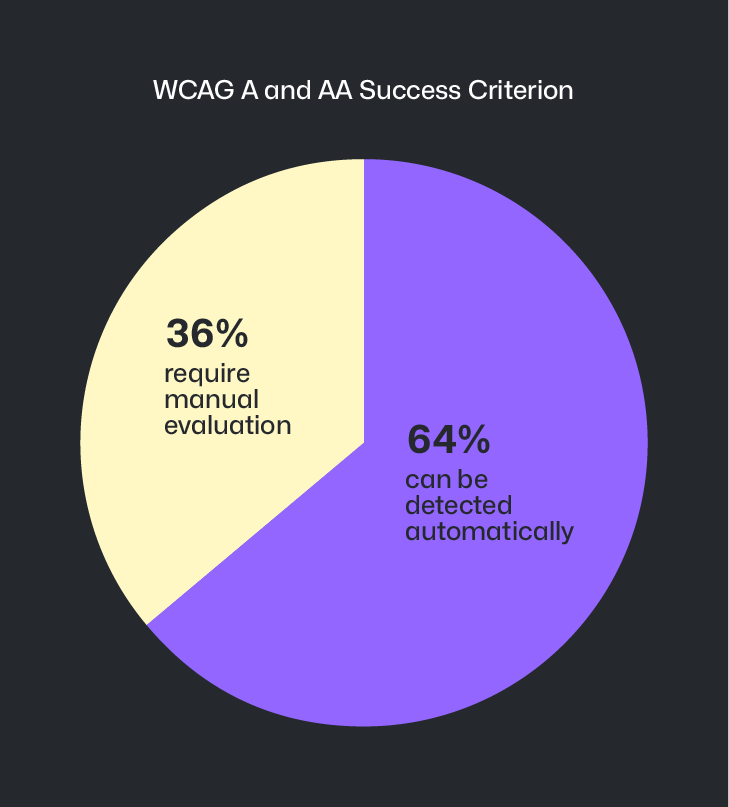
LLM-powered agents are making inroads on that 36% gap, but it is not a perfect science. This makes it important to manually identify accessibility barriers earlier during design and prototyping , the stage where the majority of accessibility issues originate.
There's also a legal tailwind here. The European Accessibility Act is now in effect, and Title II of the Americans with Disabilities Act is set to establish WCAG 2.1 AA as the legal definition of done in April 2027. Organizations that haven't invested in accessibility infrastructure are going to feel that deadline.
Why generic LLM prompts fail at accessibility
One of the most important findings in GitHub's writeup is that you can't just tell an LLM to "be accessible." Vague instructions in a skill file won't cut it , telling an LLM to "use accessibility best practices" with a short list of examples won't work well. The reason is structural: every major LLM is trained on decades of inaccessible code, so their default outputs tend to reproduce the same antipatterns.
GitHub's solution was to feed the agent a rich, structured corpus of manually audited accessibility issues , complete with reproduction steps, WCAG mappings, severity metadata, and links to the PRs that fixed them. The highly consistent and structured nature of this issue log made it an ideal corpus for the agent to reference, and instructing the agent to investigate these issues for related code and language snippets is one area where the non-deterministic "fuzzy matching" behavior of LLMs acts as an asset rather than a liability.
A two-tier agent architecture
The agent started as a single monolithic system and quickly hit the limits of that approach. GitHub evolved it into a parent-plus-sub-agent architecture with a clean separation of concerns.
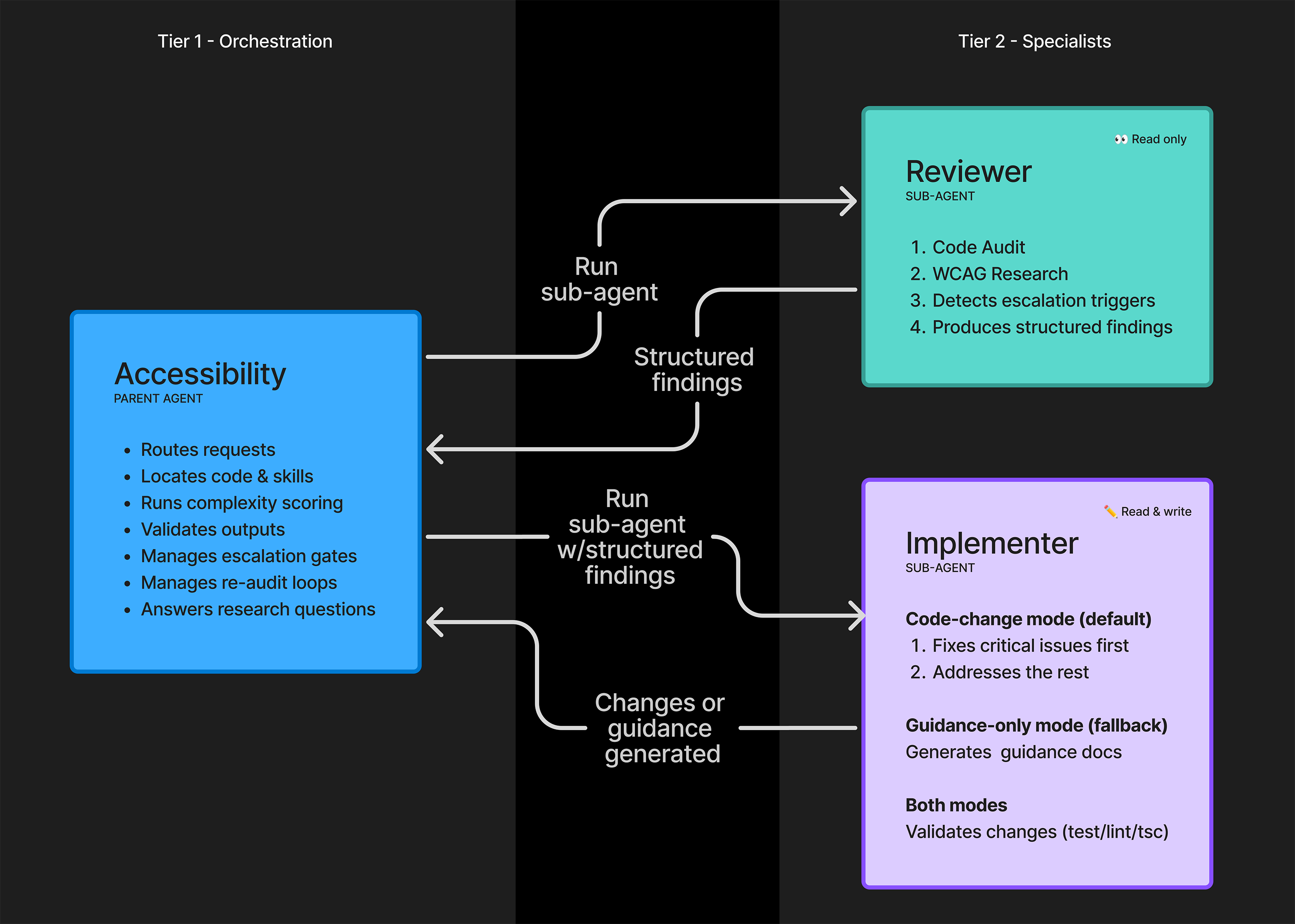
The design uses two sandboxed sub-agents that cannot talk to each other directly:
- Reviewer sub-agent: Read-only. Audits code, researches applicable WCAG criteria, checks prior audit history, and produces a structured findings report.
- Implementer sub-agent: Write-capable. Consumes the reviewer's structured output (routed through the parent agent) and either applies fixes or generates guidance documentation if the code is too complex.
The parent agent acts as orchestrator and arbiter , it routes work, validates outputs, runs complexity scoring, and manages escalation gates. GitHub also had to create anti-gaming instructions to prevent the LLM from finding workarounds to its own instructions to not generate code when human expertise is needed, which prevented it from violating its own intervention rules.
Critically, the sub-agents execute in a fixed linear order rather than in parallel. Parallelism is faster, but for accessibility work , which is holistic, contextual, and detail-oriented , accuracy matters more than speed.
Knowing when to stop
One of the most thoughtful parts of the design is the agent's explicit awareness of its own limits. It uses a small shell script to score code complexity, and if that score crosses a threshold, the agent stops trying to generate fixes and instead tells the engineer to loop in the accessibility team.
There's also a hardcoded list of high-risk UI patterns the agent will never attempt to fix automatically. These include:
- Drag and drop interactions
- Toast notifications
- Rich text editors
- Tree views
- Data grids
These patterns require nuanced, assistive-technology-specific testing that current LLMs simply can't reliably produce. Attempting them would generate code that passes automated checks but is functionally unusable for screen reader users , a worse outcome than doing nothing.
What it's catching in the wild
In order of occurrence, the top five issue types the agent catches center around: making structure and relationships clear to assistive technologies, providing clear and concise names for interactive controls, ensuring users are aware of important announcements, ensuring there are text alternatives for non-text content, and moving keyboard focus through pages and views in a logical order.
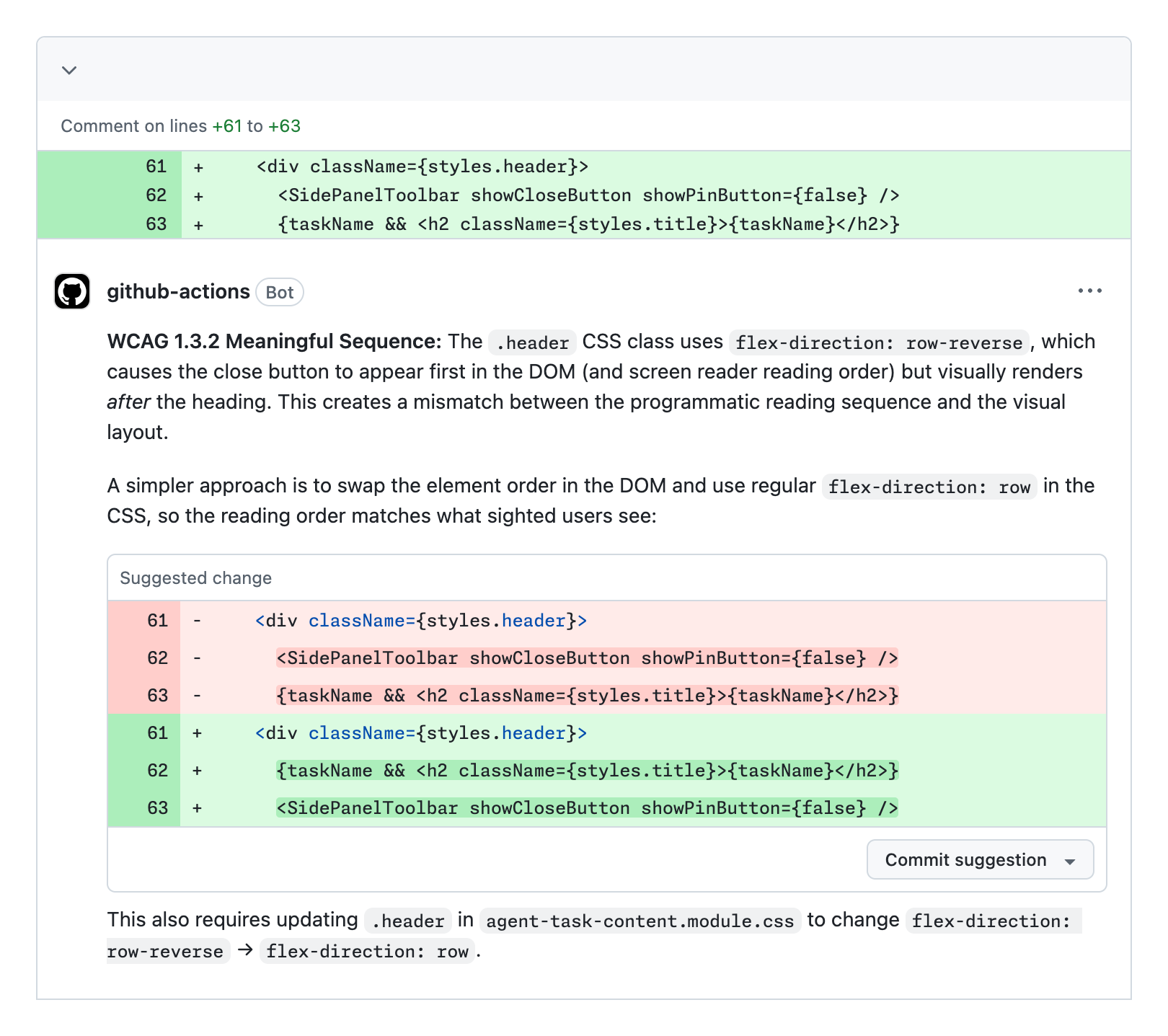
Each of these represents a real barrier removed for people who use screen readers, keyboard navigation, or other assistive technology. A 68% resolution rate across 3,535 PRs means thousands of issues that would otherwise have reached production were caught at review time.
What this means for your own stack
The agent is currently internal to GitHub and not yet publicly available. GitHub has expressed hope to eventually open source it as part of its broader accessibility pledge. In the meantime, the architectural lessons are directly applicable to anyone building domain-specific agents.
The key takeaways GitHub documented for teams looking to replicate this approach:
- Invest in a structured issue corpus first. The agent's effectiveness is directly tied to the quality of manually audited, remediated, and documented accessibility issues. Without that foundation, the LLM defaults to its training data , which is full of antipatterns.
- Use sub-agents with sandboxed communication. Direct sub-agent-to-sub-agent messaging inflates token costs, increases hallucinations, and destroys auditability. Route everything through a parent orchestrator using structured schema templates.
- Force linear execution. For tasks requiring methodical accuracy, sequential phases outperform parallel execution.
- Build explicit escalation gates. Complexity scoring and a hardcoded list of high-risk patterns prevent the agent from confidently generating broken code.
- Periodically review agent output manually. The goal isn't perfection , it's continuous improvement. Reviewing accuracy metrics each quarter and refining instructions keeps the system improving over time.
This is a rare, detailed look at a production agentic system that has processed thousands of real PRs. The broader implication is that domain-specific agents , grounded in an organization's own historical data rather than generic LLM knowledge , can achieve meaningfully better results than off-the-shelf prompting. Accessibility just happens to be the domain where GitHub proved it first.
Comments
