GitHub Copilot Now Lets Developers Plug in Their Own AI Models
GitHub Copilot's desktop app now lets you plug in your own API keys for OpenAI, Anthropic, Ollama, and more — routing inference through your own infrastructure per session.
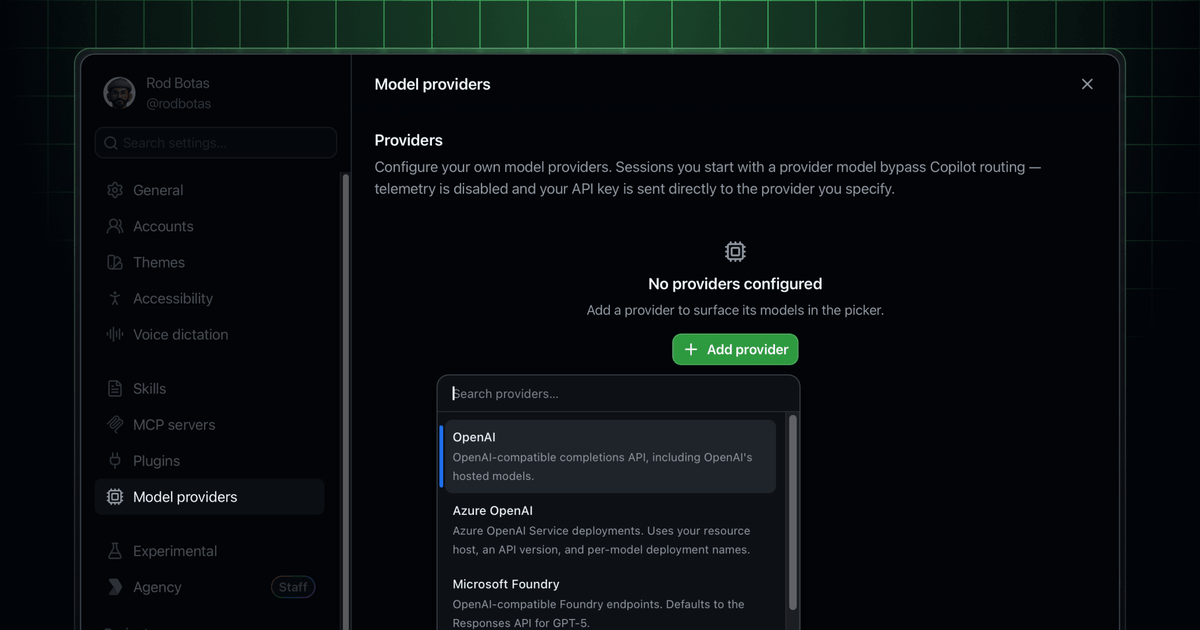
- The GitHub Copilot app now supports BYOK (Bring Your Own Key), letting you run agent sessions against your own model providers.
- Supported providers include OpenAI, Azure OpenAI, Microsoft Foundry, Anthropic, LM Studio, Ollama, and any OpenAI-compatible endpoint.
- Keys are stored in the local OS keychain and never exposed in the UI; BYOK usage is billed by your provider, not against Copilot quotas.
- You can mix frontier models for complex reasoning with local models for execution within the same workflow.
- Models must support tool calling and streaming, and require at least a 128k context window to work with the agentic session format.
- The feature is in public preview for all paid Copilot plans; Business/Enterprise users need the Copilot CLI enabled in admin policy settings.
GitHub just shipped BYOK (Bring Your Own Key) support for the GitHub Copilot app , the standalone desktop client for running agentic coding sessions. You can now connect your own model providers, use locally running models, or stick with GitHub-hosted models, all from the same model picker. The feature is available now in public preview for all paid Copilot plans.
What problem does this solve?
Until now, the Copilot app was locked to GitHub-hosted models. That's fine for most tasks, but it created friction for teams with real constraints: existing enterprise agreements with Anthropic or Azure OpenAI, data residency requirements that prohibit sending code to GitHub's infrastructure, or a preference for running open-weight models on their own GPUs. BYOK removes that lock-in.
Many teams already work with specific LLM providers and maintain custom models tailored to their needs. Copilot had long provided high-quality GitHub-hosted models by default, but teams could not connect their own organization's preferred models directly. That changes with this release.
What's supported
The GitHub Copilot app now supports BYOK, so you can run agent sessions against your own model providers, including OpenAI, Azure OpenAI, Microsoft Foundry, Anthropic, LM Studio, Ollama, and any OpenAI-compatible endpoint. That last one is the wildcard , it means anything serving the OpenAI Chat Completions API format works, including vLLM, llama.cpp servers, or custom gateways.
There are a few requirements for any model you plug in:
- Models must support tool calling (also called function calling) and streaming. These are needed for the agentic loop to work , tool calling lets the model invoke actions like reading files or running commands, and streaming keeps the UI responsive.
- A minimum 128k context window is required for the agentic session format.
How to set it up
Add a provider in Settings → Model Providers with your endpoint and API key, or just a host for LM Studio or Ollama. Once added, your provider's models appear in the model picker alongside Copilot-hosted models, and you choose which one to use each session.
The security story is clean: keys are stored in the local OS keychain and are never read back by the UI. For enterprise setups, admins can also configure provider keys centrally so they propagate to all users without anyone touching credentials in code.
For the CLI variant, the setup uses environment variables:
# Ollama (local)
export COPILOT_PROVIDER_BASE_URL=http://localhost:11434
export COPILOT_MODEL=llama3.2
# Remote OpenAI
export COPILOT_PROVIDER_BASE_URL=https://api.openai.com/v1
export COPILOT_PROVIDER_API_KEY=YOUR-OPENAI-API-KEY
export COPILOT_MODEL=gpt-4o
Three things you can now do
GitHub's changelog breaks down the practical wins into three categories:
- Use providers you already pay for. Add Azure OpenAI, Anthropic, self-hosted Ollama, LM Studio, or any OpenAI-compatible gateway, then choose the right model for each session while keeping your existing billing, quotas, regions, and data-handling terms.
- Mix frontier and local models. Pair a frontier model with a local or self-hosted model , frontier models handle complexity, local models handle execution. In practice this means you could use Claude Opus for planning and a local Qwen or Llama model for the actual file writes.
- Keep traffic in your tenant. Route inference through your own cloud account, tenant, or internal gateway for enterprise and regulated environments with stricter data-boundary requirements.
The billing angle
Usage through BYOK is billed directly by your chosen provider and does not count against GitHub Copilot request quotas. This allows teams to take advantage of existing contracts or credits while keeping access managed at the organization or enterprise level. If your team already has an Azure OpenAI commitment or Anthropic credits sitting unused, those now flow directly into your Copilot sessions.
What to watch out for
BYOK in the Copilot app is still in public preview, so the UI and behavior may shift. A few limitations worth knowing:
- You can run Copilot CLI in offline mode to prevent it from contacting GitHub's servers , designed for isolated environments where the CLI should communicate only with your local or on-premises model provider.
- BYOK authentication uses static credentials only. You must use an API key or static bearer token that you manage yourself. Dynamic credential rotation isn't supported yet.
- For Business or Enterprise plan users, your organization or enterprise admin must have the Copilot CLI enabled in policy settings before you can access the app at all.
The bigger picture
This is part of a broader push by GitHub to make Copilot a model-agnostic agentic platform rather than a wrapper around a fixed set of GitHub-hosted models. The same BYOK capability has been rolling out across the CLI, VS Code, and now the standalone app. Models from external providers configured by enterprise admins are now available in the model picker in Copilot CLI, giving enterprise developers more flexibility and allowing enterprise admins to more easily deploy custom models to developers.
The practical upshot: the Copilot app is becoming a runtime that can target any sufficiently capable model, not a product tied to GitHub's own inference stack. For teams running fine-tuned models on their own infrastructure, or operating under strict data governance rules, that's a meaningful shift. You can read the official BYOK docs to get started, or download the GitHub Copilot app directly.
Comments