

Databricks Open-Sources Omnigent to Unify and Govern Multiple AI Agents
Databricks open-sources Omnigent, a meta-harness that unifies Claude Code, Codex, and custom agents under one shared layer for composition, control, and real-time collaboration.
- Databricks open-sourced Omnigent, a meta-harness that sits above Claude Code, Codex, Pi, and custom agents under one unified interface.
- Supports composing multi-agent pipelines with one-line harness swaps, no code rewrites required.
- Stateful governance policies enforce cost budgets and security rules at the meta-harness layer, not via prompts.
- Live session sharing via URL lets teammates co-drive, comment, and steer agents in real time.
- Sessions are accessible from terminal, browser, desktop app, and mobile -- all in sync.
- Free and Apache 2.0 licensed; available now in alpha via omnigent.ai; bring your own model API keys.
Every serious engineering team running AI agents today faces the same quiet chaos: multiple coding agents open in separate tabs, context copy-pasted between Claude Code, Codex, and internal tools, and no clean way to govern what any of them are actually doing. Databricks just open-sourced Omnigent, a new layer they call a meta-harness -- a coordinator that sits above all your existing agent tools and gives them a shared interface for composition, control, and collaboration.
Omnigent targets the problems where a single harness stops: it adds easy ways to compose multiple agents, control them with advanced policies, and collaborate live with teammates. The project is released under Apache 2.0 and is available today in alpha on GitHub.
The problem with the harness-per-agent world
At Databricks, engineers often have 4-5 agents open at once -- coding agents, Gemini search, and others -- spending their time copy-pasting text between them and Docs, Slack, and other collaboration tools. The deeper issue is structural: LLM capabilities are wrapped into an agent harness, and these harnesses have different interfaces that make combining them or swapping them difficult.
The best results no longer come from a single model in a single harness. Harvey beat a frontier model on quality and cost by giving an open-source worker model a frontier advisor it can call. Anthropic built its research product as a lead agent orchestrating parallel subagents. Databricks' own Genie uses different LLMs for planning, search, and code generation. The pattern is clear: multi-agent, multi-harness pipelines are where the performance gains live. But no single harness can manage that.
What a meta-harness actually does
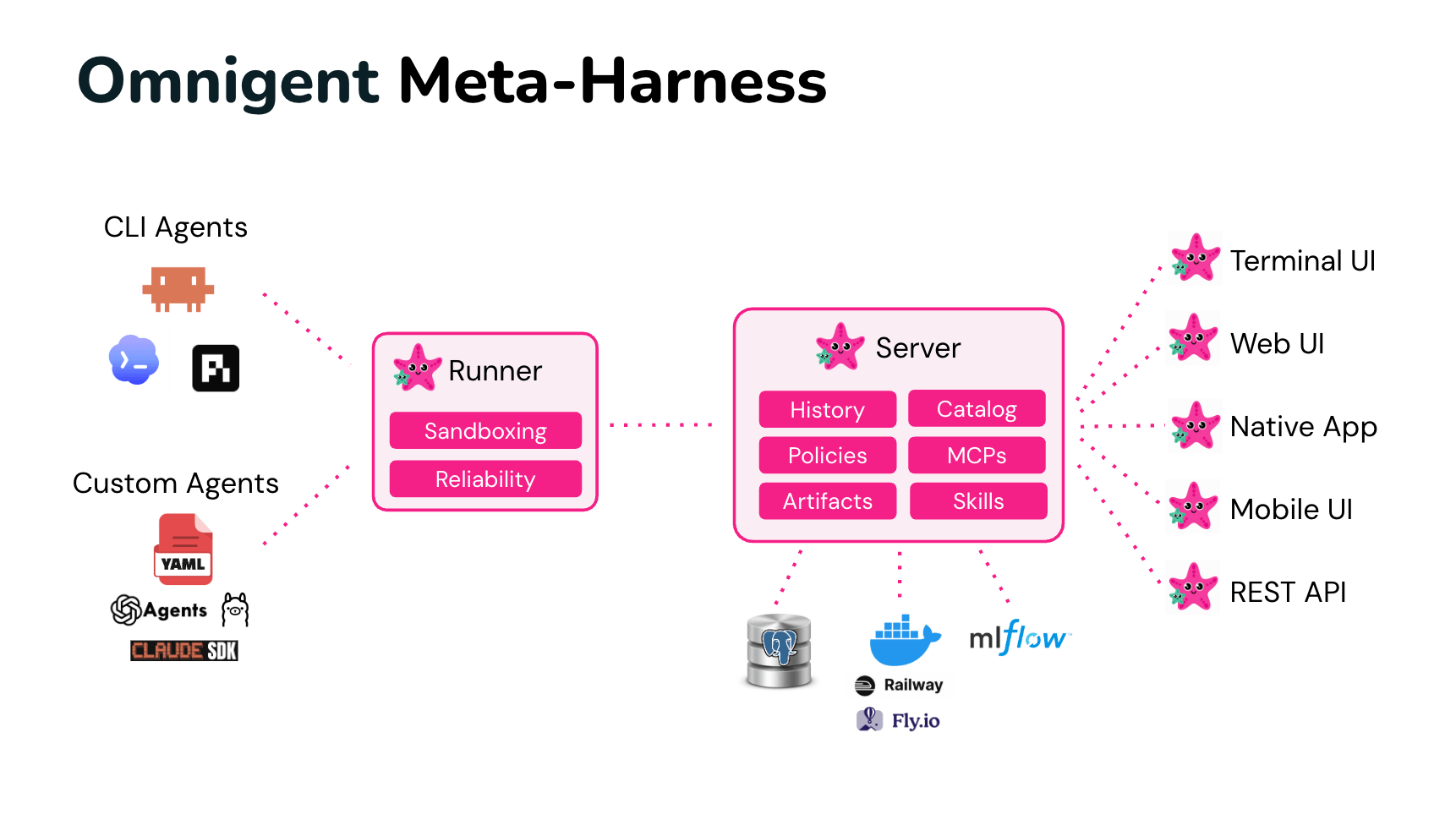
The key insight behind Omnigent is that however each agent harness calls into its LLM internally, the interface to users is the same: messages and files in, text streams and tool calls out. Omnigent builds a common API on top of that shared interface, wrapping both terminal-based coding agents (Claude Code, Codex, Pi) and SDK-based agents (OpenAI Agents, Claude Agents SDK). Everything above that common API is where Omnigent adds value:
- Composition: Combine multiple models, harnesses, and techniques without rewriting code, and switch between Claude Code, Codex, Pi, and your own agents with one-line changes.
- Control: Stateful, contextual policies that track agent actions and enforce guardrails like cost budgets and permissions at the meta-harness layer, not via prompts.
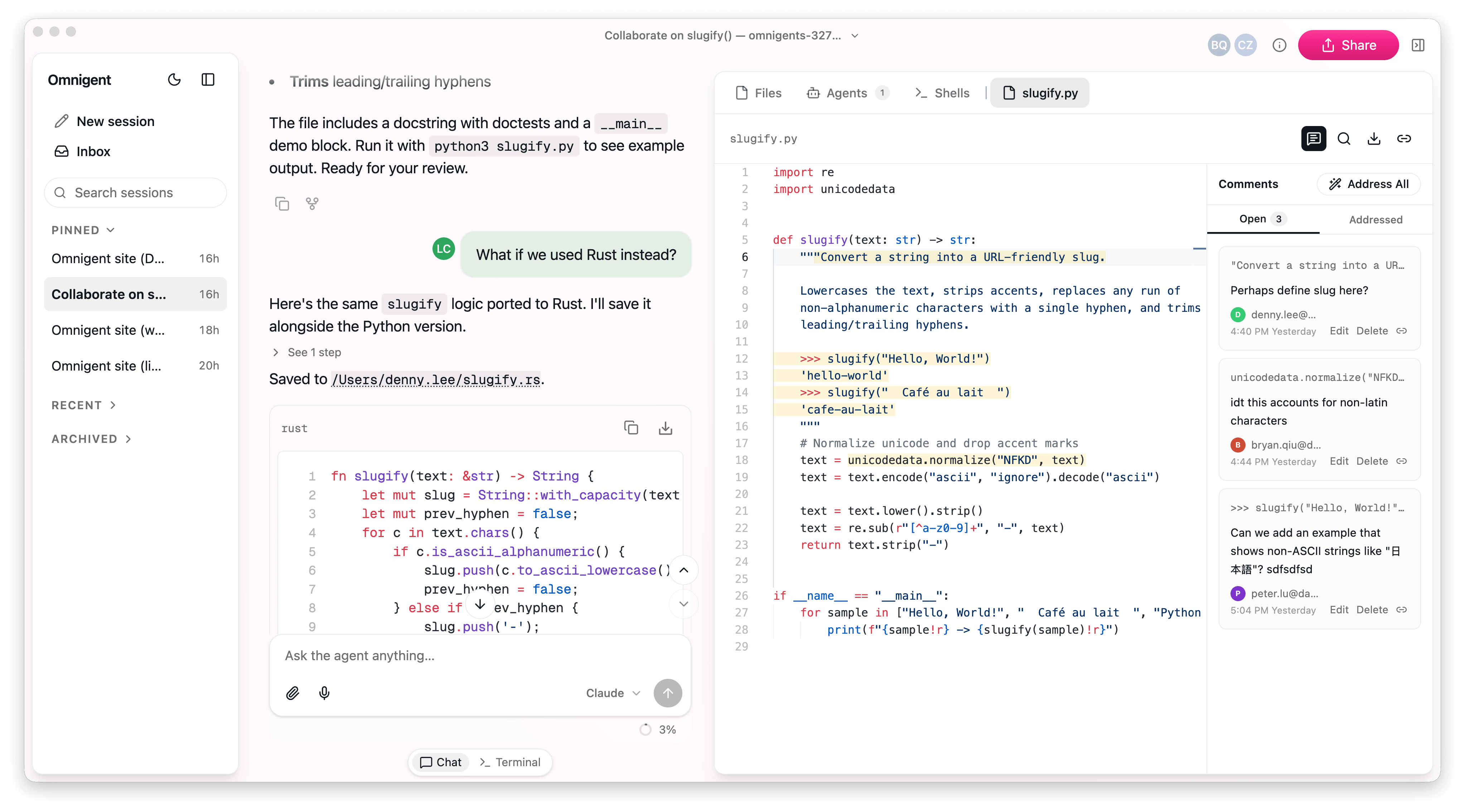
- Collaboration: Share live agent sessions via URL and review files in them together, so teammates can review, comment, and steer agents together in real time.
- Multi-device access: Sessions follow you -- start in your terminal, continue in the browser, pick it up on your phone. Messages, sub-agents, terminals, and files stay in sync.
Policies that actually think
The governance story is one of the more interesting parts. Most agent tools offer a flat allow/deny list for tool calls.
Omnigent's security policies go beyond simple "allow X / deny Y" to track dynamic state about each session and make smarter decisions.
For example, you can express rules like: after an agent downloads a new npm package, require human approval before any git push. Or cap spend dynamically --
you can ask Omnigent to pause an agent and ask to continue after every $100 it spends.
Policies stack across three levels in YAML:
policies:
  approve_shell:
    type: function
    handler: omnigent.policies.builtins.safety.ask_on_os_tools
  budget:
    type: function
    handler: omnigent.policies.builtins.cost.cost_budget
    factory_params:
      max_cost_usd: 5.00
      ask_thresholds_usd: [3.00]
Policies stack across three levels -- server-wide (admin), per-agent (developer), and per-session (you) -- with the stricter session rules checked first. This means a team can set a global spend cap while individual developers tighten rules for specific high-risk sessions.
Writing and running your own agents
An agent is a short YAML file: your prompt, your tools, and optional helper sub-agents a supervisor can delegate to. Swapping the underlying harness is a single flag change:
omnigent run examples/polly/ --harness piTwo example agents ship with the repo that illustrate the multi-agent model well.
Polly is a multi-agent coding orchestrator who writes no code herself -- she plans, delegates work to coding sub-agents (Claude Code, Codex, or Pi) in parallel git worktrees, then routes each diff to a reviewer from a different vendor than the one that wrote it.
Debby is a brainstorming partner with two heads, one Claude and one GPT -- every question goes to both, and a /debate command makes the heads critique each other for a few rounds before converging.
Getting started
Installation is a single command, and Omnigent requires Python 3.12+:
curl -fsSL https://raw.githubusercontent.com/omnigent-ai/omnigent/main/scripts/install_oss.sh | shOr via pip or Homebrew:
pip install omnigent
# or
brew install omnigent-ai/tap/omnigent
Once running, omnigent picks a model with you and starts a session in your terminal, while also launching a local web UI at http://localhost:6767 that shows the same session in the browser.
A macOS desktop app is available for download at omnigent.ai. For cloud deployment,
one docker compose up runs the server on any host; Render deploys with one click; Fly.io, Railway, Hugging Face Spaces, and Modal are covered too.
Omnigent is free and open source. You bring your own API keys or subscriptions for the underlying models (Anthropic, OpenAI, or any OpenAI-compatible gateway like OpenRouter or Ollama). The project is in alpha, so rough edges are expected -- but the architecture is already substantial, and the roadmap includes automatic agent optimization via GEPA and an Omnigent Server MCP so agents can work across sessions.
The models and harnesses will keep changing as the field evolves. The layer you work at shouldn't have to. That framing -- a stable abstraction above a volatile ecosystem -- is the real bet Databricks is making with Omnigent, and it's a compelling one for any team already juggling more than one agent.
Comments
