

Cursor Lets Enterprise Teams Run AI Coding Agents on Their own Servers
Cursor now lets teams run cloud coding agents on their own infrastructure or partnered sandbox providers, with auto-scaling worker pools.
- Cursor cloud agents can now run on your own machines or partnered sandbox providers, with the agent loop staying in Cursor.
- Supported providers include AWS Lambda, Cloudflare, Coder, Daytona, E2B, Modal, Namespace, and Vercel.
- Worker pools auto-scale based on queued requests using a team-supplied spawn script.
- Hibernation snapshots idle machines and restores them if a follow-up arrives in the reconnect window.
- Linux workers now support computer use for browser control, alongside Mac.
- Cursor reports cloud agents create over 60% of internally merged PRs; details here.
Cursor is extending its cloud agents so they no longer have to run on Cursor-managed VMs. Teams can now point cloud agents at pools of machines inside their own network, or hand off execution to sandbox providers like AWS Lambda, Cloudflare, Modal, and Vercel, while the agent loop continues to live in Cursor. The change addresses a blocker for larger engineering orgs where internal services, private repos, and specialized hardware sit behind a corporate perimeter.
Why agents need their own infrastructure
Cursor reports that cloud agents now create more than 60% of the pull requests the company merges internally and are handling a growing share of work at large enterprise customers. Once agents are writing the majority of PRs, where they execute becomes an infrastructure decision about security, compliance, and cost rather than a minor configuration choice. Self-Hosted Machines target the cases where Cursor-hosted VMs fall short: agents that need to reach internal services, use GPUs or Macs for iOS builds, or slot into unusual OS and build pipelines. Cursor-hosted VMs remain the default and still ship with per-agent isolation, secret redaction, egress controls, and signed commits.
How the split works
Only the execution environment moves to your infrastructure. The agent loop, inference, and planning remain in the Cursor cloud. The machine on your side holds the working copy of the repo, edits files, and runs commands. A small worker process bridges it back to Cursor.
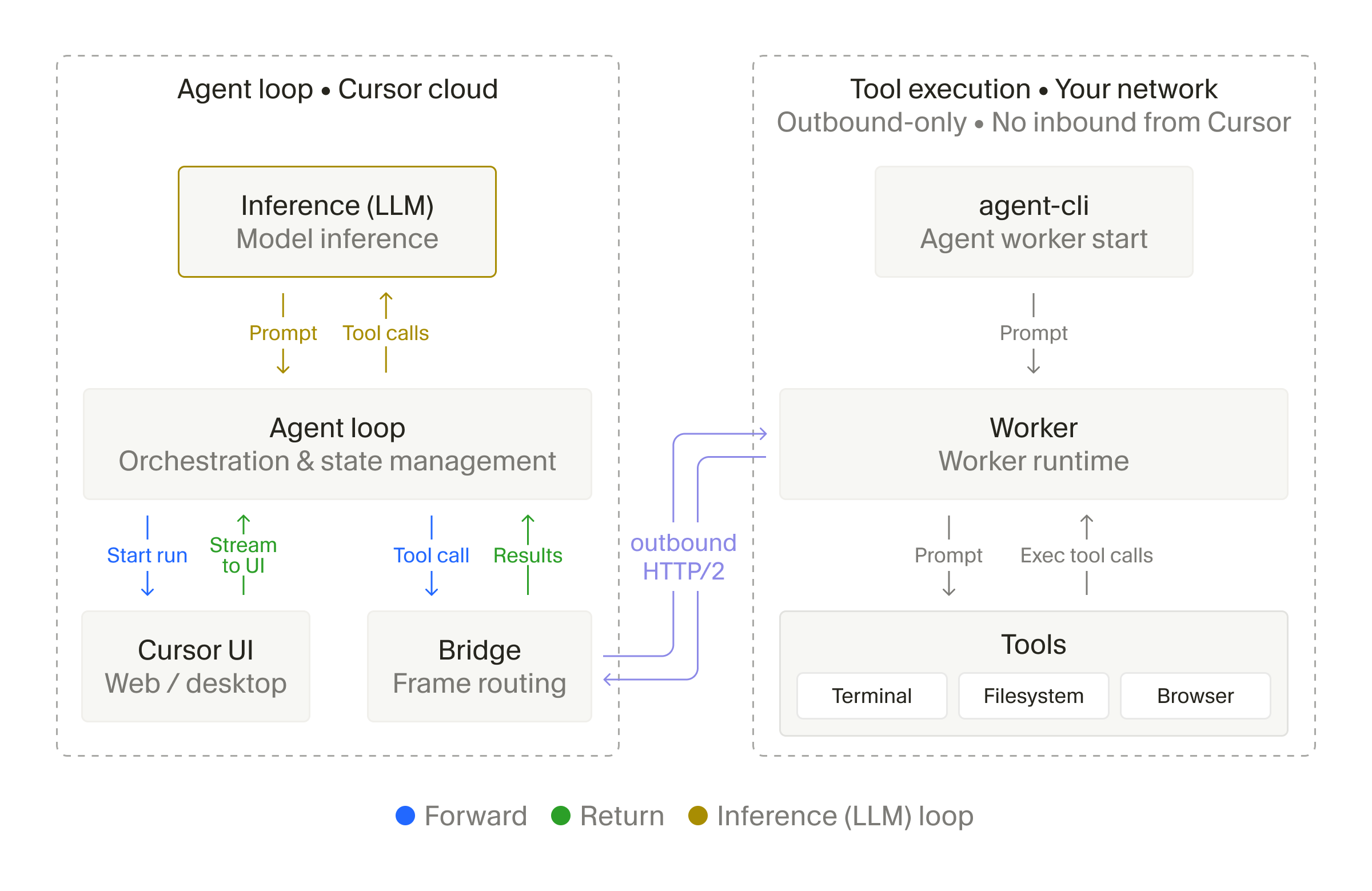
Setup is a single command: install the Cursor CLI and run agent worker start. This opens a long-lived outbound HTTPS connection to the Cursor cloud. When a session begins, Cursor's agent harness handles inference and planning, then sends tool calls to a dedicated worker for execution. The worker returns results for the next round of inference. Cursor never initiates a connection into your network, which means no inbound firewall holes.
My Machines vs Pools
Two configurations cover different scales of use:
- My Machines connects a single laptop or VM to your account, suited to individual developer workflows.
- Pools are named queues of workers serving a team or enterprise, with capacity that scales as requests arrive and shrinks as workers disconnect.
A controller watches the request queue and uses a spawn script supplied by the team to start machines as needed. Requests can target any repository, so one pool serves many codebases instead of being pinned per-repo.
Solving the idle-machine tradeoff
Long-lived dev VMs force a familiar choice: keep them warm and burn money, or tear them down and pay a cold-start tax on follow-up requests. Cursor handles this with hibernation. Teams can snapshot and stop an idle machine, and if a follow-up arrives within the reconnect window, the snapshot is restored and a worker starts with the same ID. When the window expires, the request routes to a fresh machine. Teams can also set idle timeouts and choose whether to preserve the workspace between runs.
Sandbox providers
Cursor launches with integrations across providers that most infrastructure teams already use:
- AWS Lambda MicroVMs, which the Lambda team describes as launching near-instantly from a snapshot and suspending when idle
- Cloudflare sandboxes
- Modal, giving each session its own Modal Sandbox
- Vercel Sandbox for on-demand isolated environments
- Coder, Daytona, E2B, and Namespace for devbox-style workflows
Namespace is worth highlighting for iOS shops: it spins up real Macs on Apple silicon per agent session, which matters because iOS and macOS builds require actual Mac hardware.
Computer use on Linux
Cursor also extended computer use to Linux workers. With Chrome or Chromium installed alongside the required dependencies, an agent can click, take screenshots, and control the browser. Previously this was Mac-only. Headless Linux boxes in your fleet can now handle browser-driven tasks like end-to-end tests or web scraping without a separate dedicated VM, and you can watch the agent's desktop or take direct control from Cursor.
When to use it
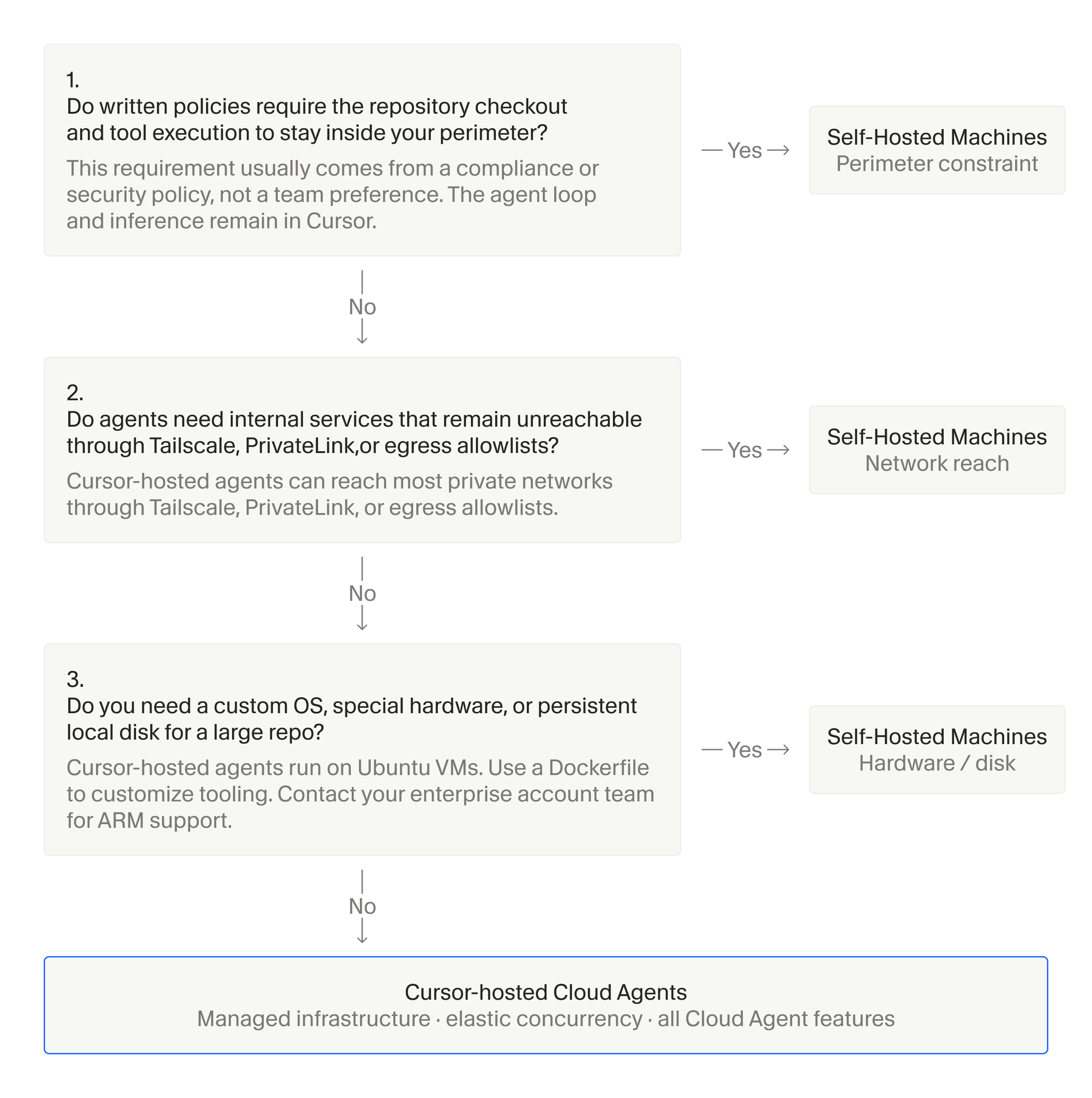
Cursor is direct about when to reach for this feature. Self-Hosted Machines make sense when:
- Agents need direct access to internal services or private repos that never leave your perimeter.
- You need custom hardware like GPUs or Macs, or want agents running inside an existing Kubernetes or managed VM setup.
- Your OS or build pipeline is awkward to package as a standard Cloud Agent build.
For everyone else, the managed option remains simpler. Enterprise Cursor customers blocked from rolling out agents due to network or hardware constraints can find configuration and pool setup in the Self-Hosted Machines docs.
Comments
