
Community Dev Gives Nous Research's Hermes Agent a Full Desktop GUI
A community-built Electron app wraps Nous Research's Hermes Agent CLI in a full native GUI, handling install, multi-provider config, scheduling, and 16 messaging gateways in one place.
 Pro
Takeaways
- What it is: hermes-desktop is a community-built, MIT-licensed Electron GUI for Nous Research's Hermes Agent CLI, not an official product.
- Core value: Replaces manual CLI setup with a guided first-run installer, provider config UI, and full agent workspace on macOS, Windows, and Linux.
- Broad integrations: Supports 11+ LLM providers, 14 toolsets, 16 messaging gateways (Telegram, Discord, WhatsApp, Signal, etc.), and 6 memory backends.
- Key features: Streaming chat with SSE, 22 slash commands, SQLite-backed session search, profile switching, cron scheduler, and persona editor.
- Free and open-source: MIT license, pre-built binaries available; Windows installer is unsigned and will trigger SmartScreen warnings.
- Traction: Over 12,000 stars and 1,400+ forks; the upstream Nous Research docs now reference it directly.
Hermes Agent from Nous Research has quietly become one of the most-starred agent projects on GitHub, sitting at 203k stars. It's a self-improving AI assistant with a built-in learning loop, tool use, and support for virtually every messaging platform. The catch: it's a CLI-first project, and getting it configured end-to-end , providers, memory backends, cron jobs, gateways , requires a fair amount of terminal work. A community developer going by fathah decided to fix that, and the result is hermes-desktop, an open-source Electron app that puts a full native GUI around the Hermes Agent core.
This is not an official Nous Research product. Hermes Desktop is a separate open-source project created by GitHub user fathah, sitting on top of Hermes Agent and giving it a native interface for setup, chat, and day-to-day management. The distinction matters if you're filing bug reports or expecting official support , but the project has clearly resonated, accumulating over 12,000 stars and nearly 1,500 forks.
One app to rule the CLI
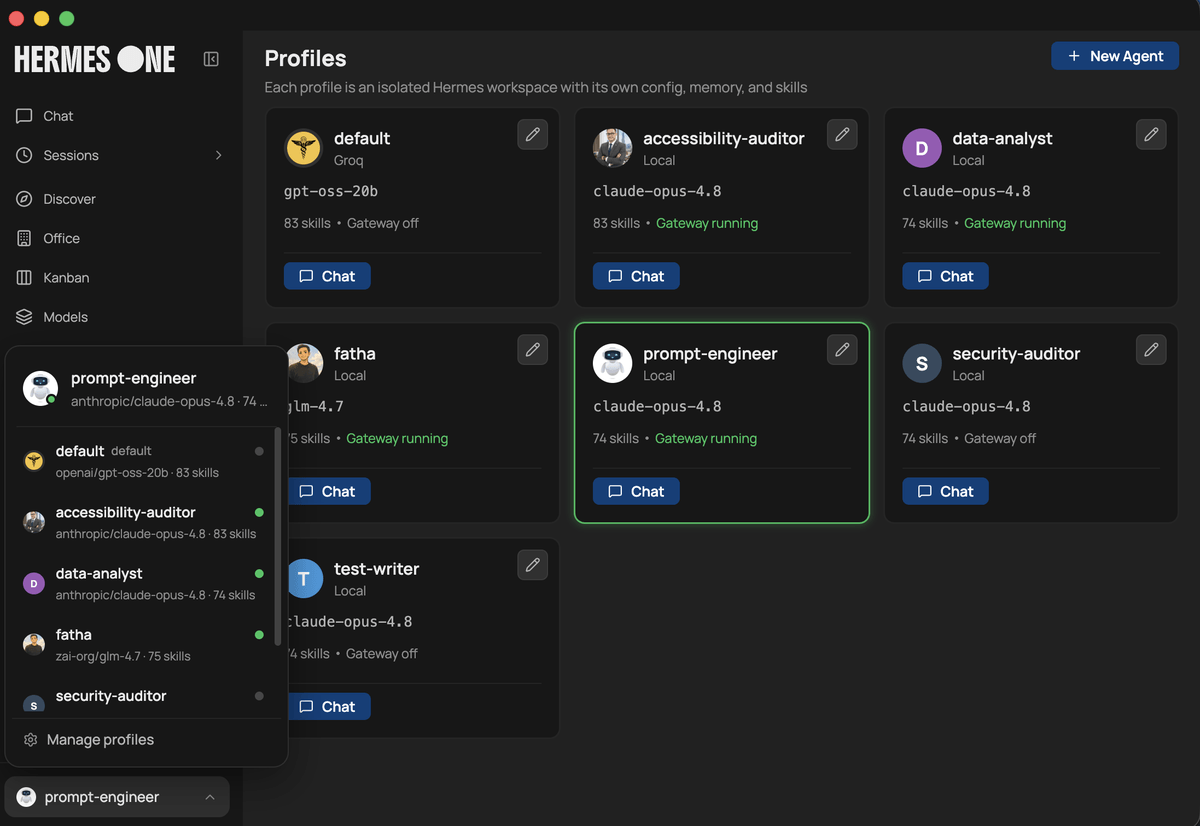
Hermes Desktop is a community-maintained native desktop app for installing, configuring, and chatting with Hermes Agent. Instead of managing the CLI by hand, the app walks through install, provider setup, and day-to-day usage in one place , giving you a GUI for chat, sessions, profiles, memory, skills, tools, scheduling, messaging gateways, and more.
The desktop app is built around the same agent you get from the CLI and the gateway , same config, same API keys, same sessions, same skills, same memory. It's not a separate product or a lightweight clone; it uses the same Hermes Agent core and drives it through a modern UI. If you've used Hermes in a terminal, everything you set up there is already in the desktop app, and anything you do in the app shows up in the terminal. It runs on macOS, Windows, and Linux.

First-run experience
When the app opens for the first time, it will either detect an existing Hermes installation or offer to install it for you. In local mode, it checks whether Hermes is already installed in ~/.hermes; if not, it runs the official Hermes installer with dependency resolution (Git, uv, Python 3.11+). In remote mode, it prompts for the remote API URL and API key, validates the connection, and skips the local install entirely.
In local mode, chat requests go through http://127.0.0.1:8642 with SSE streaming (Server-Sent Events , a protocol for streaming real-time updates from server to client). In remote mode, the app talks to your configured remote URL with the same streaming protocol. The desktop app parses the stream in real time, rendering tool progress, markdown content, and token usage as it arrives.
What's actually inside
The feature surface is surprisingly broad for a community project. Here's what ships:
- Multi-provider support , OpenAI, Anthropic, and local endpoints like Ollama, plus OpenRouter, Google Gemini, xAI Grok, Nous Portal, Qwen, MiniMax, Hugging Face, Groq, LM Studio, vLLM, and llama.cpp
- 14 toolsets , web, browser, terminal, file, code execution, vision, image generation, TTS, skills, memory, session search, clarify, delegation, MoA (Mixture-of-Agents), and task planning
- Memory management , view and edit memory entries, user profile memory, capacity tracking, and support for providers like Honcho, Hindsight, Mem0, RetainDB, Supermemory, and ByteRover
- Scheduled tasks , a cron job builder with minute, hourly, daily, weekly, and custom cron options across 15 delivery targets
- 16 messaging gateways , Telegram, Discord, Slack, WhatsApp, Signal, Matrix/Element, Mattermost, Email (IMAP/SMTP), SMS (Twilio and Vonage), iMessage (BlueBubbles), DingTalk, Feishu/Lark, WeCom, WeChat, Webhooks, and Home Assistant
- 22 slash commands ,
/web,/image,/browse,/code,/shell,/memory,/model,/usage, and more - Session management , full-text search (SQLite FTS5), date-grouped history, and the ability to resume any past conversation
- Profile switching , create, delete, and switch between isolated Hermes environments with separate configs

Tech stack and caveats
The app is built on Electron 39, React 19, TypeScript 5.9, Tailwind CSS 4, and Vite 7. Session history is stored locally with better-sqlite3 using FTS5 full-text search. It's MIT-licensed and free to use, modify, or distribute.
A few rough edges worth knowing about: the Windows installer is not code-signed, so Windows SmartScreen will warn on first launch , click "More info" then "Run anyway". Auto-update is not supported for RPM builds on Fedora; you'll need to reinstall the new RPM manually to update. The project also carries an active open issues count in the hundreds, which is expected for a fast-moving community project still marked as in active development.
Getting it
Hermes Desktop is fully free and open-source under the MIT License , no cost to use, modify, or distribute. Pre-built binaries for macOS (.dmg), Linux (.AppImage, .deb), and Windows (.exe) are available from the releases page. You can also build from source with npm install and npm run build, with platform-specific targets like npm run build:mac or npm run build:win.
If you're already running Hermes Agent from the terminal and want a cleaner day-to-day interface, or if you want to get started with Hermes without memorizing CLI flags, this is the most complete GUI wrapper currently available. The upstream official Hermes docs now reference the desktop app directly, which signals that the community project has earned a degree of recognition from Nous Research itself.