

Cognition's Devin Outposts Brings AI Coding Agent to Your Private GPU
Devin Outposts lets you run Devin sessions on your own hardware, private networks, and GPU clusters, with six launch partners ready to deploy.

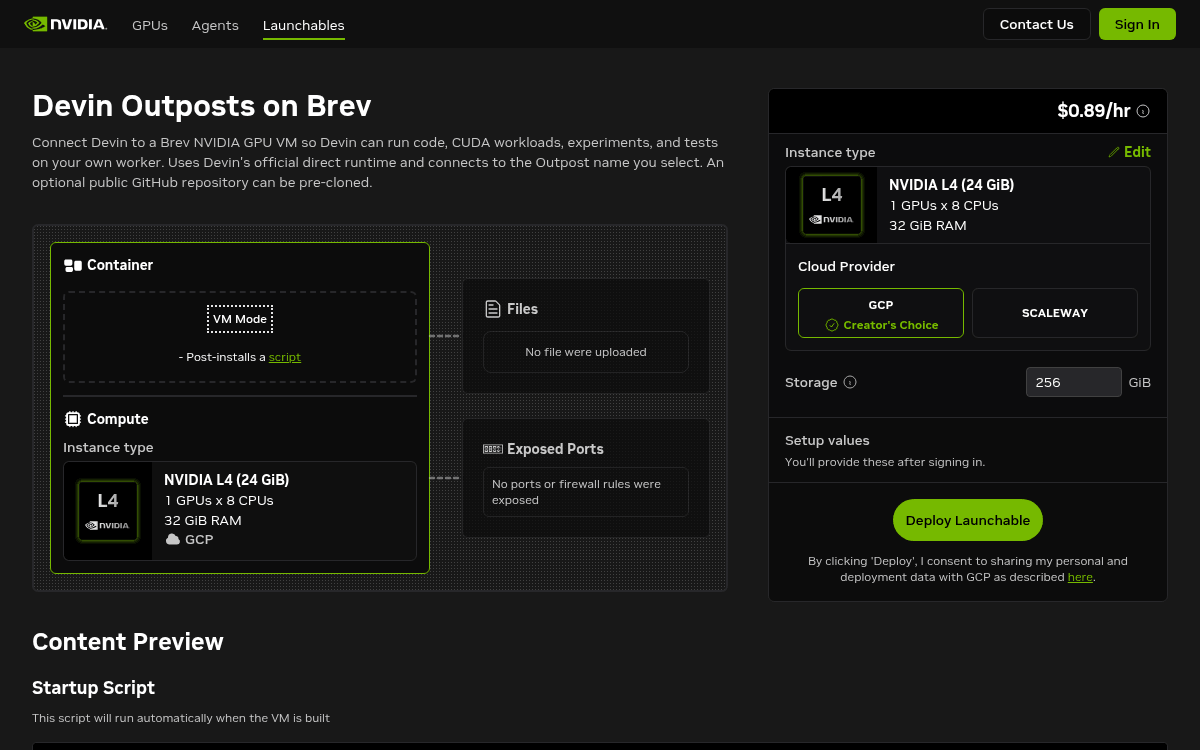
- Devin Outposts lets you run Devin sessions on your own machines (GPUs, VMs, Mac minis, Kubernetes) while Devin's AI reasoning stays in Cognition's cloud.
- Six launch partners are ready: E2B, Daytona, Cloudflare, Namespace (M5 Mac), Modal (GPU), and NVIDIA Brev (GPU).
- Workers only need outbound HTTPS -- no inbound ports, public IPs, or VPN tunnels required.
- Key use cases: debug GPU training failures in place, access private-network services, and build iOS apps with Xcode on Apple silicon.
- Currently in early access; requires contacting your Devin account team to enable for your organization.
- Outposts is intended for tech-native teams comfortable operating remote dev VMs at scale -- not a drop-in for Devin's managed hosting.
Devin Outposts is Cognition's answer to a problem that has quietly blocked enterprise adoption of AI coding agents: the work lives on your machines, but the agent lives in someone else's cloud. With Outposts, you can run Devin sessions on any machine you operate, from a Mac mini on your desk to a GPU cluster inside your VPC, while Devin's inference and planning loop stays in Cognition's cloud.
The architectural split
Devin's agent loop handles inference and planning in Cognition's cloud, while all command execution, file edits, and repository access happen on machines you control. Cognition handles the expensive, stateful reasoning; your infrastructure handles the sensitive, environment-specific execution.
Workers only need outbound HTTPS access. No inbound ports, public IPs, or VPN tunnels required. Drop a worker inside a locked-down VPC and it connects out to Devin's cloud without opening any holes in your firewall.
The mechanics work in three steps:
- Create a pool with the Devin CLI, add a worker on your machine, then select it as your runtime when starting a session.
- When a session starts and a pool is selected, the session enters that pool's queue. Your orchestrator claims it, spawns a machine, and runs the worker.
- When the session ends, the worker exits and your orchestrator tears the machine down.
Claims are atomic, so exactly one worker wins per session. The queue is exposed through an API that tells your infrastructure which sessions are waiting, so an orchestrator can spin machines up on demand and shut them down when the session ends. You never need to keep workers running around the clock.
Six partners, six environments
Cognition launched Outposts with six deployment partners, each targeting a distinct infrastructure need:
- E2B — Fast cloud sandboxes with configurable CPU and RAM, sub-second starts, and access to your private cloud infrastructure.
- Daytona — Linux and Windows sandboxes that start from a snapshot in under 90ms, with repos, dependencies, and toolchains already in place.
- Cloudflare Workers — Each Devin session runs in its own isolated sandbox backed by Cloudflare Containers, with all traffic flowing through customizable proxies and private connectivity to internal services. No VPN or public exposure needed.
- Namespace — An M-series Mac environment. With Xcode and computer use, Devin can autonomously build, run, and test iOS apps end to end.
- Modal — Devin runs on the same infrastructure where you train and serve your models, able to reproduce failures, profile fixes, and scale back to zero on production hardware.
- NVIDIA Brev — GPU infrastructure for debugging training runs, inspecting GPU state, and validating fixes on the hardware where failures actually occur.
Cognition also provides a reference Kubernetes implementation for teams that want to self-host the orchestration layer entirely.
What becomes possible
Three categories of work open up that were previously off-limits for cloud agents:
- GPU debugging in place. Start a session on the GPU box that ran the job. Devin can tail logs, inspect checkpoints and GPU state, reproduce the crash with the real drivers and dataset, and relaunch the run with a fix.
- Private network access. Run a worker on a VM inside your VPC and Devin can chase bugs that only reproduce against your staging database, exercise internal APIs end to end, or operate tooling that will never be exposed publicly.
- Apple platform development. A Mac mini on your desk becomes a Devin-ready macOS runner: Xcode builds, Apple silicon tests, and signing with your local toolchain.
The operational tradeoff
Outposts requires your team to operate the execution layer. Cognition is explicit about this in their official docs: Outposts suits tech-native organizations or small, trusted teams that already have experience running remote development VMs securely at scale.
| Option | Who operates it | Best for |
|---|---|---|
| Multi-tenant hosting | Cognition | Most teams, public repos |
| Dedicated Tenant | Cognition (isolated) | Security-conscious orgs, PrivateLink/VPN |
| Devin Outposts | Your team | Private networks, GPUs, custom hardware |
Outpost sessions have strict readiness timeouts. After your orchestrator claims a session, the worker must connect before the claim deadline. Miss that window and the claim expires, but you are still billed for the fixed and hourly costs incurred during the timeout. That detail matters when you are running at scale.
Availability and cost
Outposts is in early access, and APIs and CLI commands may change. You need to contact your account team to enable it for your organization. The feature sits on top of existing Devin Cloud plans, which start at $20/month for Pro and $80/month for Teams, with Enterprise pricing on request. Compute costs for GPU boxes, Cloudflare containers, Modal instances, and other partner infrastructure are billed separately by each partner.
The Cloudflare deployment is notably frictionless: a one-click Deploy to Cloudflare button prompts for your Devin Outpost ID and API token, then creates and configures the required containers automatically. Teams that want more control can follow a manual path using npm create cloudflare and wrangler.
Devin has always been a cloud-first product. Outposts is Cognition's acknowledgment that some work, specifically work that lives on proprietary hardware, inside locked-down networks, or on Apple silicon, cannot move to a shared cloud. Rather than waiting for those constraints to relax, they built a bridge to meet the work where it already lives.
Comments
