
Claudian Drops Anthropic's Claude Agent Directly Into Your Obsidian Vault
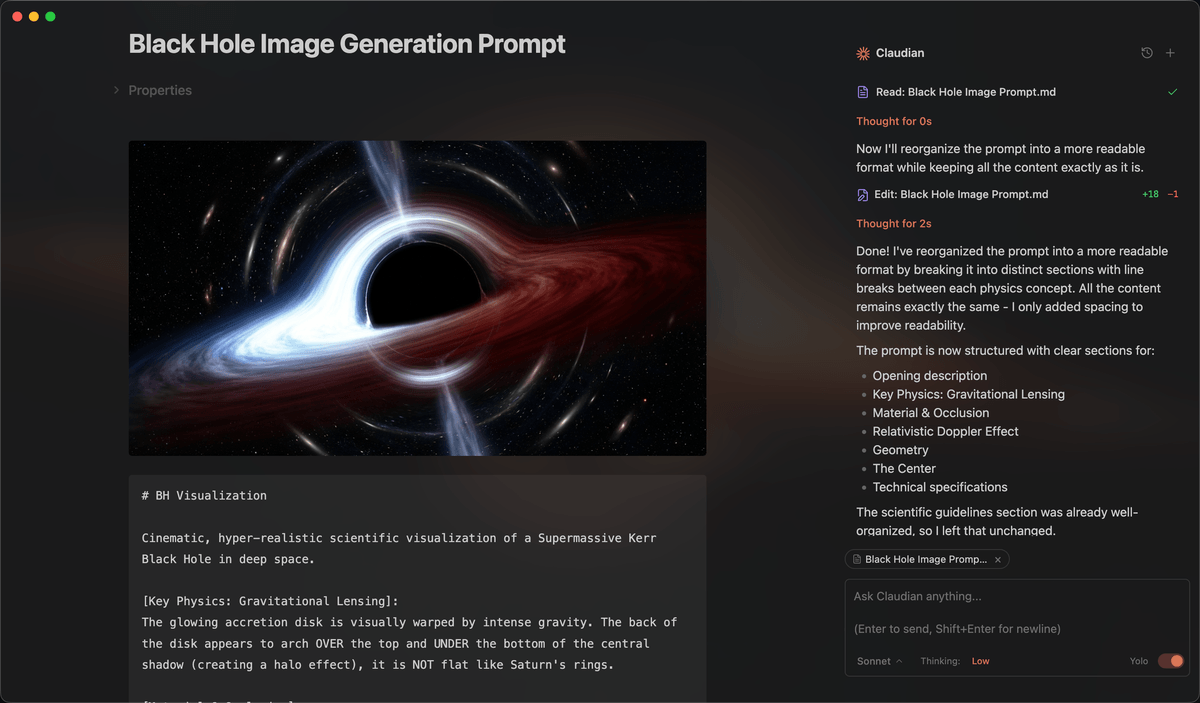
Claudian brings full Claude Code agentic capabilities into Obsidian, turning your vault into an AI-powered working directory with file access, bash, MCP, and multi-agent support
 Pro
Takeaways
- What it is: Claudian is a free, MIT-licensed Obsidian plugin that embeds Claude Code (and Codex, Pi, Opencode) as a full agentic AI directly in your vault.
- Key capability: Your vault becomes the agent's working directory — it can read/write files, run bash commands, search notes, and execute multi-step workflows without leaving Obsidian.
- Multi-provider: Supports Claude Code, OpenAI Codex, Opencode, and Pi as agent backends; compatible with OpenRouter and other Anthropic API-compatible providers.
- Standout features: Inline edit with word-level diff preview, Plan Mode for safe large-scale operations, @-mentions for files/agents/MCP servers, and multi-tab conversation history.
- Cost: Plugin is free; requires a Claude subscription or API key — Claude Pro includes $20/month of Agent SDK credits as of June 2026.
- Limitations: Desktop-only (no mobile), requires Claude Code CLI installed, and full vault file access means backups are strongly recommended before large operations.
Claudian is an open-source Obsidian plugin that does something deceptively simple: it takes Claude Code, the same terminal-based coding agent Anthropic uses internally to write the majority of its own code, and drops it directly into your Obsidian vault. No terminal switching. No copy-pasting. Your vault becomes the agent's working directory, and everything Claude Code can do in a terminal, it can now do to your notes.
The context-switching problem it solves
Developers and researchers have been using AI agents like Claude Code for tasks ranging from organizing research notes to automating workflows, but the constant friction was switching between Obsidian (where knowledge lives) and the terminal (where agents run). Claudian collapses that gap entirely.
The result is that your entire AI workflow , research, drafting, editing, organizing notes , runs inside the vault, with no alt-tabbing to a terminal or separate browser tab. And crucially, this is a real agent, not a chatbot: Claudian uses the Claude Code SDK, meaning the agent autonomously reads files, writes content, searches across notes, and chains multiple steps together without you guiding each one manually.
What the agent can actually do
Claudian embeds AI coding agents , Claude Code, Codex, Opencode, Pi, and more , in your vault. Your vault becomes the agent's working directory, with file read/write, search, bash, and multi-step workflows all working out of the box.
The feature set goes well beyond a chat sidebar:
- Inline Edit: Select text or start at the cursor position, then hit the hotkey to edit directly in notes with word-level diff preview.
- Plan Mode: Toggle via Shift+Tab. The agent explores and designs before implementing, then presents a plan for approval. This is the safest way to run large-scale vault operations.
- @-mentions: Type @ to mention anything you want the agent to work with , vault files, subagents, MCP servers, or files in external directories.
- Slash Commands and Skills: Type / or $ for reusable prompt templates or Skills from user- and vault-level scopes.
- MCP Servers: Connect external tools via Model Context Protocol (stdio, SSE, HTTP). This means you can wire in Notion, Jira, Supabase, or any MCP-compatible service.
- Multi-Tab Conversations: Multiple chat tabs, conversation history, fork, resume, and compact.
- Custom Agents: Define subagents with their own tool restrictions and model overrides, invokable via @Agents/ in the chat.
- Vision Support: Analyze images by drag-and-drop, paste, or file path.
Under the hood: the Claude Agent SDK
Claudian is built on top of the Claude Agent SDK (formerly the Claude Code SDK, renamed by Anthropic in March 2026). The Agent SDK is Anthropic's library for building production AI agents on top of the same harness that powers Claude Code. It ships in Python and TypeScript flavors, with a bundled CLI binary, subagents, sessions, MCP support, and a hosted execution model.
The SDK lets you build AI agents that autonomously read files, run commands, search the web, edit code, and more , giving you the same tools, agent loop, and context management that power Claude Code, programmable in Python and TypeScript. Claudian wraps this in a TypeScript Obsidian plugin, exposing the full agent loop through a sidebar UI.
The architecture is multi-provider. Claude is the primary, full-featured provider. Codex is opt-in and currently supports send, stream, cancel, resume, history reload, fork, plan mode, image attachments, inline edit, # instruction mode, $ skills, and subagents. Opencode and Pi are also supported as optional providers.
The broader shift: coding agents meet PKM
What makes Claudian interesting beyond its feature list is the category it creates. The frontier model race has quieted relative to the harness race , Codex versus Claude Code is a more meaningful contest right now than GPT versus Opus. Claudian takes that harness race and applies it to personal knowledge management (PKM) , the practice of building and maintaining a structured knowledge base.
Claudian's agent can read your actual vault files directly , it has context about what notes you have, what's in them, and how they link together. A browser chatbot requires you to copy-paste content manually and has no awareness of your broader knowledge base. Claudian can also take actions: creating notes, adding wikilinks, updating frontmatter , a chatbot can only produce text you then have to apply yourself.
MCP makes the vault a hub: connect Notion, Jira, Supabase, or whatever tools you use. Your Obsidian vault becomes the central coordination point for everything.
Practical use cases
The plugin is most useful when you want the agent to do multi-step work across your knowledge base, not just answer a question:
- Reorganizing and cross-linking notes across an entire research project
- Drafting structured documents from scattered notes and external sources
- Running bash scripts to process, rename, or bulk-update vault files
- Building custom Obsidian plugins from within Obsidian itself (users have reported this working in one session with a single bug fix)
- Connecting external tools via MCP to pull in live data from Jira, Notion, or databases directly into notes
- Using Plan Mode for large vault restructures where you want to review the full scope before anything changes
What to watch out for
The agent has full file access, so in theory it could delete or corrupt notes. In practice: use Plan Mode for any large-scale operations, and keep your vault backed up (Git or cloud sync). For single-note edits, the inline diff preview lets you reject changes before they're applied.
The other friction point is setup.
If you encounter spawn claude ENOENT or Claude CLI not found, the plugin can't auto-detect your Claude installation , this is common with Node version managers like nvm, fnm, or volta.
The fix is to manually set the CLI path in Settings → Advanced. Also note that
Claudian is desktop-only (macOS, Linux, Windows), requiring Obsidian v1.4.5+. Mobile (iOS/Android) is not supported.
Getting it and what it costs
Claudian is an open-source Obsidian community plugin under the MIT license.
The plugin itself is free. You will need a Claude subscription or API key to use it.
Agent SDK and claude -p usage on Claude plans now draws from a separate monthly Agent SDK credit: Claude Pro includes $20 per month, Claude Max 5x includes $100 per month, and Claude Max 20x includes $200 per month.
You can also route through compatible providers like OpenRouter, Kimi, or DeepSeek if you want to avoid Anthropic's billing directly.
Installation is available directly from the Obsidian Community Plugins page, or by downloading main.js, manifest.json, and styles.css from the latest GitHub release and dropping them into your vault's .obsidian/plugins/claudian/ folder. The BRAT plugin can handle automatic updates if you prefer that workflow.
With nearly 5,000 GitHub stars and active development across 523 commits, Claudian has become the most-starred Obsidian plugin in the AI agent category. The real bet it makes is that your knowledge base and your AI agent should live in the same place , and right now, that argument is hard to argue against.