

Artificial Analysis Rebuilds Its Image Editing Arena Across 17 Specialized Categories
Artificial Analysis rebuilt its Image Editing Arena with a two-axis taxonomy of editing actions and use cases, revealing which model wins each specific task.
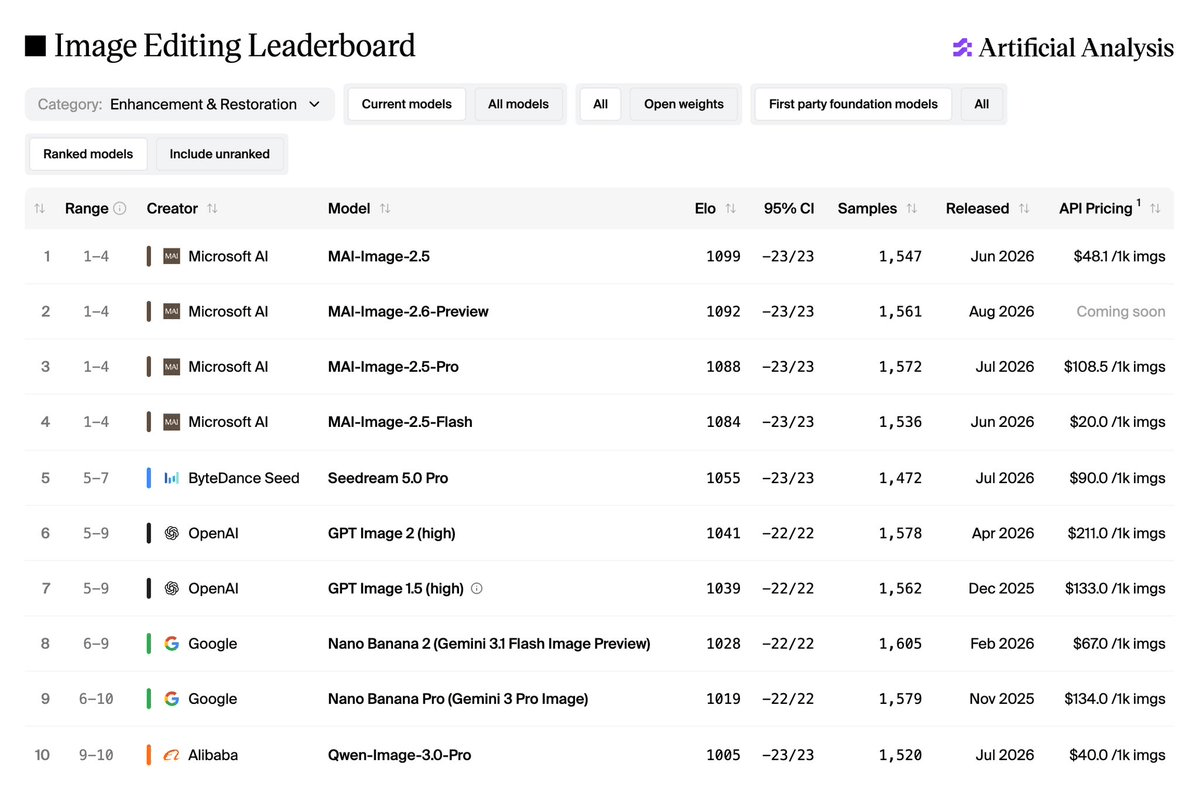
- Artificial Analysis relaunched its Image Editing Arena with 7 editing actions and 10 use cases.
- MAI-Image-2.6-Preview leads overall and wins 7 of 17 category boards.
- GPT Image 2 (high) ranks #2, dominates object-level edits and spatial reframing.
- Seedream 5.0 Pro takes #1 on Identity-Preserving Edit for character work.
- MAI-Image-2.5-Flash is the value pick at $20 per 1,000 images versus $211 for GPT Image 2.
- Ranking uses Bradley-Terry Elo on blind pairwise votes with monthly prompt refresh.
The Artificial Analysis Image Editing Arena has overhauled its leaderboard to rank models across 7 editing actions and 10 real-world use cases, from restoring degraded photos to reworking UI mockups. The updated leaderboard makes clear that the best editor depends entirely on what you are trying to edit, with voting open to the public.
Why one leaderboard falls short
Frontier image editors have largely saturated single-instruction edits like "remove the coffee cup" or "change the sky to sunset." Meaningful differences now appear in complex, chained instructions and specialized workflows where the same model can be world-class at one job and mediocre at another. Artificial Analysis treats Image Editing and Reference to Image as two independent benchmarks based on where each capability sits in end-user workflows. Image Editing covers post-production changes to an existing image; the upcoming Reference to Image benchmark will cover generating novel outputs from reference inputs.
Every prompt in the new arena pairs a source image with an edit instruction, tagged along two axes. The seven editing actions are:
- Object-Level Edit — adding, removing, or replacing objects
- Scene and Style Edit — relighting and restyling
- Enhancement and Restoration — denoising and repair
- Composition and Framing — cropping and reframing
- Identity-Preserving Edit — keeping faces and characters intact
- Text or Symbol Edits
- Reasoning-Based Edit — instructions requiring inference about the scene
The 10 use cases mirror the text-to-image taxonomy: Marketing, Retail, Live-Action Film, Animation and Gaming, Architecture, Productivity, UI/UX, Consumer, Social Media, and Frontier.
Who wins what
MAI-Image-2.6-Preview from Microsoft leads the overall leaderboard and tops 7 of 17 category boards. It dominates transformation-heavy actions — Scene and Style Edit, Text or Symbol Edits, Reasoning-Based Edit — and ties for first on Enhancement and Restoration. Reach for it when you want to restyle, relight, or retouch an image while preserving fine detail.
GPT Image 2 (high) sits at second overall but wins where precision matters most. It takes first on Object-Level Edit and Composition and Framing, making it the strongest choice for surgical local edits and spatial reframing like camera angle changes or zoom-outs that extend a scene. Its weakness is whole-image transformations: it drops to seventh on Scene and Style Edit and sixth on Enhancement and Restoration.
Seedream 5.0 Pro is the specialist pick for character work, ranking first on Identity-Preserving Edit. It preserves face, likeness, outfit, and accessories through pose or expression changes better than any other top-10 model.
The price-to-quality frontier
Costs vary by more than 10x across the top of the leaderboard. Here is how the frontier looks per 1,000 images:
| Model | Price per 1,000 images | Notable strength |
|---|---|---|
| MAI-Image-2.5-Flash | $20 | Value pick of top 10 |
| Qwen-Image-3.0-Pro | $40 | Budget marketing alternative |
| MAI-Image-2.5 | $48.10 | Strong text rendering |
| Nano Banana 2 | $67 | Balanced generalist |
| Seedream 5.0 Pro | $90 | Identity preservation |
| GPT Image 2 (high) | $211 | Object and framing edits |
MAI-Image-2.6-Preview leads on quality but sits above the frontier line because its pricing has not been announced. For teams running batch workflows, MAI-Image-2.5-Flash at $20 per 1,000 images runs roughly 10x cheaper than GPT Image 2 (high) while staying competitive across many category boards.
Category patterns worth noting
- UI/UX design: MAI-Image-2.6-Preview leads by 26 Elo, with MAI-Image-2.5 second. UI edits are dense with in-image text, which correlates with its 30-Elo lead on Text or Symbol Edits.
- Marketing and Advertising: MAI-Image-2.6-Preview beats GPT Image 2 by 23 Elo, driven by restyling and logo or copy edits.
- Productivity and Knowledge Work: GPT Image 2, Nano Banana Pro, and MAI-Image-2.6-Preview are tied at the top, as chart edits require both object-level precision and reasoning about underlying data.
- Human anatomy: GPT Image 2 and Seedream 5.0 Pro lead the top 10, while the MAI models sit mid-pack or lower on faces, hands, and bodies.
- Enhancement and Restoration: MAI models sweep the top four spots, with GPT Image 2 dropping to sixth.
How the ranking works
Elo scores derive from user votes in the Image Arena, computed using Bradley-Terry Maximum Likelihood Estimation and rescaled to an Elo-like range for readability. Voting is blind and pairwise: two outputs from the same prompt appear side by side with model identities hidden until after the vote. The prompt set refreshes every month, retiring prompts if their favorite win rate is statistically indistinguishable from chance or if they no longer reflect real user prompting patterns.
A cohort-based filter also applies when comparing scores over time. Models in the current cohort are ranked only on votes collected under the current methodology, legacy models keep their full vote history, and a vote is retained only if both participating models are eligible for it. Overall Elo is anchored at Gemini 2.0 Flash Preview = 1000, with FLUX.2 [dev] = 1000 as the anchor for subcategory leaderboards.
What this means for your pipeline
Model selection for image editing is now a routing problem. A pipeline touching marketing assets, UI mockups, and character shots will generally get better results by sending each task to a different model than by defaulting to one. The methodology page details the full taxonomy, and the arena is open for anyone who wants to contribute votes and see where their preferences diverge from the aggregate.
Comments
