Anthropic's Claude Design Hits Beta With Self-Correcting Brand Consistency
Claude Design graduates from research preview to beta, adding design-system enforcement, two-way Claude Code sync, and a growing list of export connectors including Adobe, Replit, and Vercel.
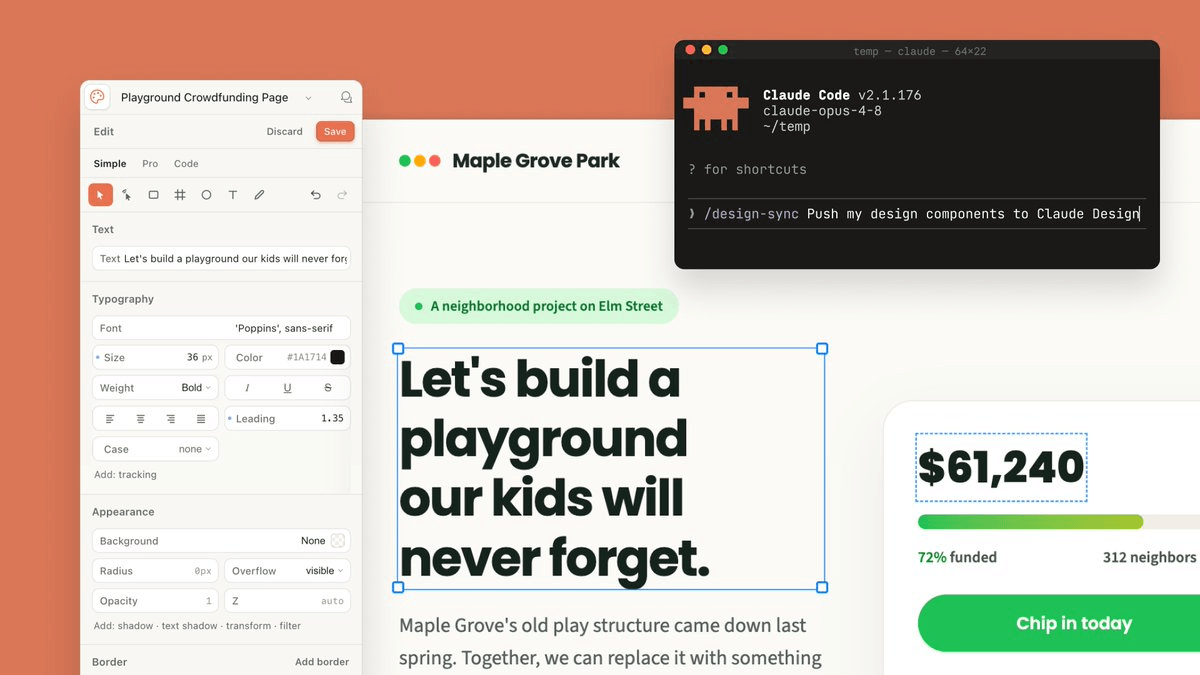
- Beta launch: Claude Design graduates from research preview to beta, now available on all paid Claude plans (Pro, Max, Team, Enterprise).
- Brand enforcement: Claude now self-checks its output against your design system before you see it, with a rebuilt import pipeline supporting GitHub repos, design files, and raw uploads.
- Two-way Claude Code sync: Use
/design-syncand/designterminal commands to move between design and code in both directions without manual handoffs. - Connector ecosystem: New export destinations include Adobe, Replit, Vercel, Lovable, Gamma, Miro, and Wix, in addition to existing Canva, PDF, and PPTX exports.
- Usage limits improved: Design now shares the usage pool with chat and Claude Code, giving most users significantly more headroom.
- Key limitations remain: No native Figma export, no PNG export, and credit burn on design system generation is still high on entry-level plans.
Claude Design, Anthropic's AI-powered visual canvas, just got its most significant update since launching in research preview two months ago. The product is now in full beta, and the headline change is one that early users were loudly asking for: it actually stays on brand. Claude now checks its own output against your design system before you ever see it, and a rebuilt import pipeline lets you bring in components from a GitHub repo, design files, or raw uploads.
One million users, one loud piece of feedback
Over one million people used Claude Design in its first week, and the feedback was consistent. Users consistently reported three limits: fast usage burn, drift from its own design system, and a recognizable default aesthetic. This update addresses all three directly.
Anthropic rebuilt the design system import to give more flexibility and increase precision. You can now bring in one or several design systems from a GitHub repo, design files, or raw uploads. Claude builds with your components, checks its output against your design system, and makes corrections before you see it. That last part is the key shift: the model is now doing a self-review pass against your brand guidelines, not just generating and hoping for the best.
What Claude Design actually is
Claude Design lets you collaborate with Claude to create polished visual work like designs, prototypes, slides, one-pagers, and more. The interaction model is simple: you type what you want on the left, and Claude builds a working design on a canvas on the right. From there, instead of re-prompting from scratch, you comment inline on specific elements, edit text directly on the canvas, or use adjustment knobs to tweak spacing, color, and layout live.
Claude Design is powered by Anthropic's most capable vision model, Claude Opus 4.7. It features high-resolution image support and better file system-based memory, meaning Claude Opus 4.7 generates more accurate prototypes and layouts based on your existing design files and adopts a design-thinking approach to solving your prompts.
The design-to-code pipeline just got real
The other major unlock in this update is the two-way bridge with Claude Code. Previously, you could hand a design off to Claude Code for implementation. Now the connection runs in both directions.
- Use
/design-syncin Claude Code to pull in your design system, so everything you build in Claude Design starts from your existing components. - When a design is ready to become software, you can hand it off to Claude Code, which continues from your existing work instead of starting over from a screenshot.
- Prefer to begin in Claude Code? You can create, edit, and sync design projects without leaving the terminal using
/design. Import a design into your codebase, turn your code into a live prototype, or let Claude carry a project all the way through.
This closes a loop that previously required manual copy-paste or screenshot-based handoffs. A PM can sketch a flow in Claude Design, a developer can pull it into their terminal with a single command, and the implementation starts from the actual components, not a static image.
Where it shines, and where it still struggles
Claude Design is strongest when speed matters. It helps users move from an idea to a visual artifact quickly, which is valuable for PMs, founders, marketers, and designers who want to explore more directions without spending hours setting up files. Early users at companies like Datadog reported going "from a rough idea to a working prototype before anyone leaves the room."
The limitations are real though. Claude Design does not offer a direct export to Figma, which matters because many teams still rely on Figma for final design refinement, design system management, collaboration, and handoff. The design system generation feature also burns through AI credits rather quickly, especially on the entry-level plan. And there is no PNG export, which catches people off guard.
A growing ecosystem of connectors
The export story has expanded significantly. The list of connectors now includes Adobe, Base44, Canva, Gamma, Lovable, Miro, Replit, Vercel, and Wix, with more destinations coming soon. The practical implication: you can sketch a landing page in Claude Design, push it to Vercel to ship, hand the deck version to Gamma for polish, or send social assets straight to Adobe Express, all without leaving the Claude ecosystem.
The connector list also signals Anthropic's positioning. While Claude Design may initially seem like it's looking to compete with Canva, Anthropic has said it's intended to complement it rather than replace it. The integrations with Figma-adjacent tools like Miro and Lovable suggest Anthropic is betting on Claude Design as the ideation and prototyping layer, not the final production environment.
What it's useful for
Based on the launch materials and early user reports, the clearest use cases are:
- Turning static mockups into easily shareable interactive prototypes to gather feedback and user-test, without code review or PRs.
- Sketching out feature flows as a PM and handing them off to Claude Code for implementation, or sharing them with designers to refine further.
- Going from a rough outline to a complete, on-brand pitch deck in minutes, then exporting as PPTX or sending to Canva.
- Building code-powered prototypes with voice, video, shaders, 3D, and built-in AI for frontier design work.
Pricing and access
Claude Design is in beta on Claude Pro, Max, Team, and Enterprise plans and included with your subscription. It's turned off by default for Enterprise users; admins can enable it in organization settings, and work is shareable only within your organization. Usage limits have also improved: Claude Design now shares usage limits with chat, Claude Cowork, and Claude Code, so most people will get much more headroom to create. You can find it at claude.ai/design or in the sidebar of the desktop app.
The self-correcting design system and the two-way Claude Code sync are the two features that move this from a fun prototyping toy into something that can sit in a real product workflow. Whether it earns a permanent spot depends on whether Anthropic can keep the brand consistency improvements stable as designs get more complex, and whether the Figma gap ever gets closed.
Comments