

Anthropic's Claude Cowork Lets You Teach AI by Recording Your Screen
Claude Cowork's new 'Record a skill' feature lets you demonstrate a workflow once on screen, and Claude turns it into a reusable automation it can run on demand.
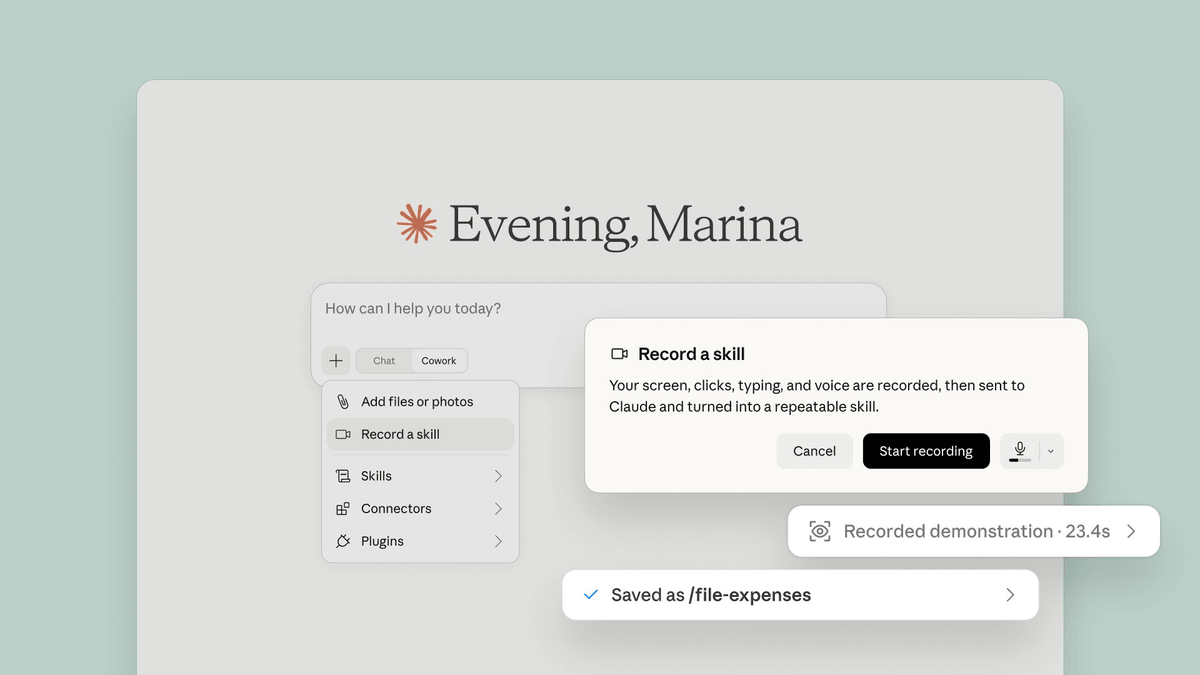
- New feature: Claude Cowork's Record a skill lets you record your screen while narrating a task, and Claude converts it into a reusable automation skill.
- Where to find it: Available in the
+menu of the Claude desktop app under "Record a skill", on Pro, Max, and Team plans. - What skills are: Structured instruction packs (a folder with a
SKILL.mdfile) that Claude loads automatically when a relevant task comes up. - Who it's for: Primarily non-technical knowledge workers; Anthropic data shows 90%+ of Cowork usage is non-software work (ops, finance, content).
- Key limitation: Cowork tasks consume significantly more usage allocation than regular chat, and Claude can modify files without prior review if not configured carefully.
- Team sharing: On Team and Enterprise plans, recorded skills can be shared with specific colleagues or published to the entire organization's directory.
Writing instructions for an AI agent is tedious. You have to describe every step, anticipate edge cases, and hope the model interprets your words the way you meant them. Anthropic just shipped a shortcut: record your screen while you do the task, talk through what you're doing, and Claude Cowork converts that into a reusable skill it can run again on demand.
Record once, reuse forever
The new Record a skill feature lives in the + menu of the Claude desktop app. Hit record, do the task on your screen while narrating your reasoning out loud, stop the recording, and Claude synthesizes everything into a skill it can replay later. No writing required, no markdown files to author by hand.
The previous path to creating a custom skill was more technical. Skills are structured instruction packs that Claude loads when relevant, and until now, creating one meant writing a SKILL.md file yourself: a structured markdown document with metadata, step-by-step instructions, and optional executable scripts. That approach gives you control and transparency, but it requires writing, and non-technical users may find the structure intimidating. The recording flow inverts that: the skill is authored for you from a demonstration.
What skills actually are
A skill is a single capability: a folder with a SKILL.md file that Claude loads when relevant. Claude Cowork plugins bundle multiple skills together with connectors (integrations like Gmail or Slack) and sub-agents into one installable package. Think of a skill as a single repeatable procedure, and a plugin as a full role bundled with all the tools it needs.
Claude applies relevant skills automatically while you work, so you don't need to invoke them separately. You can also trigger one explicitly by typing /skill-name in the sidebar. On Team and Enterprise plans, you can share skills with specific colleagues or your entire organization, and skill sharing works in both chat and Cowork.
Who this is built for
In Anthropic's own analysis of 1.2 million Cowork sessions, business process operations (reports, checklists, spreadsheets) made up 33.4% of usage and content creation another 16.4%, while software development was just 8.7%. More than 90% of Cowork usage has nothing to do with software work. The record-a-skill feature is a direct response to that: it targets the ops manager, the recruiter, the finance analyst rather than the developer who's comfortable writing a SKILL.md by hand.
Strong use cases for recorded skills include:
- Repetitive data entry or file organization workflows that follow a consistent pattern
- Internal report generation with specific formatting rules your team follows
- Research synthesis pipelines where you always pull from the same sources in the same order
- Client prep routines that combine calendar, email, and CRM lookups
- Document review checklists that require the same set of checks every time
The gap it closes
Claude Cowork uses the same agentic architecture that powers Claude Code, with no terminal required. Instead of responding to prompts one at a time, Claude takes on complex, multi-step tasks and executes them on your behalf. Out of the box, it's a generalist. With the right skills installed, it becomes a specialist: an agent that builds spreadsheets the way your finance team does, formats decks to your brand, and researches prospects with live data. The distance between an impressive demo and something that does your actual job comes down almost entirely to skills.
Demonstrating a workflow once is faster and more precise than writing out every step in text. The recording becomes the spec.
Limitations worth knowing
Skills created from recordings are only as good as the demonstration. If your narration skips a step or the recording captures an unusual edge case, the resulting skill may behave unexpectedly on different inputs. Users have reported Claude changing files without prior review, so back up any folder that holds important files before granting Cowork access to it.
Cowork tasks consume more of your usage allocation than regular chat because multi-step execution requires more compute and tokens. Heavy daily use of skills will draw down your plan's allocation faster than you might expect on a Pro subscription.
Availability and pricing
Record a skill is available now in the Claude desktop app on macOS and Windows. Cowork is available on Pro ($20/mo), Max ($100–$200/mo), Team ($30/user/mo), and Enterprise plans. Pro users get access to the same features but will hit usage limits sooner. There is no free tier for Cowork or skills.
Anthropic's broader goal with Cowork is an agentic administrative coworker: something that runs in the background, follows you across devices, and asks for human input only when a decision requires it. Record a skill is the clearest signal of that direction yet. Teaching Claude your workflows now takes no longer than doing the work once and talking through it.
Comments
