

Anthropic's Claude Code Now Designs UI Mockups Before Writing a Single Line
The new /design skill inside Claude Code generates multiple editable UI mockups as artboards, then hands the chosen one off to code implementation.
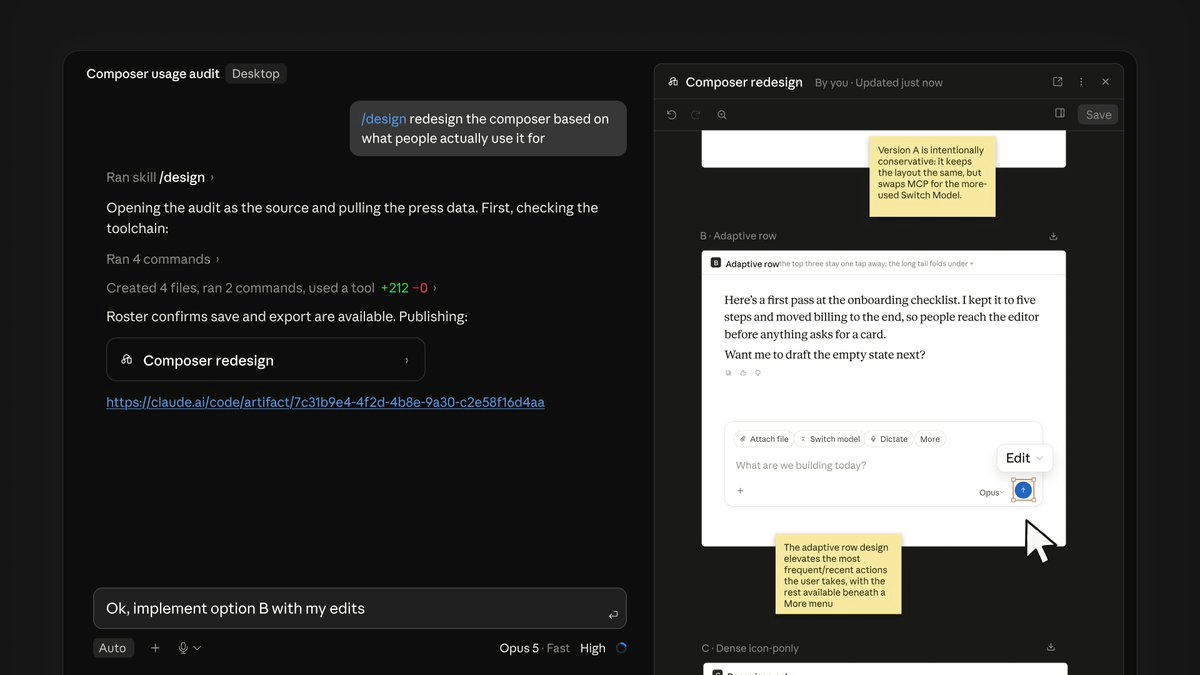
- Anthropic added a /design skill to Claude Code in research preview, in CLI and Desktop.
- Generates multiple editable UI artboards side by side; pick one, tweak, then implement.
- Built on artifacts, so runs as single HTML pages with inline CSS and JS.
- Claude reads your existing codebase and attempts to match current UI style and components.
- Available on Pro, Max, Team, and Enterprise; requires CLI 2.1.183+ or Desktop 1.13576.0.
- Use
CLAUDE.mdor a theme file to enforce your design system;/design-syncsyncs it.
Anthropic just wired a visual design loop directly into its coding agent. Claude Code now has a /design skill in research preview that generates editable UI artboards before you write a single line of code, then hands the chosen mockup off to Claude to implement.
The pitch is straightforward: type something like /design a few options for {feature}, and Claude generates multiple drafts as artboards. Users can pick their favorite, edit it, and then build it out. The artboards render on the side of your session, so you can compare directions visually instead of guessing which prompt will land the layout you want.
The pick, tweak, implement loop
The core change is where the design decision lives. Until yesterday Claude Code built interfaces only by writing code, with no intermediate visual stage. Now, when you run /design and describe the screen you want, Claude does not hand you a code file right away but several graphic variants side by side, each one editable. The value is in that word, editable. These are not static images to just look at. You can change a color, move a block, widen a gap, and only when the draft convinces you do you ask Claude to turn it into real code for your project.
Under the hood, this is not a new model capability. The /design artboards are artifacts specialized for interface design. This explains why the workflow works the same way in the CLI and in the desktop app, since both surfaces already know how to publish artifacts. From a technical standpoint an artifact stays a single HTML page with inline CSS and JavaScript, served under a strict Content Security Policy, with no backend of its own. Good enough for a UI draft, not a full stack app.
It reads your codebase first
The interesting bit for anyone with an existing project: the generated artboards are not decoupled from your repo. According to developer Nate Parrott, Claude reads the existing codebase, matches the current UI style, and creates shareable mockups as Artifacts. That means the options you compare are built with reference to your components and tokens rather than as generic screenshots you'd have to translate later.
You can push this further with configuration. Note colors, typography and spacing in the project's CLAUDE.md file or in a theme file. Claude treats your design system as taking priority over its own choices, so every draft is born consistent with your product's visual identity. With /design-sync you can also sync the design system between the repository and Claude Design.
What it's good and bad at
The clearest win is workflow ordering. Between requirements and code, there is now a design artifact that can be compared, modified, and confirmed. Having a Coding Agent write pages directly often produces a false sense of progress: components are quickly assembled, yet colors, density, information hierarchy, and interaction direction remain unaligned. Every subsequent visual tweak then affects both structure and styles. The model can write code, but the team decides what it actually wants far too late.
Rough edges worth knowing about:
- The designs carry over into the build step, but they still need to be saved manually for now.
- Claude Design's full workflow can import a design system from your repo so generated screens inherit your actual tokens and components. Whether /design inside Claude Code inherits that same import automatically, or whether you need to attach CLAUDE.md and component paths manually the way you would for any AI-generated UI, isn't spelled out in the initial announcement.
- Claude reads the existing codebase and attempts to match the existing UI. This claim of "matching" comes from the product side and doesn't guarantee accuracy or pixel-perfect reproduction.
How to try it
Access is tied to the paid plans that already run artifacts. The /design skill is available on the Pro, Max, Team and Enterprise plans, the same ones on which artifacts work. Since it is a research preview, it should be treated as a feature in flux, one that may change behavior or interface before it becomes stable.
Version requirements matter here. Artifacts, and therefore the /design artboards too, require the Claude Code CLI from version 2.1.183 onward or the desktop app from 1.13576.0. The session must be authenticated with a claude.ai account via /login. To update, run:
npm install -g @anthropic-ai/claude-code@latest
claude /login
claude /design a few options for a settings page
The artboards themselves live outside your terminal window. The actual artboards open as pages on claude.ai, which you open and edit in the browser.
Why this matters
Zoom out and this is Anthropic collapsing the design-to-code handoff into a single agent context. Anthropic is stitching design and development together in the same environment, cutting the manual handoffs between whoever designs and whoever writes the code. It is a strategy consistent with the expansion of the Claude Code ecosystem over the last few months, from isolated environments for multiple clients to the security plugin for code.
For solo builders and small teams, that means fewer round trips to Figma or v0 for wireframes that then have to be re-explained to the coding agent. For anyone already using Claude Design as a standalone product, /design is the shortcut that brings its artboard canvas into the same place you actually ship from.
Comments
