
Microsoft Foundry Opens 11,000 Hugging Face Models to One-Click Azure Deployment
Microsoft Foundry's Hugging Face catalog now offers one-click managed compute deployment for over 11,000 open-source models, from GPT-2 Large to modern LLMs.
 Pro
Takeaways
- Microsoft Foundry's Hugging Face catalog now exposes 11,000+ deployable open-source models.
- Managed Compute deployment is in public preview across A100, H100, and MI300X accelerators.
- Model weights stay on the Hugging Face Hub; Azure endpoints pull them at deploy time.
- Eligible models need Safetensors weights, supported tasks, and no
trust_remote_code. - Serving stack uses open-source runtimes: TGI, vLLM, SGLang, and TEI for embeddings.
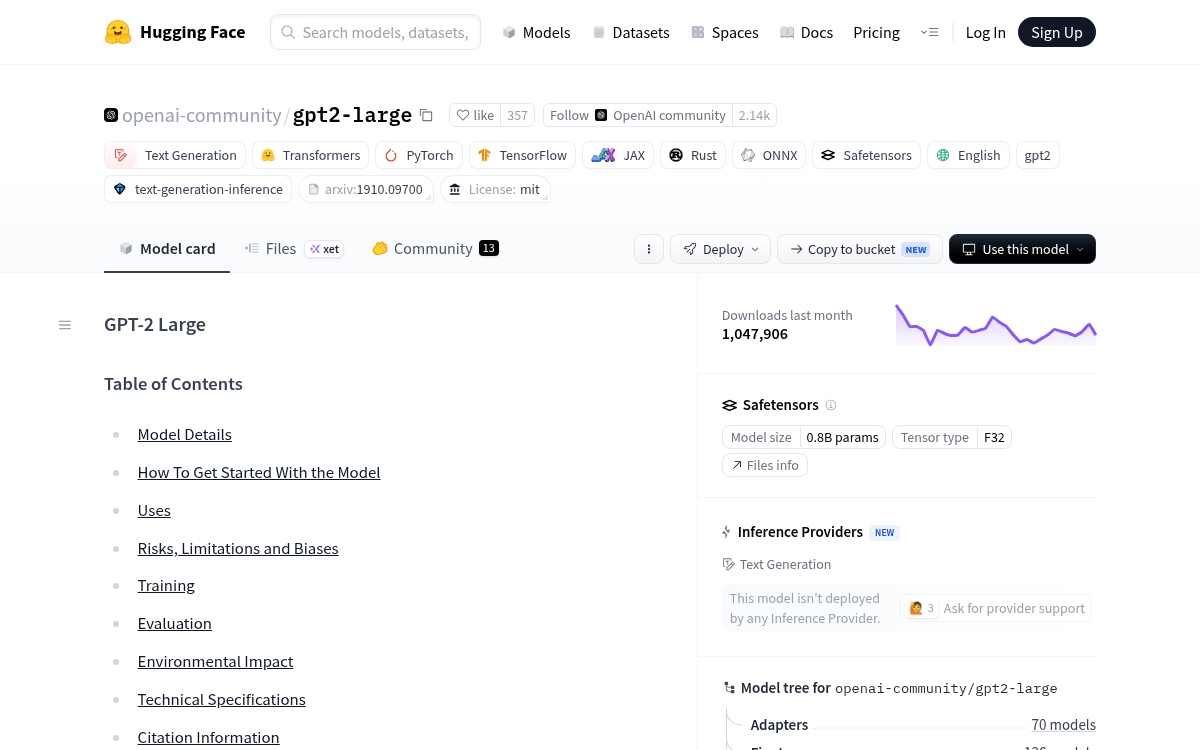
- Classic models like GPT-2 Large now show a Deploy on Microsoft Foundry button.
The list of Hugging Face models you can deploy on Azure with a single click just crossed a notable threshold. Microsoft Foundry and Azure Machine Learning now expose more than 11,000 curated open-source models through a native catalog, and even classics like GPT-2 Large now carry a deploy:azure tag on their Hub page. You can push them to a managed GPU endpoint without touching a Dockerfile or a Kubernetes manifest.
Microsoft and Hugging Face have been building toward this for years. At Microsoft Build, Satya Nadella announced an expanded collaboration to make Hugging Face's open models easy to deploy on Azure's secure infrastructure. At Ignite 2025, Azure AI Foundry was renamed to Microsoft Foundry, part of a unified Azure PaaS offering for enterprise AI operations, model builders, and application development.
What's actually shipping
The core piece is Managed Compute, a deployment mode that gives you a dedicated GPU endpoint for any supported Hugging Face model without provisioning VMs or clusters yourself. It's in public preview, so APIs, SKU names, and supported regions may change before general availability. Built-in content filtering isn't part of the managed compute data path during preview; if you need request-level or response-level filtering, call the Azure AI Content Safety APIs directly from your application.
One architectural detail matters for anyone worried about weight duplication or license drift: the model weights aren't hosted on Azure. When you deploy, online endpoints in your workspace pull weights directly from the Hugging Face Hub. The HuggingFace registry in Azure Machine Learning works as a catalog for discovery and deployment, not as a storage layer.
Which models qualify
Not every repo on the Hub is eligible. The catalog is filtered to models that meet a few technical requirements:
- The model carries the Transformers, Diffusers, or Sentence-Transformers tag on Hugging Face Hub.
- It targets a supported task such as chat-completion, image-to-text, or embeddings.
- Weights are in Safetensors format, and the model doesn't require
trust_remote_code.
The easiest way to check whether a specific model is deployable is to open its Hub page and look for the Deploy button with a Deploy on Microsoft Foundry option. If it's available, a Go to model on Microsoft Foundry button will link straight through. Otherwise, you can click Request to add. That's why an old workhorse like GPT-2 Large now shows a deploy tag alongside its Transformers, ONNX, and Safetensors metadata.
What runs the models under the hood
Rather than a single proprietary runtime, Foundry hooks into the same open-source serving stack most teams already use. The integration runs on Text Generation Inference (TGI), vLLM, or SGLang for LLMs and VLMs, Text Embeddings Inference (TEI) for embeddings, and several others. Each model can be deployed across a wide range of Azure hardware, from NVIDIA GPUs to CPUs, and ships with a default suggested SKU.
On the accelerator side, you'll need approved managed compute quota for the family you plan to deploy on (A100, H100, or MI300X) in your target region. Managed compute quota is separate from Azure VM quota. The AMD MI300X option is worth flagging if you've been stuck on H100 waitlists.
How the deploy flow actually works
The path from Hub to live endpoint is short:
- Open a supported model's card on huggingface.co and click Deploy, then Deploy on Microsoft Foundry.
- On Azure AI Foundry, click Use this model on the redirected model card, then fill in the configuration values for the endpoint and deployment: endpoint name, instance type, and instance count.
- Deploy, then call the endpoint via REST, the Azure SDK, or the OpenAI-compatible client.
For programmatic workflows, managed compute deployments sit behind the same unified Foundry Routing Endpoint, authentication (Microsoft Entra ID or API key), SDKs, and observability surface as any other Foundry model. The same client code you use for a first-party Azure OpenAI model can hit a self-served Llama, Qwen, or SmolLM3 endpoint.
Why this matters beyond the announcement
Practically, this closes a gap that has annoyed teams for years. Pulling an open-weights model from the Hub, wiring it into vLLM or TGI, provisioning GPUs, and handling auth plus observability was a multi-day project. Compressing that work into a wizard, while keeping weights on the Hub instead of copying them into a proprietary registry, changes how open models reach production on a hyperscaler.
It also broadens what belongs in an enterprise catalog. GPT-2 Large won't win any 2026 benchmarks, but a 774M-parameter causal LM is genuinely useful for classification heads, offline text generation, distillation targets, or teaching fine-tuning pipelines to junior engineers. Having it in the same one-click catalog as SAM 3, Nemotron, and Parakeet ASR means the whole open-source stack, old and new, is now a first-class citizen on Foundry.