
ByteDance's AnimateDiff-Lightning Generates Videos 10x Faster in 2 Steps
ByteDance's distilled text-to-video model generates clips in as few as one to eight steps, running more than ten times faster than the original AnimateDiff.
 Pro
Takeaways
- ByteDance released AnimateDiff-Lightning, a distilled text-to-video model over 10x faster than the original.
- Ships 1, 2, 4, and 8-step checkpoints distilled from AnimateDiff SD1.5 v2.
- Uses progressive adversarial diffusion distillation, detailed in the arXiv paper.
- Cross-model distillation gives one motion module compatible with many stylized SD1.5 bases.
- Supports Diffusers, ComfyUI, Motion LoRAs, and ControlNet-based video-to-video restyling.
- Available under CreativeML OpenRAIL-M with a hosted demo Space on Hugging Face.
ByteDance has released AnimateDiff-Lightning, a distilled text-to-video generator that trims the sampling loop down to a handful of steps while preserving the animation quality of the original AnimateDiff. The model runs more than ten times faster than its predecessor, and the release includes weights, a ComfyUI workflow, and a Diffusers integration under the CreativeML OpenRAIL-M license.
Fewer steps, same motion
The core trick is diffusion distillation. Standard AnimateDiff needs dozens of denoising steps to produce a coherent clip, which is why it drags. ByteDance's paper introduces progressive adversarial diffusion distillation, in which a student model learns to reproduce in one or two jumps what the teacher does over many small ones, with an adversarial loss keeping the outputs sharp.
The models are distilled from AnimateDiff SD1.5 v2, and the repository ships checkpoints for 1-, 2-, 4-, and 8-step variants. The 2-, 4-, and 8-step models hold up well in generation quality; the 1-step version is provided for research only. That gives a clear quality-versus-latency dial: 8 steps for the cleanest results, 2 steps for near-instant previews.
Cross-model distillation carries the release
The more interesting contribution sits underneath the speed number. The authors distill the probability flow of several base diffusion models simultaneously, producing a single motion module with broader style compatibility. Rather than binding the weights to one Stable Diffusion checkpoint, they optimize across several at once so the same module slots into many community models.
That matters because AnimateDiff in practice is almost always paired with a stylized SD1.5 checkpoint from Civitai. The recommended base models cover realistic looks (epiCRealism, Realistic Vision, DreamShaper, AbsoluteReality, MajicMix Realistic) as well as anime and cartoon styles (ToonYou, Mistoon Anime, DynaVision, RCNZ Cartoon 3d). Motion LoRAs from the original AnimateDiff repo also plug in, and the authors suggest a strength of 0.7 to 0.8 to keep the training-data watermark from bleeding through.
Running it
The Diffusers path takes only a few lines. Pick a step count, load the motion adapter into an AnimateDiffPipeline, and swap the scheduler to EulerDiscreteScheduler with trailing timestep spacing:
step = 4  # 1, 2, 4, or 8
adapter = MotionAdapter().to("cuda", torch.float16)
adapter.load_state_dict(load_file(hf_hub_download(
    "ByteDance/AnimateDiff-Lightning",
    f"animatediff_lightning_{step}step_diffusers.safetensors")))
pipe = AnimateDiffPipeline.from_pretrained(
    "emilianJR/epiCRealism", motion_adapter=adapter, torch_dtype=torch.float16).to("cuda")
pipe.scheduler = EulerDiscreteScheduler.from_config(
    pipe.scheduler.config, timestep_spacing="trailing", beta_schedule="linear")
output = pipe(prompt="A girl smiling", guidance_scale=1.0, num_inference_steps=step)
Note the guidance_scale=1.0. Classifier-free guidance is effectively off, which is standard for distilled few-step models and part of why they run so fast. A hosted Hugging Face Space is available if you want to try it before wiring anything up locally.
ComfyUI and video-to-video
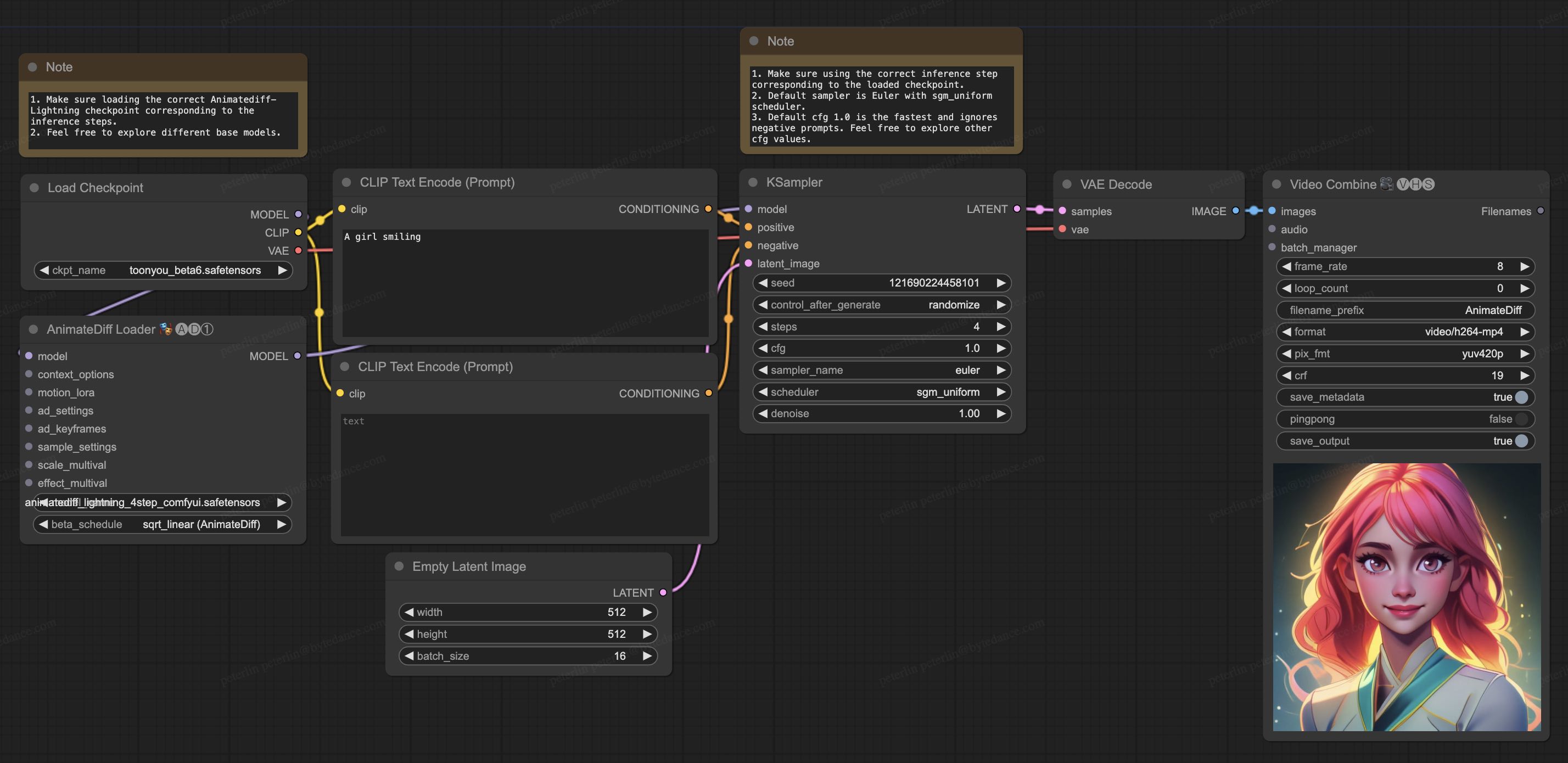
For node-graph users, the repo ships a ComfyUI workflow that drops the Lightning checkpoint into ComfyUI-AnimateDiff-Evolved alongside a standard SD1.5 base and VAE.
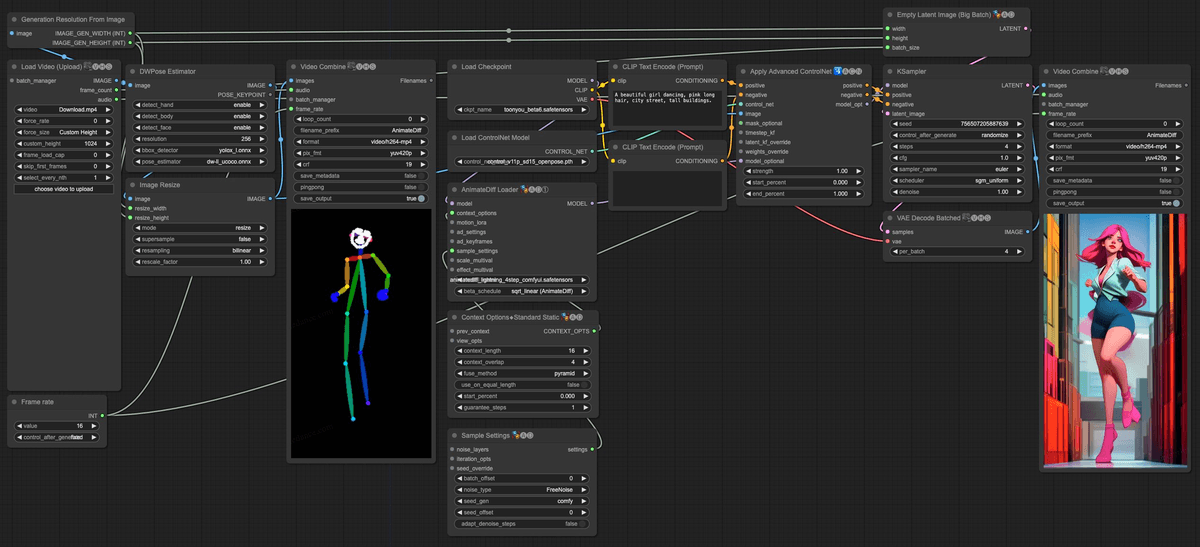
Video-to-video restyling is the more useful mode for creators. A second workflow chains AnimateDiff-Lightning with ControlNet OpenPose, letting you feed in a source video and re-render it in a new style while preserving motion. The authors tested on 576x1024, 8-second, 30fps clips, and recommend matching the output frame rate to the input to keep audio aligned.
Where it fits
Think of AnimateDiff-Lightning as a speed upgrade for the existing SD1.5 animation stack rather than a rival to newer transformer-based video models like Sora or Kling. A few strengths and limits worth knowing:
- Good at: short stylized clips, anime and cartoon looks, dance and pose transfer with ControlNet, fast iteration on prompts.
- Weaker at: photoreal long-form video, complex multi-subject scenes, and anything requiring temporal coherence beyond a few seconds.
- Base-model sensitive: output quality depends heavily on the paired SD1.5 checkpoint, and some bases work better with CFG enabled.
- License: CreativeML OpenRAIL-M, which permits commercial use with the standard usage restrictions.
For anyone already running AnimateDiff pipelines, swapping in the Lightning motion module is a near-free upgrade: same tooling, same base models, a fraction of the inference cost.