| Hey, | Welcome to AlphaSignal, the most read source of news by AI engineers and researchers. Every day, we identity and summarize the top 1% of news, papers, models, and repos, so you’re always up to date. Here’s today’s roundup: |
|
|
|
If you're enjoying AlphaSignal please forward this email to a colleague.
It helps us keep this content free. |
|
|
|
./TOP_NEWS
| | OpenAI launches ChatGPT Agent: a virtual AI worker that can control your computer
| 55,385 Likes |
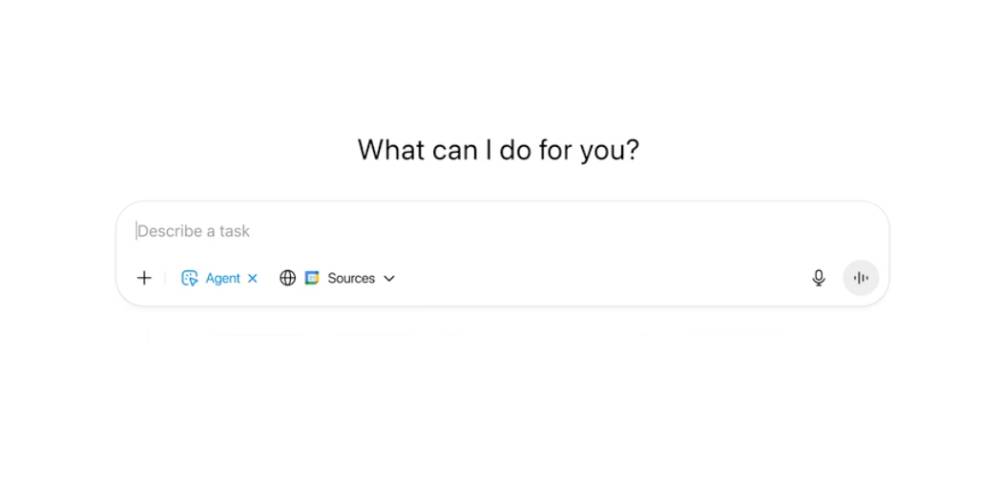
| ChatGPT Agent is a general purpose agentic system that performs full tasks using its own virtual machine. It merges OpenAI products such as Deep Research, Operator, and ChatGPT into one system.
How does it work at a high level? Agent runs in a sandboxed virtual machine and uses built-in tools like browser and terminal with ability to call external APIs. It selects tools dynamically based on task needs while retaining full context. You can interrupt, inspect, or approve actions during execution.
Key Features
Autonomous task execution involving browsing, coding, file editing, and scheduling Uses tool suite: browser (visual/text), terminal, code interpreter, API runner Retains task memory while switching tools,o, and handling user interruptions Connects with apps like Gmail, GitHub, Calendar with scoped permissions Processes spreadsheets, writes code, generates slides, fills forms Achieves 41.6% on HLE, top-tier performance on real-world benchmarks User controls: interrupt, pause, override, and approve Available to Pro users Coming soon for Plus & Team Enterprise/Edu users 400 requests/month (Pro), 40/month (Plus & Team) How to use it?
Use ChatGPT on desktop with the Agent feature. Start a task like “Book a hotel,” “Create a financial model,” or “Write and send an email.” Provide access to the required tool or connector permissions when prompted.
Main Limitations
It’s experimental and not suited for sensitive or critical tasks. OpenAI has classified it as “High Capability” for bio/chemical risks, activating its strict safety protocols to prevent harm
Community Feedback
"It feels like a cross between Manus and o3. Manus is capable of somewhat more complex tasks, but agents is better at integrating research and doing a wider range of tasks well (this is early impressions, and I know they are still working on the tool)" - Ethan Mollick
"Most impressed by the spreadsheets and slide deck generation capabilities, but similar results to what I can get with Manus or Genspark. It’ll be mind blowing to most people, given most haven’t tried the other tools" - Rowan Cheung |
|
| Try now
|
|
|
|
./TOP_SIGNALS
| |
Anthropic launches Claude for Finance to let you analyze market data, create financial models, and perform research workflows |
4,539 Likes | |
Mistral releases Voxtral, an open-source voice model that transcribes speech and lets you query the data with natural language |
4,435 Likes | |
OpenAI enables voice recording in ChatGPT macOS app to capture meetings and create actionable summaries |
4,937 Likes | |
|
Manus AI introduces a visual analytics tool to automate dashboards, reports, and meeting prep workflows using spreadsheets |
2,104 Likes | |
OpenAI, DeepMind researchers urge to monitor CoT to catch early signs of model misbehavior |
1,345 Likes | | |
|
|
|
|
July 24 Webinar: AI Agent Wars – The Hype, Hope, and Hidden Risks.
| Learn about today's agentic frameworks, multi-agent monitoring, and production workflows from Fiddler AI and Nate B. Jones. |
Save your spot now. ↗️ |
|
|
|
./TOP_LECTURES
| |
| 1,847 Likes |
Learn how Anthropic built its Claude multi-agent research system. You’ll understand how agents coordinate, share memory, and parallelize evaluations across compute. | |
|
| 2,937 Likes |
This lecture series shows you how to build and deploy AI agents in n8n. Set up chat-based workflows, manage memory, integrate apps like Gmail, enforce guardrails, and write structured prompts. | | |
| 1,485 Likes |
Read how Hugging Face built its MCP server using Streamable HTTP. Understand transport trade-offs, server push patterns, and deployment strategies. Learn how to expose tools and Spaces to AI Assistants. |
| |
| |
|
|
./HOW_TO
| Generate Spreadsheets Using ChatGPT Agent | Use ChatGPT Agent to research data, format it, and create a spreadsheet. Agent uses its own browser, terminal, and file tools to handle the workflow.
Step 1 Open ChatGPT (Pro or Plus) and start a new chat. Make sure Agent is enabled in your workspace.
Step 2
Prompt the Agent with a task. For example:
Research office rental prices and government grants for tech startups in Singapore. Create a spreadsheet with pricing, locations, and grant programs.
Step 3 Approve the file system and browser access when prompted. This allows the Agent to search online and generate files.
Step 4
Agent will browse sources, extract data, and start writing the spreadsheet. The agent will provide a downloadable spreadsheet file once the task is complete.
You can edit the output using natural language. For example: Add source URLs in a new column.
And agent will create an update file according to the prompt. |
| Try now
|
|
|
|
At Alpha Signal, our mission is to build a sharp, engaged community focused on AI, machine learning, and cutting-edge language models, helping over 200,000 developers stay informed and ahead. We’re passionate about curating the best in AI, from top research and trending technical blogs to expert insights and tailored job opportunities. We keep you connected to the breakthroughs and discussions that matter, so you can stay in the loop without endless searching. We also work closely with partners who value the future of AI, including employers and advertisers who want to reach an audience as passionate about AI as we are.
Our partnerships are based on shared values of ethics, responsibility, and a commitment to building a better world through technology.Privacy is a priority at Alpha Signal. Our Privacy Policy clearly explains how we collect, store, and use your personal and non-personal information. By using our website, you accept these terms, which you can review on our website. This policy applies across all Alpha Signal pages, outlining your rights and how to contact us if you want to adjust the use of your information. We’re based in the United States. By using our site, you agree to be governed by U.S. laws. |
|
|
|
Looking to promote your company, product, service, or event to 200,000+ AI developers? Let's work together.
|
| Work with us
|
|
|
|
|
