

Zed v1.7 Ships Auto Context Compaction so AI Agents Never Hit the Wall
Zed v1.7 adds automatic context compaction to its native agent, letting long coding sessions run indefinitely without hitting model token limits

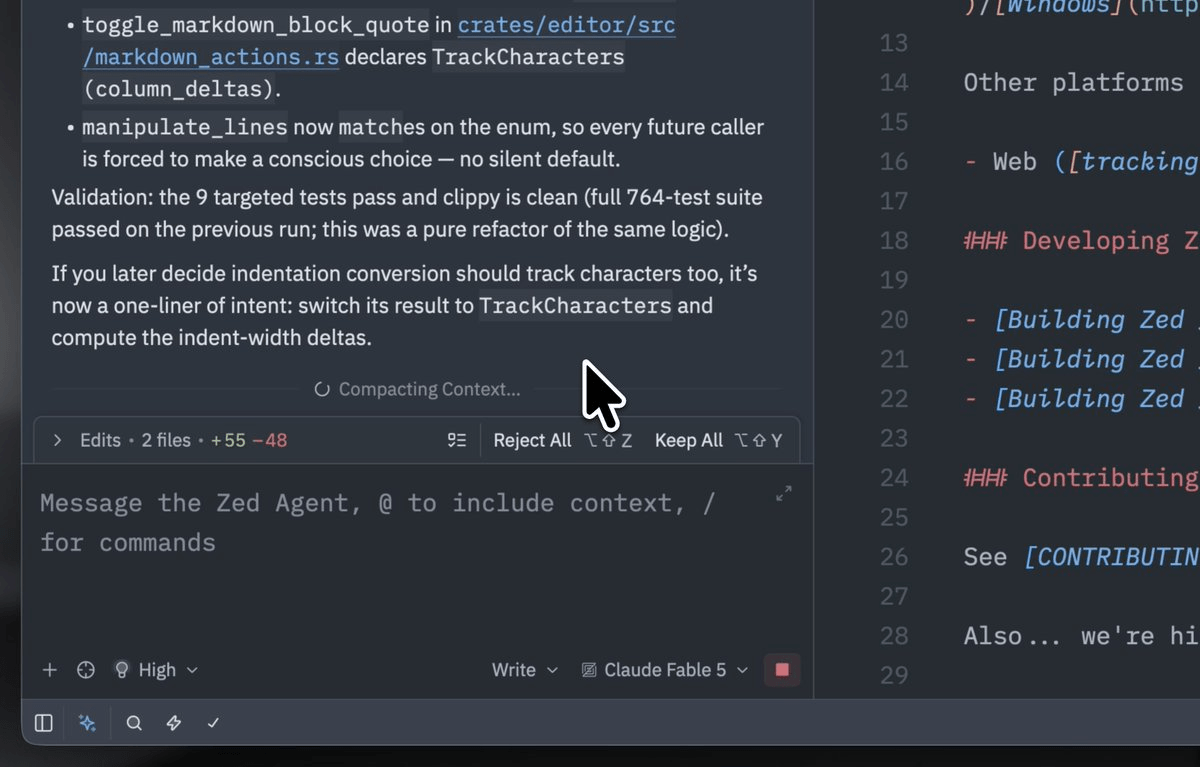
- Auto-compaction lands: Zed v1.7 automatically summarizes agent conversation history when the context window nears its limit, letting sessions run indefinitely.
- Manual control too: Type
/compactin the agent panel to trigger compaction on demand, or adjustagent.compact.thresholdin settings. - Cost visibility: External agents now show real-time context window usage and token cost metrics for supported agents.
- Skills UI overhaul: Agent skills management moves into the settings UI, eliminating the need to edit config files manually.
- Git graph commands: Right-click any branch or tag in the git graph to run custom git commands via the new
$ZED_GIT_REFcontext menu. - Pricing: Zed is free with 50 hosted AI prompts/month; Pro is $20/month with 500 prompts and unlimited edit predictions.
Zed, the GPU-accelerated Rust-based code editor, just shipped v1.7 with a feature that anyone who has watched an AI agent session grind to a halt will appreciate: automatic context compaction. The native agent now monitors how full the model's context window is and, when it hits a threshold, automatically summarizes the conversation history to free up space, all without interrupting your session.
The wall every agentic session hits
Context windows are the hard ceiling on how much an AI model can "remember" at once. Every file read, every tool call, every back-and-forth message eats into that budget. Context windows fill up fast, and watching the token count climb while the AI starts hallucinating about old function names is a familiar pain. Until now, the only real option in Zed was to manually start a new thread and try to carry over the relevant context yourself, which breaks flow and loses accumulated reasoning.
Users had been requesting automatic context compression, similar to Claude Code and Gemini CLI, to enable continuous conversations within a single thread without hitting context limits. Zed has now delivered exactly that.
How compaction actually works
This week's release includes automatic agent context compaction that you can also trigger manually with the new /compact command. When the conversation approaches the threshold, the agent asks the model to produce a dense summary of everything that has happened so far, then replaces the full history with that summary. The thread continues seamlessly from that point, with the model carrying forward the key decisions, file states, and reasoning without starting from scratch.
There are two ways to interact with this system:
- Automatic: The agent compacts on its own when the context hits the configured threshold. No action required.
- Manual: Type
/compactin the agent panel to trigger compaction immediately, useful when you know a complex subtask is wrapping up and you want a clean slate before the next one.
You can also tune the trigger point. The agent.compact.threshold setting in your settings.json controls how full the context window needs to be before auto-compaction fires. Lower it to compact more aggressively and keep costs down; raise it if you want the model to retain more raw history before summarizing.
// settings.json
{
  "agent": {
    "compact": {
      "threshold": 0.8
    }
  }
}
More than just compaction
The v1.7 release bundles several other quality-of-life improvements alongside the headline feature. External agents now show context window usage and cost metrics, and you can delete sessions from history for agents that support it. That cost visibility matters when you are billing API calls by the token across long agentic runs.
The agent skills system also got a polish pass. The skill management move into the settings UI removes the need to hunt through config files just to tweak prompt rules. Skills, Zed's reusable instruction bundles that tell the agent how to behave on specific tasks, are now surfaced directly in the settings panel rather than buried in JSON.
On the Git side, a context menu for ref labels (branches, remote refs, and tags) in the git graph now lets you run custom git commands against the clicked ref, available as $ZED_GIT_REF. That means you can define a task like git checkout $ZED_GIT_REF and trigger it with a right-click, without ever dropping to the terminal.
The release also addresses some persistent performance issues: LSP memory usage improves when a language server emits messages faster than the foreground thread can handle them, and go-to-definition now avoids repeatedly querying the language server while moving the mouse over the same symbol.
Who this is for
Automatic compaction is most valuable for the kinds of tasks where AI agents genuinely shine: large refactors that touch dozens of files, multi-step debugging sessions, or end-to-end feature builds that require the agent to hold a lot of architectural context. These are exactly the sessions that used to die mid-task when the token budget ran out.
If you use Zed with your own API keys (Anthropic, OpenAI, Gemini, or any OpenAI-compatible provider), compaction also has a direct cost implication. A summarized context is dramatically smaller than the raw history, which means fewer tokens billed per request for the remainder of the session. External agents now also show context window usage and cost metrics for agents that support it, so you can actually see the impact in real time.
Getting it
Zed is free to download and use. The free plan includes 50 Zed-hosted AI prompts per month and unlimited use of local models via Ollama or any OpenAI-compatible API with your own key. The Pro plan at $20/month includes 500 Zed-hosted prompts per month, a $5 monthly token credit, unlimited accepted edit predictions, and priority access to the latest frontier models. You can download the update from zed.dev/download or let the editor auto-update. The full changelog is on GitHub.
Context compaction is not a flashy feature, but it is the kind of thing that quietly removes one of the most frustrating hard stops in agentic coding. The fact that it fires automatically, with a configurable threshold and a manual escape hatch, means most users will simply never hit the context wall again.
Comments
