



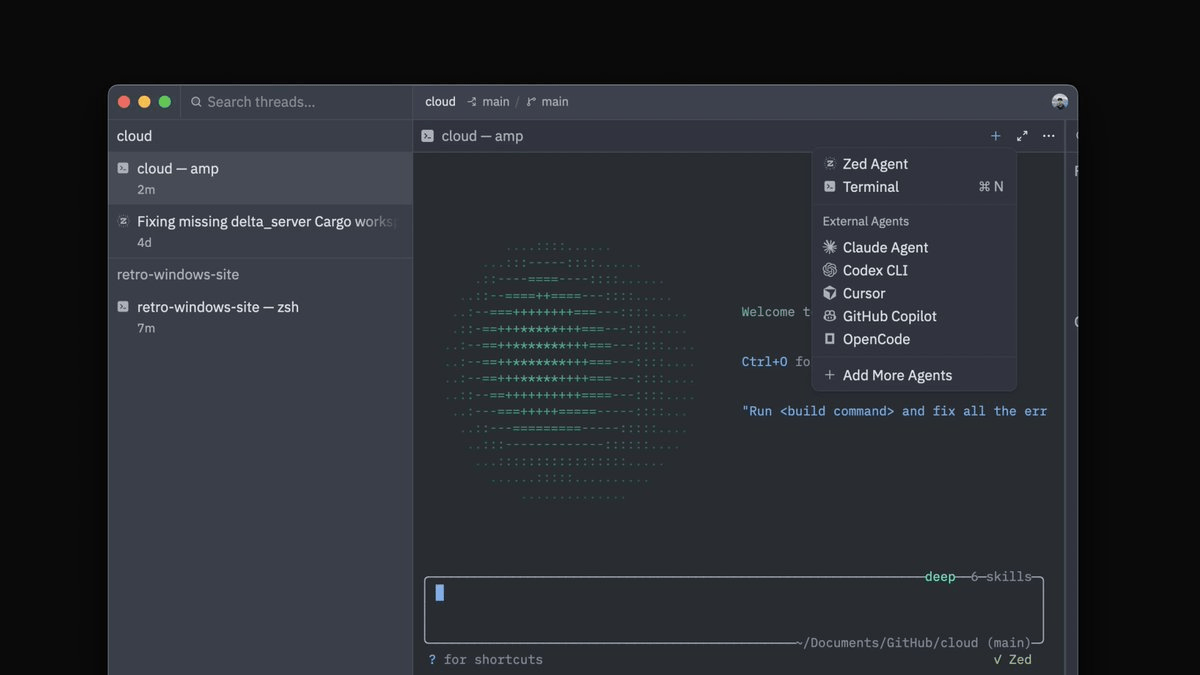
Terminal Threads are Zed's answer to a problem that has been quietly frustrating agentic developers for months: you can run powerful CLI agents like Claude Code or Amp, or you can have a clean, organized workspace. Until now, you couldn't easily have both. With the release of Zed v1.3.5, that tradeoff is gone.
The Problem With Terminals and Agents
When Zed launched Parallel Agents last month, many users started running multiple agents at once in the same window. But Parallel Agents only worked with Zed's built-in agent and external agents connected through ACP (Agent Client Protocol, Zed's standard for integrating external AI tools). Many developers prefer working with agents in the terminal, and some were already making it work with the existing terminal pane, even though that pane was never designed for managing parallel agent sessions.
Terminal Threads bring those sessions into the same sidebar where Zed already tracks agent work. The result is a unified control plane for every kind of agent work happening in your editor, regardless of whether the agent speaks ACP or just runs in a shell.
How It Works
Open the "New Thread" menu from the + icon in the Agent Panel toolbar and choose Terminal. A new terminal opens in the panel body and appears as its own entry in the Threads Sidebar, just like any other thread. From there, you launch whatever CLI tool you want.


Don't miss what's next in AI
Join 300,000+ engineers and researchers who get the signal, not the noise.
- Full access to in-depth AI research breakdowns
- Be the first to know what's trending before it hits mainstream
- Daily curated papers, repos, and industry moves