

GitHub's Copilot Code Review Got 20% Cheaper by Rewriting Instructions, Not Tools
GitHub's Copilot code review got worse after a tool upgrade — until they rewrote the instructions, cutting costs 20% with no quality loss
- GitHub migrated Copilot code review to shared CLI tools (
grep,glob,view) expecting an upgrade, but benchmarks showed higher costs and fewer issues caught. - The root cause was tool instructions written for a general coding assistant, not a reviewer — causing the agent to browse repos instead of investigating diffs.
- Rewriting instructions to encode a reviewer's workflow (ask, narrow, read, decide) fixed the regression without changing the tools at all.
- The result: ~20% lower average review cost in both offline and production evaluation, with no quality degradation.
- Key insight: for agents, tool instructions are as load-bearing as API docs — a small wording change can reshape the entire investigation pattern.
- The improvements are live now; the 4,000-character limit on
copilot-instructions.mdfiles has also been removed for more customization flexibility.
There's a widely-held assumption in agentic AI development: give the agent better tools, and it will do better work. GitHub just published a detailed post-mortem showing exactly how that assumption burned them , and what they learned fixing it.
When you open a pull request, Copilot code review reads the diff and explores the surrounding code to find problems before they ship. To do that, it used its own set of code exploration tools , until the team swapped in the better-maintained, shared tools that power the Copilot CLI: grep, glob, and view. It seemed like a clean infrastructure win.
Instead, benchmarks showed that the cost of reviews went up and fewer issues were being caught. But the tools weren't the problem. The instructions were. Once GitHub rewrote them to match how a reviewer actually reads a pull request, the regression flipped into a win: roughly 20% lower average review cost, while maintaining the same review quality.
Why the migration made things worse
The original Copilot code review tools were inspired by earlier agentic systems like SWE-agent-style repository navigation and GitHub Copilot Autofix. Those tools were specific to code review and designed for how models behaved at the time , earlier agentic models made fewer tool calls and were worse at automatically pulling in context, so it was more important to include all relevant information in the few calls that were made.
The Copilot CLI harness is also used by a growing number of Copilot agent products, including the GitHub Copilot cloud agent, so harness improvements can benefit more than one product. GitHub wanted to clean up and share infrastructure, so they experimented with using the CLI tools in code review , the goal being to reduce duplicated implementations and make it easier to carry improvements across Copilot products.
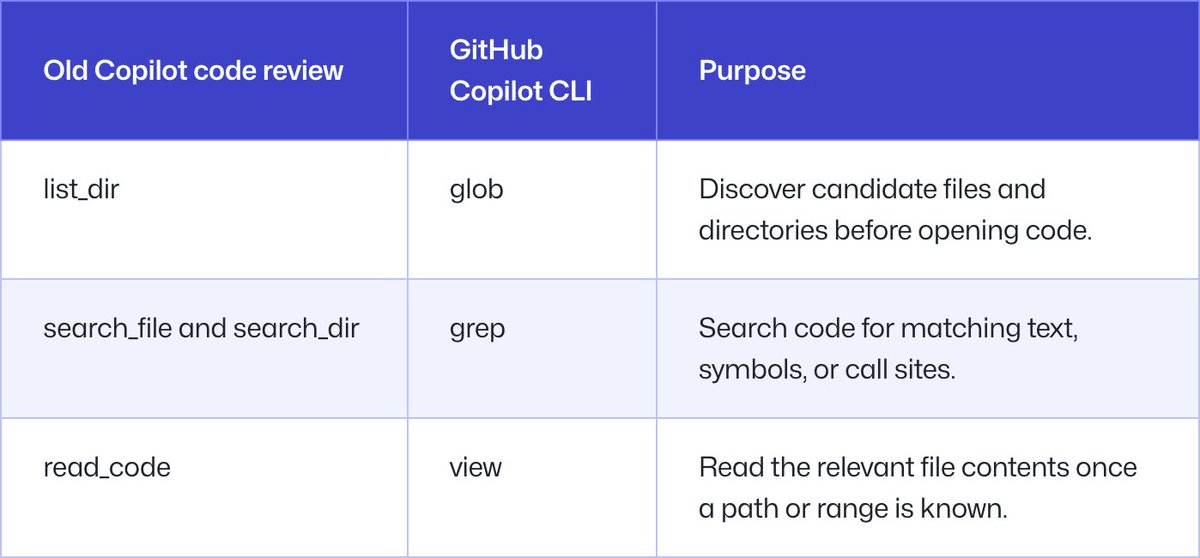
The tool mapping looked straightforward on paper:
| Old Copilot Code Review | Copilot CLI | Purpose |
|---|---|---|
list_dir | glob | Discover candidate files and directories |
search_file / search_dir | grep | Search code for symbols or call sites |
read_code | view | Read file contents once a path is known |
The tools themselves worked, but their instructions were tuned for use within the Copilot CLI and implied the wrong workflow: the agent used grep, glob, and view like a broad coding assistant instead of a reviewer. A coding assistant may map a whole area before making a change to ensure it doesn't break some other corner of the code. A reviewer, on the other hand, usually starts from the diff, asks whether the change introduced a problem, and then looks for the narrowest nearby evidence required to confirm or dismiss it.
The browsing loop problem
The team's internal benchmarks revealed more than a final score , they showed the full trace of every tool call the agent made. And the traces told a clear story.
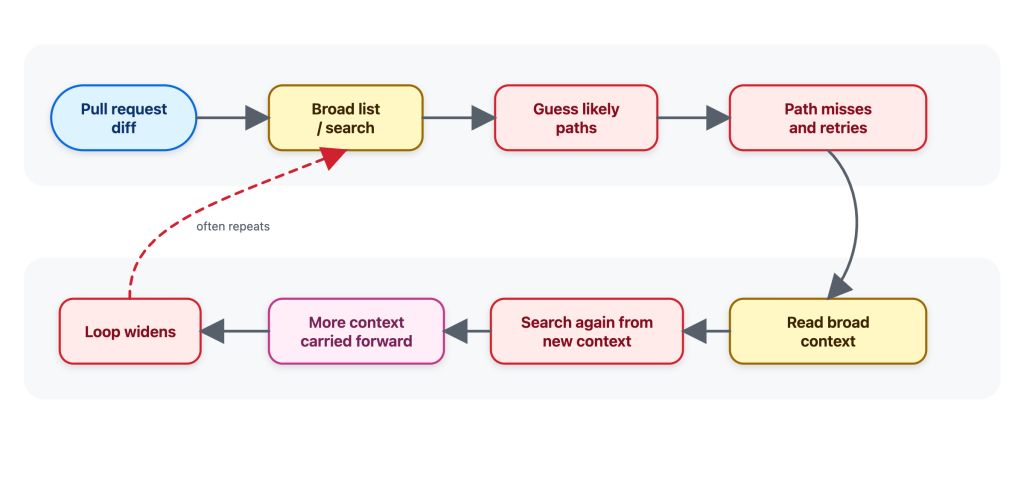
When using the CLI tools with their original instructions, general coding-assistant instructions make sense for an interactive assistant where a developer may ask it to understand a repository, plan a change, edit files, and continue over multiple turns. But Copilot code review has a narrower job: start from a pull request diff, gather enough surrounding evidence to decide whether a change introduces a real issue, and avoid loading context that is not needed for that review question.
This distinction matters because every tool result gets added to the agent's context window. Extra file contents don't just cost tokens , they can dilute the agent's focus, causing it to generate less targeted review comments. The agent was doing more work and catching fewer things precisely because it was accumulating irrelevant context.
Rewriting the instructions around a reviewer's mental model
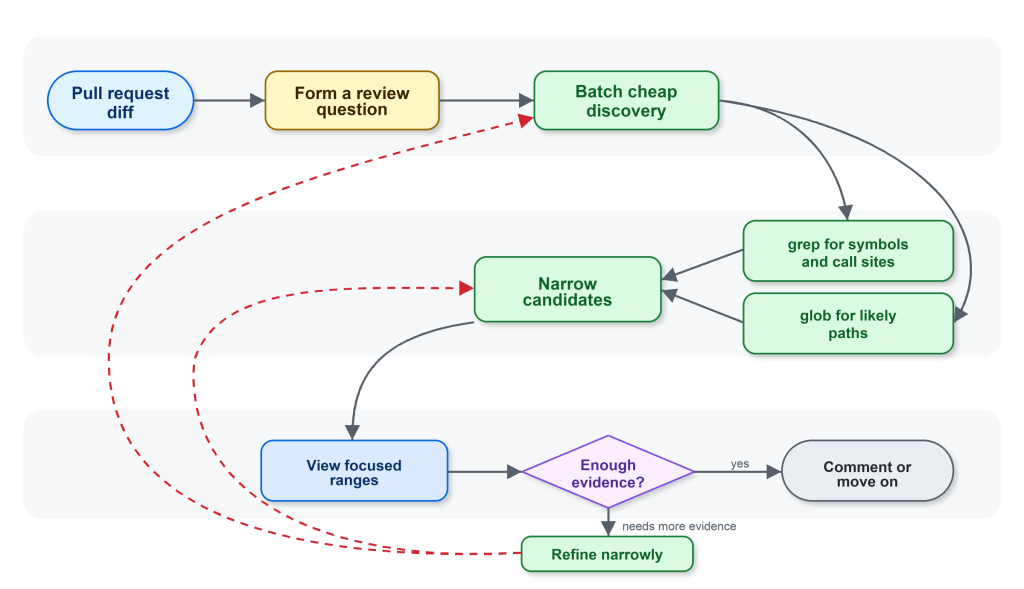
The next iterations made the guidance specific to code review. The workflow GitHub encoded was: start from the diff and form specific review questions; use glob when the path is uncertain and grep to find candidate files, symbols, and call sites; batch cheap discovery before reading files; use view only when the agent knows which file or line range it needs; and batch focused reads instead of alternating between one search and one read.
Think of it like the difference between two approaches to reviewing an authorization change:
- Old behavior (browsing): Show me the full contents of every file that calls this helper
- New behavior (reviewing): Are any request-handling callers relying on the old behavior?
The intended path after the rewrite is short and purposeful:
start from the helper changed in the diff
grep for callers of that helper
glob for likely route, handler, or controller files
view the most relevant caller ranges
decide whether any caller changes the risk
The team also changed how the agent recovered from failed searches. If grep failed, the better next step was one simpler, corrected search , not a cascade of guesses. If a path was wrong, pivot to glob rather than reading neighboring files that happened to exist. Small nudges in the instructions prevented a single tool failure from snowballing into a full exploration loop.
Benchmarks as a debugging tool, not just a score
What made this fixable was having benchmarks that exposed behavior, not just outcomes. The team could run the same review examples, compare tool traces, update instructions, and run again. The questions they asked were concrete:
- Did the agent narrow first, or read broadly first?
- Did it batch independent searches?
- Did it call
viewonly when it had a specific reason? - Did a change in instructions reduce tool errors, or just move them somewhere else?
- Did the trace stay anchored to evidence from the diff?
The most useful signal wasn't "the instructions are better." It was more concrete: the agent was making a similar number of tool calls, but spending more of them on relevant evidence instead of repeatedly expanding the search.
The result: 20% cheaper, same quality
These efficiency gains reduced Copilot code review costs by about 20% while maintaining the same standard of review quality , observed in both offline and online evaluation. The reduction didn't come from the tools themselves. It came from the workflow around them.
There's also an important counterexample worth noting. Copilot code review is anchored to a diff and a review question. Copilot CLI handles broader, interactive coding tasks where exploration can be part of the job , there may be no single diff anchor, the user may change direction over multiple turns, and the right context may not be obvious at the start. The same grep, glob, and view tools can support both products, but the workflow around those tools has to match the product. When the team tried applying review-focused instructions to the CLI, it didn't produce the same win , because the CLI's job is fundamentally different.
The broader lesson for anyone building agents
This story carries a principle that applies well beyond Copilot. Tool descriptions and system instructions are closer to API documentation than configuration. Unclear API docs leave a developer confused and lead to inefficient or wrong decisions. Unclear tool prompting does the same for an LLM , a small wording change can affect cost, quality, and the entire shape of an investigation, because it changes how the agent spends its attention.
The takeaway is that shared tools scale when the instructions and benchmarks match the job. If you're building agentic systems on top of shared tool harnesses, the tools are table stakes. The real leverage is in writing instructions that encode the specific workflow your agent needs to follow , and having traces detailed enough to debug when it drifts.
The improvements are already live. You can try GitHub Copilot code review on any pull request today by selecting Copilot from the Reviewers sidebar. Custom instructions can be added via .github/copilot-instructions.md in your repository, and the previous 4,000-character limit on those instruction files has been removed, allowing additional customization and flexibility.
Comments
