

Black Forest Labs' FLUX VTO Solves Virtual Try-On in Under 4 Seconds
Black Forest Labs launches FLUX VTO, a production-ready virtual try-on API that generates photorealistic outfit results in under 4 seconds at catalog scale

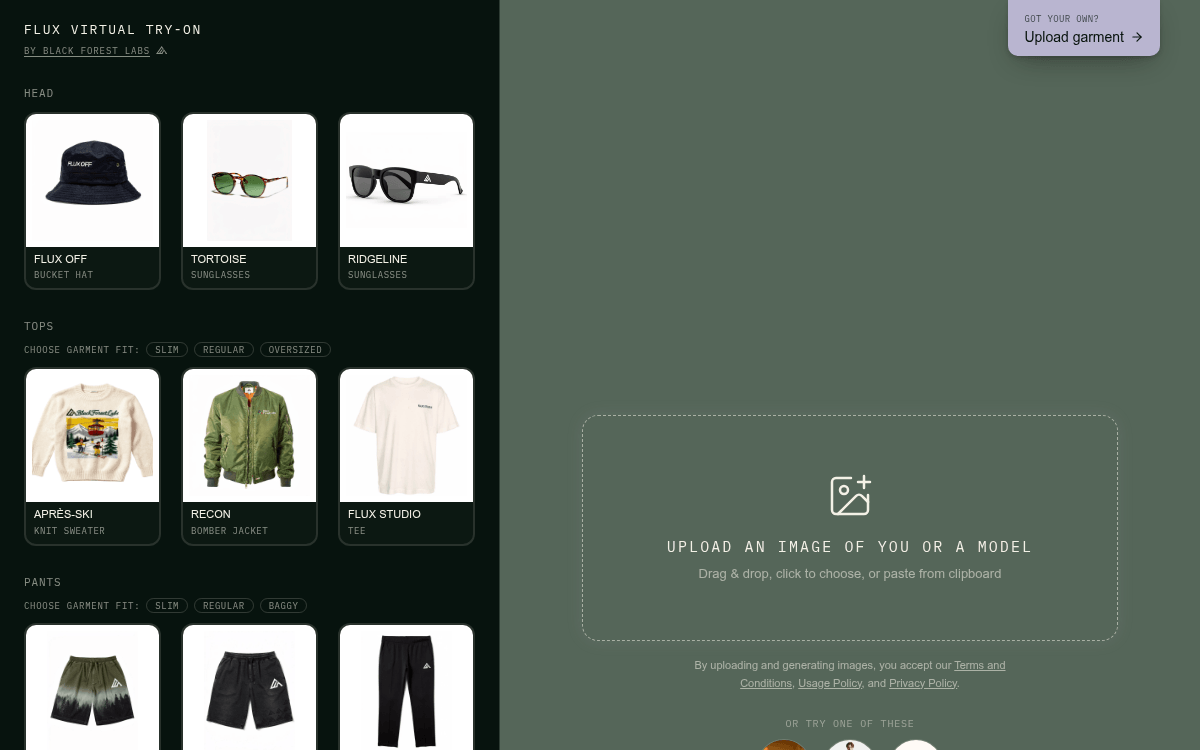
- FLUX VTO is live: Black Forest Labs launched a virtual try-on API that generates photorealistic outfit results in under 4 seconds.
- Fidelity focus: The model preserves the subject's face, pose, and garment details including logos, stitching, and prints.
- Multi-garment support: Up to four garments can be layered in a single generation using a merged canvas image.
- Simple API: POST a person image + garment image to
api.bfl.ai/v1/flux-tools/vto-v1; poll for result. Regional endpoints (EU/US) cut latency by up to 1 second. - Pricing: Credit-based via BFL API; third-party platforms like Runware price it at ~$0.0375 per first input MP. Free demo available at flux-tools.bfl.ai.
- Limitations: Visual styling only (not sizing), swimwear/lingerie blocked by default, inputs capped at 2 MP, best results with full-body shots in plain clothing.
Virtual try-on has been a running promise in e-commerce AI for years. The demos always looked impressive; the production deployments almost never shipped. Black Forest Labs thinks it has finally cracked the three problems that kept the technology stuck in demo purgatory: speed, fidelity, and economics. Their new FLUX Virtual Try-On (VTO) endpoint is live now on the BFL API.
Why every previous attempt fell apart
The failure modes of existing virtual try-on models are well understood by anyone who has tried to ship one. Models drift between generations, so identity, hair, and pose shift in ways that make outputs unusable on a live product page. Garments fare no better: logos disappear, stitching degrades, prints render incorrectly, and buttons vanish. Even when the geometry is right, the look is often wrong, with outputs that don't match a brand's contrast, highlights, or aesthetic.
Then there is the economics problem. Existing try-on models take 10 to 30 seconds per generation, which is too slow for interactive shopping and too expensive to run across a full catalog. Any one of those issues is enough to kill a production deployment. Together, they explain why so few catalogs have actually shipped it.
Three bars, all cleared
FLUX VTO is built around three specific claims that map directly to those failure modes:
- Speed: Generations complete in under four seconds, fast enough to feel interactive in a consumer flow.
- Fidelity: Identity is preserved across generations, and garments come through with their logos, prints, stitching, and hardware intact. The output looks like the person wearing the actual product, not a reinterpretation of it.
- Scale: The model is cheaper to run than comparable systems, which is what makes try-on viable across thousands of SKUs rather than a curated handful.
What it can actually do
FLUX VTO is tuned to preserve the subject's face and pose while transferring garments with strong logo, print, stitching, and hardware fidelity, making it suitable for catalog-scale styling, product visualization, outfit transfer, and shopper-facing try-on workflows. The model supports three input modes:
- Single garment (packshot): A flat product shot on a plain background. This is the cleanest input and produces the best results.
- Multi-garment: Multiple pieces arranged on a single canvas image. Sub-4-second generations; layer up to four pieces.
- Model-to-model: The garment reference is already worn by a different model. Useful when you only have on-model imagery available.
This makes VTO useful for e-commerce catalogs where a single garment photo needs to be shown on multiple models without re-shooting.
How to call it
The API is a straightforward async REST workflow. You POST a person image and a garment image (both as base64 or URLs), along with a natural-language prompt, then poll for the result. The endpoint is POST https://api.bfl.ai/v1/flux-tools/vto-v1.
The prompt formula is simple and templated:
The person of image 1, maintaining exactly their face and pose,
wearing the {garment description} of image 2.
Here is a minimal Python example:
import base64, os, time, requests
API_KEY = os.environ["BFL_API_KEY"]
HEADERS = {"x-key": API_KEY, "Content-Type": "application/json"}
with open("person.png", "rb") as f:
    person_b64 = base64.b64encode(f.read()).decode()
with open("garment.png", "rb") as f:
    garment_b64 = base64.b64encode(f.read()).decode()
payload = {
    "prompt": "The person of image 1, maintaining exactly their face "
              "and pose, wearing the white t-shirt of image 2.",
    "person": person_b64,
    "garment": garment_b64,
    "output_format": "webp",
}
resp = requests.post("https://api.bfl.ai/v1/flux-tools/vto-v1",
                     headers=HEADERS, json=payload)
poll_url = resp.json()["polling_url"]
while True:
    r = requests.get(poll_url, headers={"x-key": API_KEY})
    result = r.json()
    if result["status"] == "Ready":
        print(result["result"]["sample"])  # signed URL, valid 10 min
        break
    time.sleep(1)
To reduce latency further, BFL offers regional endpoints. Picking the region closest to your traffic can make a difference of up to 1 second in latency, with dedicated hosts for Europe (api.eu.bfl.ai) and the US (api.us.bfl.ai).
A few things to know before you ship
FLUX VTO is a styling tool, not a sizing tool. BFL is explicit that the model shows how a garment looks on a person, not precise body or garment measurements. Outputs are best used as visual styling guidance.
There are also some practical input constraints worth knowing:
- Inputs over 2 MP are downscaled to 1 MP before processing, with the original aspect ratio preserved. Send images at or below 2 MP to control exactly what the model sees.
- Full-body or three-quarter shots work best. The model needs to see enough of the body to place the garment. The person can be wearing anything, but tight-fitting, plain clothing produces cleaner transfers.
- For multi-garment try-ons, merge all pieces into a single canvas image before sending. This reduces overhead and keeps latency low.
- Swimwear and lingerie are not supported under the default moderation policy.
Pricing and access
BFL uses simple credit-based pricing: 1 credit = $0.01 USD, pay per image, same price for API and Playground. VTO pricing on third-party platforms like Runware is $0.0375 for the first input megapixel, then $0.005 per subsequent input MP. You can try it for free without an API key in the BFL Shop Demo, which lets you try on BFL-branded merchandise interactively. The model is also accessible through the FLUX MCP integration for agent-based workflows, and BFL offers self-hosted deployment for teams that need sub-second response times.
The bigger picture
FLUX VTO lands as part of BFL's broader FLUX Tools suite, which also includes outpainting and an erase endpoint. These are model-agnostic, use-case-specific APIs, each a specialized endpoint tuned to master a single image task and beat a general-purpose model at it. The pattern is deliberate: rather than asking a general image model to do everything adequately, BFL is shipping task-specific fine-tunes that are optimized for production SLAs.
For the e-commerce industry, the implications are real. Showing a garment on a diverse set of models has historically required expensive photo shoots. A sub-4-second, API-callable try-on that preserves logo and print fidelity changes that math significantly, especially for brands managing catalogs of thousands of SKUs. The question is no longer whether the technology works well enough, but whether teams are ready to build the pipelines around it.
Comments
