

Anthropic Lets Claude Finally Send Gmail Emails on Your Behalf
Claude can now send Gmail messages and save files to Drive directly from chat, closing the last-mile gap between drafting and doing.
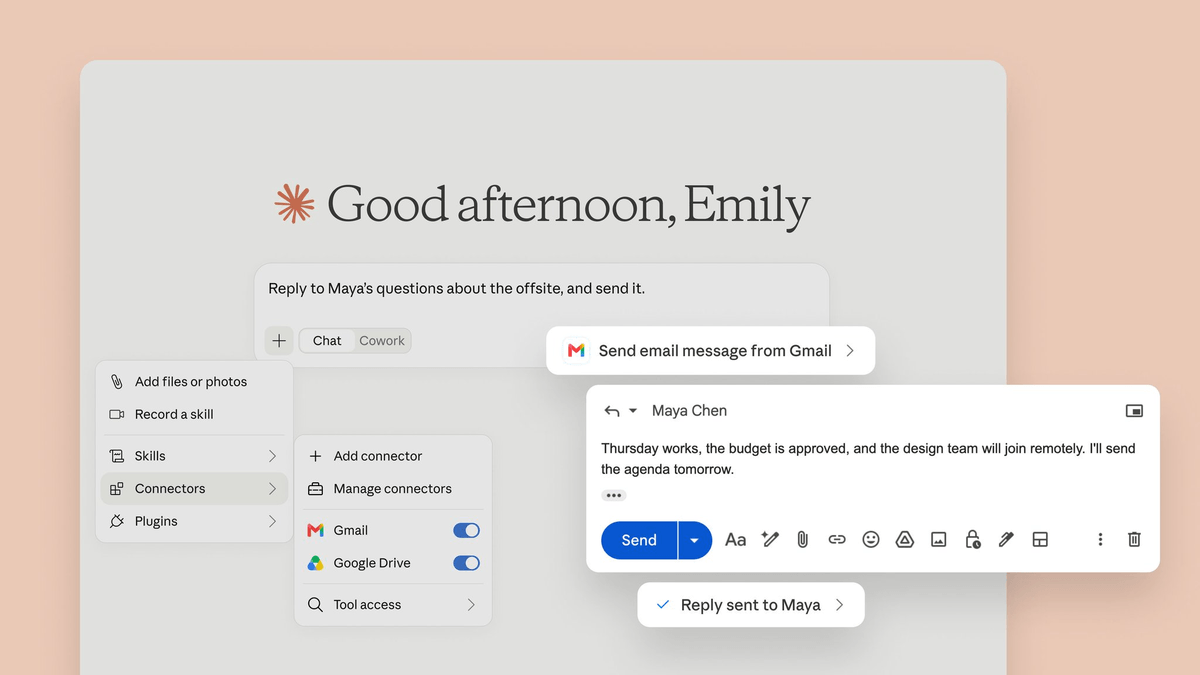
- Claude can now send, reply, and forward Gmail messages directly, not just draft them
- Available on all paid plans via the Connectors menu in Settings
- Approval required by default; Team and Enterprise owners can enable auto-send
- Google Drive connector reads files and saves new ones, but cannot edit existing documents
- Calendar connector handles event creation, updates, deletion, and RSVPs
- Attachment contents remain inaccessible; only metadata is exposed to Claude
Anthropic just handed Claude the missing piece of its Google Workspace integration: the ability to actually send emails, not just draft them. The update turns the assistant from a helpful drafter into something that can finish an inbox task end to end, without you tabbing over to Gmail to hit send.
Anthropic has expanded Claude's Gmail integration so the AI can now reply to, send, and forward emails on a user's behalf without requiring approval every time. The capability builds on an existing Claude connector for Google Workspace, which already allowed users to work with Gmail, Google Calendar and Google Drive. Sending an email was the notable missing piece. The rollout is live on all paid plans.
What actually changed
Until now, Claude's Gmail connector was read-and-draft only. According to Anthropic's own support documentation, the send function was not enabled, and all emails had to go out manually through a user's Gmail account. Claude could search inboxes, summarize threads, and prepare drafts, but a person still had to open Gmail and hit send. That constraint was widely griped about as the difference between a real assistant and a glorified autocomplete.
Now, the flow is closed. Claude can send, reply to, and forward emails from Gmail, and asks for your approval by default before each of these actions. On Team and Enterprise plans, owners decide whether members can allow these actions to run without asking each time. That last bit is the escape hatch for teams that want true autonomy: an admin toggle to skip per-message confirmation.
Getting it connected
Setup is deliberately boring, which is the point. Open Claude.ai or the Claude desktop app, click the plus sign in the chat input area, toggle on Gmail, Google Calendar, or Google Drive (or all three), then sign in with your Google account when the login window appears and approve the permissions. No API keys, no OAuth app registration on your end.
Two caveats if you work inside an org: On Team and Enterprise plans an owner has to enable them for the organization before anyone can authenticate. If your company runs Google Workspace, an administrator may also need to mark Claude as a trusted app in the Google Admin Console, or the connection will fail at sign-in.
What each connector can and cannot do
The three connectors have different permission surfaces, and it matters if you plan to chain them together in a workflow.
| Connector | Can do | Cannot do |
|---|---|---|
| Gmail | Search, read, summarize, draft, reply, forward, send | Read attachment contents (metadata only); no triggers on incoming mail |
| Google Drive | Search, read, analyze files, save Claude-generated files | Edit existing files |
| Google Calendar | Create, update, delete events; find open times; RSVP | None major |
The Drive limitation is worth calling out. Google Drive is read/write too. Claude can search and read files, and save Claude-generated files directly back to your Drive. Gmail is the odd one out - read and draft only. It can read and write a draft, but it can't send. Wait, that was the old state. Post-update, Gmail is the more capable one on the write side. Drive still can't touch documents you already have; it can only add new ones.
Where this gets genuinely useful
The value shows up when you chain the connectors instead of using them one at a time. A concrete example: you can chain them, saying read the project proposal doc in my Drive, then draft a follow-up email to the client summarizing the three main deliverables and asking for sign-off. Claude pulls the doc, writes the draft, and drops it in your Gmail drafts. You review and hit send. With the new send capability, that final step is now optional.
Practical patterns worth trying:
- Meeting prep: Claude scans past email threads and calendar invites to build a briefing doc before a client call
- Inbox triage: summarize unread threads, then draft replies to the ones that need one, and send the routine ones automatically if you're on a Team plan with auto-send enabled
- Document rollups: cross-reference multiple Drive docs and save a synthesized summary back to a designated folder
- Calendar coordination: find open times across your calendar and send scheduling emails in a single turn
The privacy and training footnote
One detail worth surfacing before you connect a personal account: if you are using consumer products like Claude Free, Pro, and Max and you have chosen to allow Anthropic to use your chats and coding sessions for model training, then any content you copy or paste from your Gmail, Drive, Calendar, or Claude's responses which include specific information from these connectors may be used to improve their models. Data is encrypted at rest and in transit, but the training-data opt-in is the setting to double-check.
Why this matters
The gap between drafting and doing is where most AI assistants stall out. Claude spent months as a very smart read-only tool for Google Workspace, and users noticed. Closing the send loop while keeping approval as the default is a reasonable compromise: it makes agentic behavior available without making it the automatic setting. If you already live inside Gmail, this is the kind of update that quietly rearranges your daily workflow.
Comments
